Accepting diff regression: jumping again

Where does the bug appear (feature/product)?

Cursor IDE

Describe the Bug

First reported in the 1.7 thread here, and behavior was rolled back: Discussion: New Features in Cursor 1.7 - #27 by RafeSacks

When accepting diff lines, the view is scrolled to the next diff automatically. This is extremely disruptive, and sometimes dangerous! (Reasons and more information in thread above). As this was rolled back right away, I thought the devs agreed with us.

Steps to Reproduce

  1. Click “Keep” button to accept a diff line and an auto-scroll happens.

Expected Behavior

Add a NEW button to accept + jump, e.g. buttons like

 [Undo] [Keep] [Keep >>]

Or shorter

 [Undo] [Keep] [>>]

This would allow users to choose, turning this bad UX in to a really great feature that I would use often when I am reviewing and not actively working on a section of code.

Operating System

MacOS

Current Cursor Version (Menu → About Cursor → Copy)

Version: 1.7.38 (Universal)
VSCode Version: 1.99.3
Commit: fe5d1728063e86edeeda5bebd2c8e14bf4d0f960
Date: 2025-10-06T18:18:58.523Z
Electron: 34.5.8
Chromium: 132.0.6834.210
Node.js: 20.19.1
V8: 13.2.152.41-electron.0
OS: Darwin arm64 24.6.0

Additional Information

See: Discussion: New Features in Cursor 1.7 - #27 by RafeSacks

Does this stop you from using Cursor

No - Cursor works, but with this issue

3 Likes

As feedback, I wanted to mention that this is a 911 bug to me. It is VERY difficult to work when I can not accept a diff without the area where I am working being scrolled off-screen.

1 Like

I agree 100%. This really affects my ability to review code and make changes efficiently. Suggestions

  • something we can turn on/off in settings
  • pressing a modifier like Ctrl before pressing “Keep” takes you to the next diff, while no modifier leaves you where you were at.
  • or as @RafeSacks suggested, some extra button that does a “Keep >>”

It’s weird this was already disabled because of complaints, but then it is brought back. @andrewh

1 Like

There is a setting for this one as well!

1 Like

Found it. Thanks.

1 Like

Please provide more explicit information when you give such great tips! I found it.

However, Cmd+Y doesn’t do anything. I thought maybe it would be one of these 3 things. Please fix/clarify:

  1. Toggle the setting. It did not, and this would be my least favorite way to use a hotkey anyway
  2. Pressed Cmd+Y while the cursor is in the diff block. Just pops up a tool tip that says “No definition found”. Not sure what this was trying to do. This would actually be a pretty cool hotkey for keyboard accept plus jump
  3. Held Cmd+Y while clicking the button. Had no effect. This would be pretty nice as mentioned up thread, but I would still rather have a “>>” button if I am already using my mouse. Less chord work
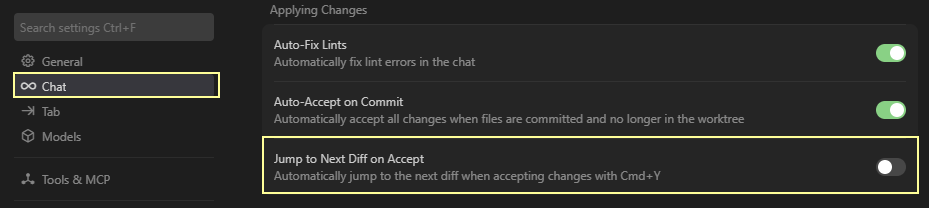
@MidnightOak that is not it. That just accepts diffs when you git commit.

1 Like

Thanks, yea I highlighted the wrong setting. Fixed it.

I agree it would be nice to use this feature if I was quickly reviewing code. Pressing a modifier or having an extra button would work.

1 Like

This topic was automatically closed 22 days after the last reply. New replies are no longer allowed.