Agent terminal commands never return output, always hit ~30s timeout (macOS, zsh)

Where does the bug appear (feature/product)?

Cursor IDE

Describe the Bug

Environment

OS: macOS (darwin 25.3.0)
Shell: zsh (default profile: terminal.integrated.defaultProfile.osx: “zsh”)
Cursor: recent version (likely 2.x)
What happens When the AI agent runs simple terminal commands (e.g. ls, ls -la, pwd) in the project directory:

The command is sent to the terminal.
No stdout/stderr is ever returned to the agent.
After ~30 seconds the run is treated as timed out and the command is sent to the background.
The terminal log file only contains metadata (cwd, command, started_at, running_for_ms: 30000) and no actual command output.
So the agent never sees the result of any terminal command, even for instant commands like ls.

What was tried

Legacy Terminal Tool: Tried both ON and OFF in Inline Editing & Terminal — no change.
Sandbox: Added .cursor/sandbox.json with “type”: “insecure_none” for this project — no change.
Shell prompt: Added a simple prompt when CURSOR_AGENT is set in ~/.zshrc (as in the Terminal docs) — no change.
Auto-Run: Commands are allowed to run (not “Ask every time” blocking them).
Expected The agent should receive the command output (e.g. the listing from ls) so it can use it in the conversation.

Question Is this a known issue? Is there a setting or workaround (e.g. timeout, terminal backend, or shell configuration) that would allow the agent to get terminal output on this setup?

Thanks.

Steps to Reproduce

Steps to Reproduce

Open Cursor on macOS with zsh as the default shell.
Open a project (e.g. any folder with files).
Open the Agent chat (Composer or Chat with Agent).
Ask the agent to run a simple command, e.g.:
“Run ls in the terminal” or “Execute ls in the project directory”.
Let the command run; do not cancel it.
Wait about 30 seconds.
Expected: The agent receives and shows the ls output (list of files).

Actual: No output is returned to the agent; after ~30 seconds the run is reported as timed out and the command is sent to the background. The agent never sees any terminal output.

Operating System

MacOS

Version Information

Version: 2.6.12 (Universal)
VSCode Version: 1.105.1
Commit: 1917e900a0c4b0111dc7975777cfff60853059d0
Date: 2026-03-04T21:41:18.914Z
Build Type: Stable
Release Track: Default
Electron: 39.6.0
Chromium: 142.0.7444.265
Node.js: 22.22.0
V8: 14.2.231.22-electron.0
OS: Darwin x64 25.3.0

Does this stop you from using Cursor

Sometimes - I can sometimes use Cursor
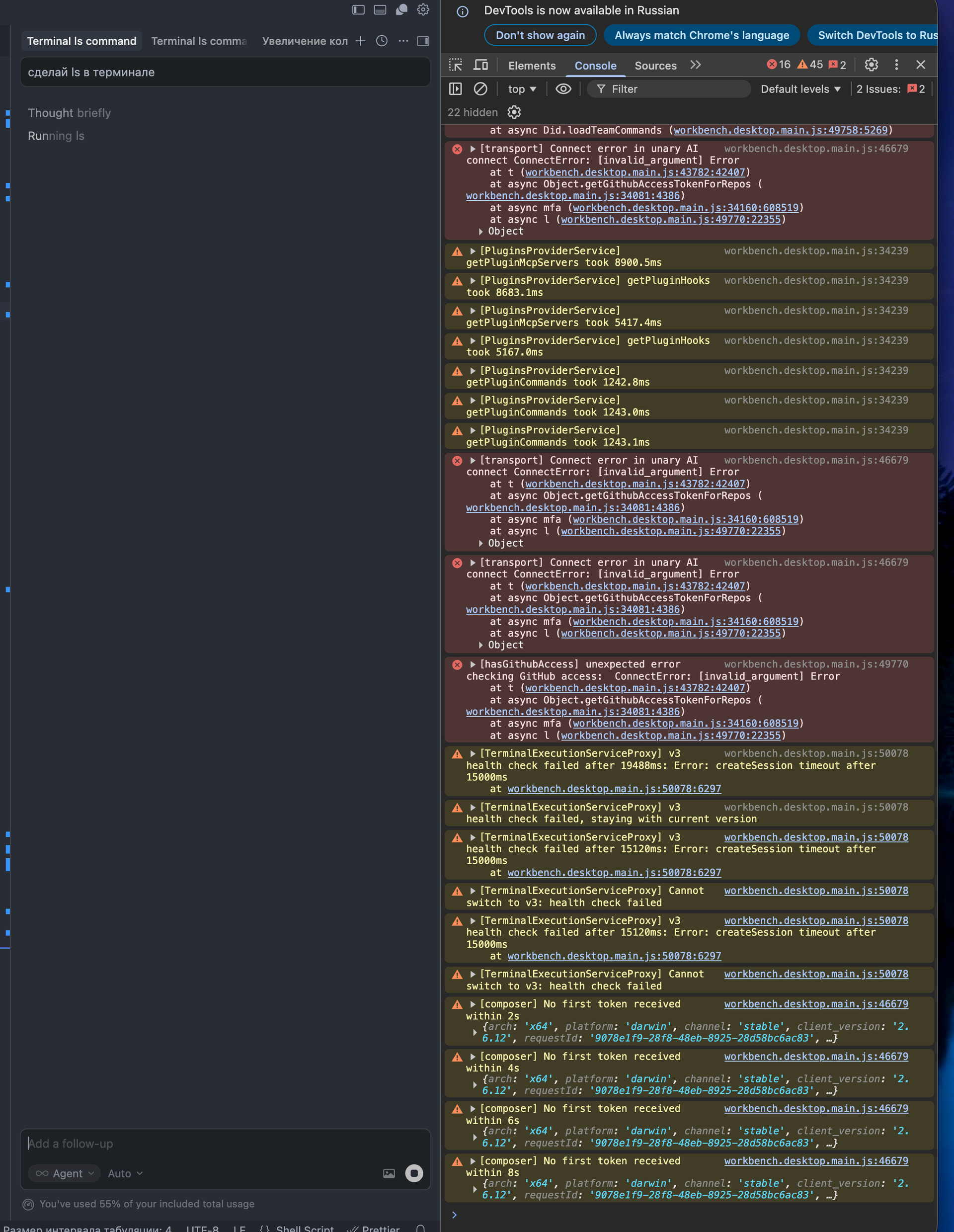
Hey, thanks for the detailed report. This is a known issue. We’ve seen it in several reports, especially on macOS with zsh.

A few things to check:

  1. Stale working directory
    This is the most common cause. Even if the folder exists now, if it was ever moved or renamed, the workspace state might still point to an old path. Try closing Cursor completely, then reopen the project via File > Open Folder from the real current path.

  2. Start a fresh chat
    In several cases, the issue was session-specific. The terminal broke mid-session, but a new Agent chat worked fine. Worth trying first.

  3. Kill all terminals first
    Run CMD+Shift+P then Terminal: Kill All Terminals, then restart Cursor fully.

  4. Check DevTools
    Go to Help > Toggle Developer Tools > Console, then run a command via the agent. Look for ENOENT errors or anything path-related. That would confirm the stale directory idea.

If none of that helps, I’ll need:

  • The Request ID from the failing chat (top right of chat > Copy Request ID)
  • A screenshot of the DevTools Console output after running a command

Some related threads for reference:

The team is aware of this pattern. Let me know what DevTools shows.

Console debug -

9078e1f9-28f8-48eb-8925-28d58bc6ac83 - request id from chat

Hey, I can see the DevTools screenshot and there’s a lot of useful info there. The main issue is clear:

[TerminalExecutionServiceProxy] v3 health check failed: createSession timeout after 15000ms

Terminal v3 can’t create a session, so all commands hang and then time out. I also see MCP servers took about 9 seconds to load, which isn’t normal.

Let’s try to isolate the problem:

  1. Disable extensions: start Cursor from Terminal with cursor --disable-extensions, open the project, and try again. This checks if an extension is blocking the terminal.

  2. Check MCP: if you have MCP servers configured (in .cursor/mcp.json or globally), try removing them temporarily. An 8900 ms MCP load time looks suspicious.

  3. Legacy Terminal Tool: if you haven’t tried this yet, go to Cursor Settings (CMD+Shift+J) > Agents > enable Legacy Terminal Tool, then CMD+Shift+P > Terminal: Kill All Terminals, then fully restart Cursor.

  4. Clean zsh profile: temporarily rename ~/.zshrc to ~/.zshrc.bak and restart Cursor. Some zsh plugins (oh-my-zsh, powerlevel10k) can conflict with terminal capture.

I also see ConnectError: [invalid_argument] on getGithubAccessTokenForRepos. That’s a separate GitHub auth issue. Try CMD+Shift+P > Sign Out of GitHub, then sign in again.

Let me know which step helped, or if none did, and we’ll dig deeper.

The issue was with the MCP servers. I removed them (Chrome DevTools, Notion, and Context7), and after that the createSession timeout after 15000ms error and the hanging terminal commands went away. Terminal v3 now creates sessions normally.

The long MCP load time (~9 seconds) was likely caused by these servers as well. I’ll try re‑enabling them one by one later to see which one causes the conflict. For now I’m keeping MCP disabled.

Thanks for the troubleshooting steps — disabling MCP is what fixed it.

1 Like

Had the same problem here. No mcp servers was added.

the fix was to removing ~./zshrc

which acually the cursor was trying to fix, when i asked him to fix this problem. But he edited .zprofile, not zshrc

It appeared 1-2 days ago and fiinally fixed. I broke my whole mind trying to fix that