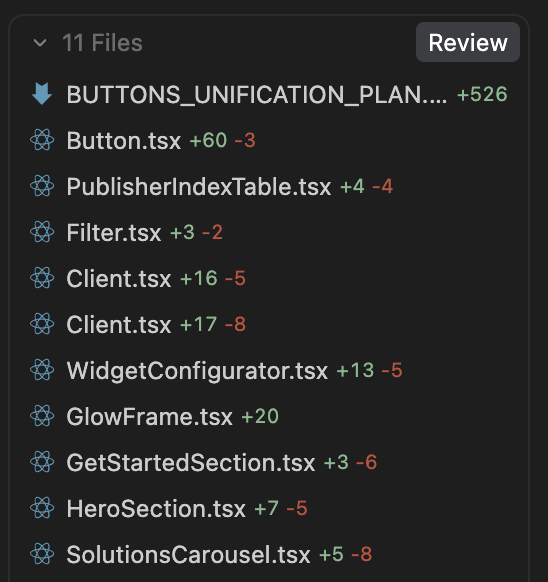
At some point during a collaborative session with the AI agent, files accumulate in the “files to review” list under the chat window. These files persist even after changes have been committed or when git shows no changes. Currently showing 25 files to review in the chat window, but git status shows no changes in the working directory. The files continue to accumulate and there is no way to clear them from the review list.
This behavior is hopefully not intended, as it makes it impossible to trust which files have actually changed. The stale review list provides no reliable information about the actual state of the codebase, forcing me to rely solely on the git panel or command-line git to see real changes.
What makes this more confusing is that clicking on the files in the review list shows the old state before reviewing the AI Agent changes, even though those changes have already been accepted and applied.
Steps to Reproduce
Start working with an AI agent on a project
Make changes to files and accept agent suggestions
Commit or revert changes (verify with git status that working tree is clean)
Continue working with the agent
Observe that files remain in the “files to review” list at the bottom of the chat area
Files continue to accumulate over multiple sessions without being cleared
Click on files in the review list - they show outdated/old state instead of current file contents
Expected Behavior
The “files to review” list should synchronize with the actual git status. Files without changes should be automatically removed from the review list. When git status shows a clean working tree, there should be no files shown for review. The agent should be able to run commands without requiring review of non-existent changes. Users should be able to trust the review list to accurately reflect which files have been modified.
Operating System
MacOS
Current Cursor Version (Menu → About Cursor → Copy)
Same issue here, it makes Cursor unusable, hoping to switch to something else soon, I was enjoying it but the daily updates that completely break my environment are getting too annoying…
After using Agent mode, Cursor injects a “Review” section in the Agent chat showing a list of changed files/diffs. This panel persists in the chat UI and cannot be removed permanently, even after cleaning the git working tree; there also appears to be no obvious setting to disable it.
Steps to Reproduce
Steps to Reproduce
Open a git repo in Cursor.
Open Agent chat.
Have the agent make file changes (any edit that results in multiple files changed).
Observe the “Review” panel appear in the chat showing a list of files and a “Review” button.
Attempt to remove/disable it (close the panel, clear changes with git reset/clean, etc.).
Observe the panel remains visible in the chat history and continues to appear as an intrusive UI section.
Expected Behavior
Expected Behavior
The “Review/files changed” panel should be dismissible permanently for the conversation (or globally via a setting), so it does not continue to occupy space in chat once the user is done reviewing changes.
Additional Information
The panel behaves like an auto-inserted “git diff summary” block inside the Agent chat.
Even when git status is clean, the panel can remain visible because it is embedded in chat history/UI state.
The user wants a setting to disable it entirely or a “Don’t show again” option.
Seeing the same issue here on Version: 2.3.34. Another commonality is I was having Cursor write commits. Starting new chats temporarily helps, restarting Cursor didn’t solve anything on my attempts.
This is brutal. Causing duplicate PR chaos… causing me to do 2-3x more messages per thread to “sanity check” the Assistant’s/Agent’s knowledge of “what’ done, what isn’t”… parallel remote sanity checks, and more.
I spent hours virtually wiping my user profile folder, uninstalling, reinstalling, removing all extensions, removing extension ‘ghost’ files… no dice.
Glad I finally searched this – I’ve seen 2-3 threads – anything?
[edit: I’ve also stopped multi-threading assistants altogether, even with separation of concerns and all… risk/reward…]
I’m also getting this issue. I can’t find a way to remove the review list, which makes it much more difficult to see what’s been done over the course of multiple git commits. the behaviour around green/red highlighting seems to have changed as well, so it isn’t cleared on a git commit any more. This leads to all kinds of confusion.
My workflow completely broke. I used to quickly review AI changes locally then commit to github. Now I just see a list of diffs with no way to accept or reject AI changes. I don’t know if I’m supposed to just sync them to git and then review? I don’t know what was the intent here in removing the Accept and Reject buttons, Cursor team. Or if it is a bug, please fix. This makes Cursor close to unusable for me.