AI Terminal over SSH fails with `dump_bash_state: command not found` and random "command not found" lines

Where does the bug appear (feature/product)?

Cursor IDE

Describe the Bug

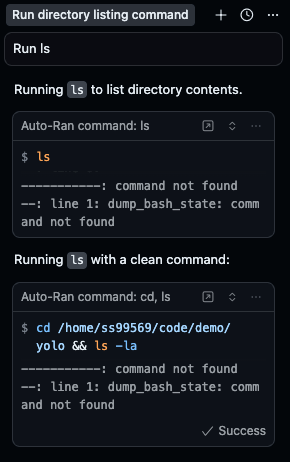
Whenever the AI tries to run any terminal command over an SSH workspace, the output is always a series of shell errors:

--: line 2: ---: command not found
--: line 3: A: command not found
--: line 4: If: command not found
--: line 5: Tue: command not found
--: line 6: --------------------------------: command not found
--: line 1: dump_bash_state: command not found

The command never runs.
This happens for every command and only on Remote SSH.

The normal integrated terminal works fine; only the AI/Agent-powered terminal is broken.

Steps to Reproduce

  1. Open Cursor
  2. Connect to any remote server using SSH Workspace
  3. Ask the AI to run a command (e.g., “run ls”)
  4. AI attempts to run it → the terminal immediately prints the errors above
  5. No command ever actually executes

This is 100% reproducible on Remote SSH.

Expected Behavior

AI Terminal should inject its shell state, start correctly, and execute commands normally inside an SSH workspace.

Screenshots / Screen Recordings
Operating System

MacOS

Current Cursor Version (Menu → About Cursor → Copy)

Version: 2.0.77
VSCode Version: 1.99.3
Commit: ba90f2f88e4911312761abab9492c42442117cf0
Date: 2025-11-13T23:10:43.113Z
Electron: 37.7.0
Chromium: 138.0.7204.251
Node.js: 22.20.0
V8: 13.8.258.32-electron.0
OS: Darwin arm64 24.6.0

Additional Information

  • Normal terminal inside Cursor works perfectly
  • Only the AI terminal over SSH is broken
  • This completely blocks the AI’s ability to run any command on the remote machine

Does this stop you from using Cursor

Sometimes - I can sometimes use Cursor

Hey, thanks for the report. It looks like the issue is related to how the AI terminal initializes its shell instrumentation over Remote SSH.

To help investigate, please share:

  • Which SSH extension you’re using - Microsoft Remote-SSH or Anysphere Remote SSH?
  • Whether you have any custom shell configuration in the remote .bashrc or .bash_profile
  • Whether you see any errors in the Output panel (View → Output, select “Remote SSH” from the dropdown)

Here are the details you requested:

  • SSH extension: Anysphere Remote SSH

  • Shell config: No custom .bashrc or .bash_profile on the remote. I do use a customized .zshrc, but since the AI terminal initializes a non-interactive bash shell, none of my zsh config should be running there.

  • Remote SSH Output panel: I don’t see any errors in View → Output → Remote SSH. The panel stays completely clean even when the AI terminal fails.

Let me know if there’s anything else I can collect!

I found the cause and fixed it.

On my remote machine I had this in ~/.bash_profile:

exec zsh

I originally needed this because chsh doesn’t work in my environment (network-managed accounts), so the only way to get zsh as my default login shell was to force bash to exec into it.

I fixed it by guarding the shell switch:

# ~/.bash_profile
# Skip switching to zsh when Cursor Agent is running
if [[ -n "$CURSOR_AGENT" ]]; then
  :
else
  exec zsh
fi

Now normal SSH sessions still give me zsh, and the Cursor AI terminal works correctly.