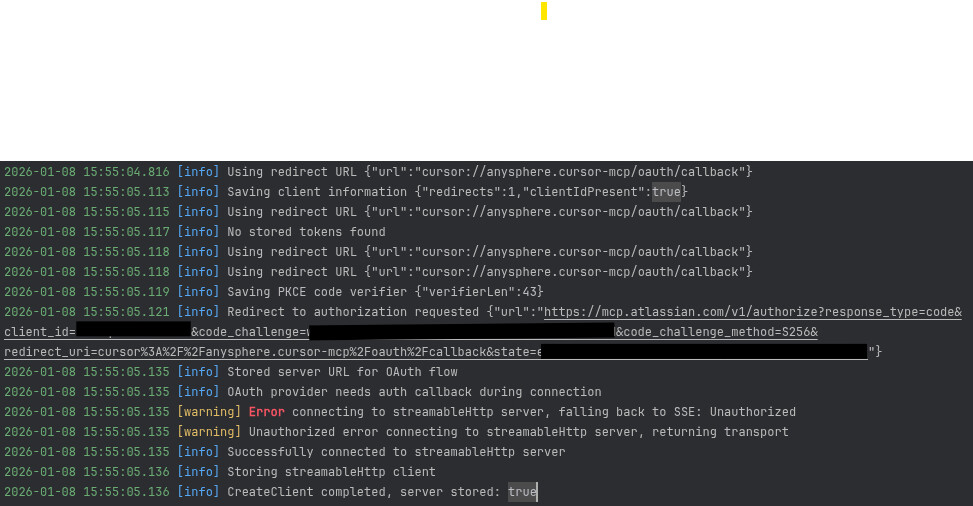
On a linux redhat 8 server. cursor 2.3.26
I have added a MCP config for our atlassian site.
When i hit connect, the browser opens the first configuration page: Atlassian ROVO MCP server, to select the apps (i click approve),
then the page where Atlassian MCP requests access to my Atlassian account.
On this page when i click accept i get the following behaviors:
if i configure cursor to use chromium: an error popup: Failed to open URI The specified location is not supported: cursor://anysphere.cursor-mcp/oauth/callback?code=…&state=…
if i configure cursor to use firefox: the page waits indefinitely for an answer but the request response contains NS_ERROR_UNKNOWN_PROTOCOL
I’m stuck here. Can anyone help with this issue ? (PS: i’m not an admin on the server but i can request help from the IT if some admin actions are necessary)
Thanks a lot for your answer. I have some colleagues who completed the connection process successfully on windows (like you) but it seems i’m the only one trying to do it on linux.
From suggestions by another colleague i tried a different configuration:
That’s Cursor running with WSL2, so for example I would ask the agent to contribute to the “codebase / whatever” from the agent chat using the Atlassian MCP.
One thing I have found with the Atlassian MCP tools is that sometimes they are loaded even though Cursor MCP connections in settings might be showing an error.
Did you take the extra step to ask an agent to specifically use the knowledge bases of the MCP connection(s) or that they could “see” them?
Hey! This is a known issue with registering the cursor:// protocol on Linux.
Fix: Switching from the AppImage to the .deb version of Cursor fixes the OAuth callback issue. Download the .deb installer here: Download · Cursor
If you need an .rpm build for Red Hat, it’s also available on the downloads page.
Why this works: The .deb and .rpm builds correctly register cursor-url-handler.desktop with the --open-url flag, so the browser can pass the OAuth callback back to Cursor.
Alternative (if you can’t install the .deb): Use the npx approach like you tried in post #4. If MCP shows an error but auth worked, try asking the Agent to use the Atlassian tools. Sometimes they work even if Settings still shows an error.