lwc
October 15, 2025, 9:56pm
1
Maybe @deanrie ?
The Browser Doc mentions none of this.
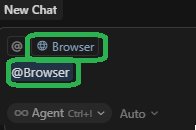
First option is + Browser:
Second option is @browser:
And also there’s a beta option called Cursor Browser, but the aforementioned options can be chosen even when the beta option is disabled:
deanrie
October 16, 2025, 5:47am
2
Hey, thanks for noticing. Yes, it’s the same feature. We’re still working on its implementation. We’ll fix it in the next update.
lwc
October 16, 2025, 6:49am
3
Thanks, for now which way do you recommend to choose out of these 3 options?
deanrie
October 16, 2025, 9:51am
4
They all work the same, use any of them. However, the first option with +browser has another advantage: it works like a switch, and it will stay on for all subsequent requests.
lwc
October 16, 2025, 10:00am
5
Well, + Browserisn’t supported for me . But when I tried @browser it tried to install Playwright, so what’s going on?
Also, does the beta option matter?
Cheez_One
October 16, 2025, 10:38am
6
@deanrie now cursor lose some @. like generate cursor rules, notepad, Doc…
deanrie
October 16, 2025, 10:50am
7
I already replied in that thread: you need to install the standard version of Chrome. In that case, everything should work as expected.
deanrie
October 16, 2025, 10:51am
8
Are you using the nightly version?
lwc
October 16, 2025, 11:28am
9
So no need to enable the beta option?
deanrie
October 16, 2025, 11:33am
10
In this case it’s enabled by default. The team is aware and we’re waiting for a fix.
lwc
October 16, 2025, 11:46am
11
Since by default I see it disabled, do you mean it’s always enabled even when visually it’s disabled?
deanrie
October 16, 2025, 12:18pm
12
Hey, that’s right. This feature is active even when it’s disabled in settings, it’s a bug.
lwc
October 30, 2025, 2:25am
14
v2.0 has come out and removed the aforementioned irrelevant beta option.+browser was replaced with a clickable icon that exists only in Agents (as opposed to Editor):