Where does the bug appear (feature/product)?
Background Agent (GitHub, Slack, Web, Linear)
Describe the Bug
I am experiencing a sharp decline in the accuracy of agentic responses, something is not normal, broken, not working properly. I am on MacOS, with latest cursor release. I am in auto mode, but I make the agent announce the model and version every time. The issue is not dependent on model type ot version at all, I get the same issues from Claude 4.5 too. Examples:
- Tool tells me a location for a log file it created, it also gives me a command I can copy/paste to monitor the logs (something like “tail -f …”). But the location is wrong. E.g. it gives me ~/Library/Application Support/Something/Somethingelse, then it creates a log in ~/Library/Something/Somethingelse. And after this when I run the code and return, it can’t find its own log file, and starts to investigate the code why the log file was not created - but it does not notice the incorrect path.
- It gives me instructions for something at the finishing summary of the agent’s work, and puts a completely irrelevant piece of code there instead of the one it is talking about. E.g. it is talking about checking the logs in the log file, and you expect a piece of code for that, but it repeats the same code it has already shown you, that resets the cache.
These are major issues in my opinion, it makes you lose trust even in the smallest bit the agent is saying.
Steps to Reproduce
There is no exact instruction for this. I can share entire conversations with you in private if necessary.
Expected Behavior
As above I mentioned, there are trivial bugs in agent responses, like telling the user a file path, but using a different one, giving the user a shell command that is irrelevant, etc…
Screenshots / Screen Recordings
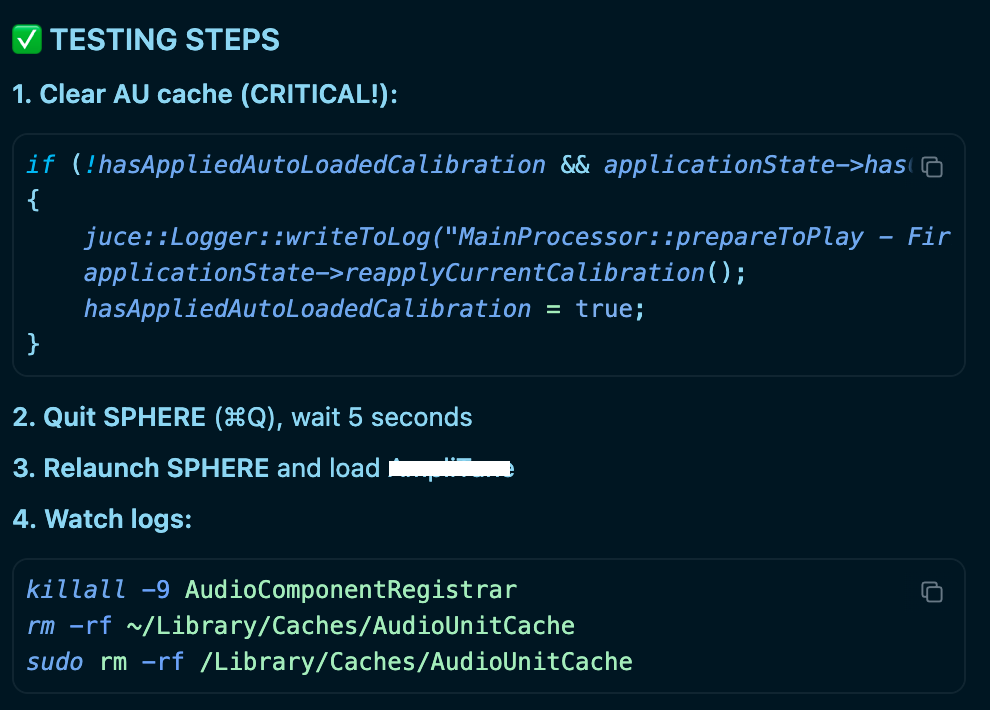
Operating System
MacOS
Current Cursor Version (Menu → About Cursor → Copy)
Version: 2.0.43 (Universal)
VSCode Version: 1.99.3
Commit: 8e4da76ad196925accaa169efcae28c45454cce0
Date: 2025-10-30T18:49:27.589Z
Electron: 34.5.8
Chromium: 132.0.6834.210
Node.js: 20.19.1
V8: 13.2.152.41-electron.0
OS: Darwin arm64 25.0.0
For AI issues: which model did you use?
In auto mode, but Sonnet 4.5 mostly.
Does this stop you from using Cursor
Sometimes - I can sometimes use Cursor