Claude code integration

I found some similar issues but they seem to be slightly different, so I’m opening a separate issue

issue

according to doc. I can run command + Esc to run claude in panel. but I can’t use it.

info

I can confirm my cursor command is installed. and vscode version is later than 1.98.0, so the troubleshooting is not working.

winnies@Mac webreact % which cursor
/usr/local/bin/cursor
Version: 1.2.2 (Universal)
VSCode Version: 1.99.3
Commit: faa03b17cce93e8a80b7d62d57f5eda6bb6ab9f0
Date: 2025-07-07T06:07:27.002Z
Electron: 34.5.1
Chromium: 132.0.6834.210
Node.js: 20.19.0
V8: 13.2.152.41-electron.0
OS: Darwin arm64 24.2.0

keyboard binding is ok(maybe)

{
"key": "cmd+escape",
"command": "claude-code.runClaude.keyboard",
"when": "claude-code.hasClaudeInPath"
}

steps

I followed the official instructions to install claude code


npm install -g @anthropic-ai/claude-code

claude

# I run migrate-installer to install claude in device not in npm global

/migrate-installer

  • /doctor
 Claude CLI Diagnostic
 Currently running: npm-local (1.0.44)
 Path: /Users/winnies/.nvm/versions/node/v20.9.0/bin/node
 Invoked: /Users/winnies/.claude/local/node_modules/.bin/claude
 Auto-updates: Yes
 Config install method: local
 Config auto-updates: true
 Press Enter to continue…
  • /status
 Claude Code Status v1.0.44

  L Session ID: 

 Working Directory 
  L /Volumes/work/webreact

 IDE Integration • /config
 ✔  Installed Cursor extension

 Account • /login
  L Login Method: Claude Pro Account
  L Organization: 
  L Email: 

 Model • /model
  L Sonnet Sonnet 4 for daily use


 Press Enter to continue…

here says extension is installed.

  • /ide
│  Select IDE                                                                                                                                                                                                                                                                  │
│  Connect to an IDE for integrated development features.                                                                                                                                                                                                                      │
│                                                                                                                                                                                                                                                                              │
│  No available IDEs detected. Make sure your IDE has the Claude Code extension or plugin installed and is running.          

but IDE is not available.

extension

First, I didn’t manually install the extension because it said it would auto-install when running claude.

.

testing

Extension: install from VSIX

I try Extension: install from VSIX and select /Users/winnies/.claude/local/node_modules/@anthropic-ai/claude-code/vendor/claude-code.vsix.

  • /status
 Claude Code Status v1.0.44

  L Session ID: 

 Working Directory 
  L /Volumes/work/webreact

 IDE Integration • /config
 ✔  Connected to Cursor extension
 ✔  Installed Cursor extension

 Account • /login
  L Login Method: Claude Pro Account
  L Organization: 
  L Email: 

 Model • /model
  L Sonnet Sonnet 4 for daily use


 Press Enter to continue…
  • /ide
│  Select IDE                                                                                                                                                                                                                                                                                    │
│  Connect to an IDE for integrated development features.                                                                                                                                                                                                                                        │
│                                                                                                                                                                                                                                                                                                │
│   ❯ 1. Cursor✔                                                                                                                                                                                                                                                                                 │
│     2. None                                                                                                                                                                                                                                                                                    │

connect to Cursor success. But command+Esc still not working.

manually install extension

  • /status

  L Session ID: 

 Working Directory 
  L /Volumes/work/webreact

 IDE Integration • /config
 ✔  Connected to Cursor extension
  L Installed Cursor extension version 1.0.44 (server version: 1.0.29)

 Account • /login
  L Login Method: Claude Pro Account
  L Organization: 
  L Email: 

 Model • /model
  L Sonnet Sonnet 4 for daily use          
  • /ide
    same as using install from VSIX

connect to Cursor success. But command+Esc still not working.

I try to re-install claude.
but get another error.

uninstall claude

rm -rf /Users/winnies/.claude
rm -rf /Users/winnies/.claude.json.backup
rm -rf /Users/winnies/.claude.json

# and remove this from .zshrc
alias claude="/Users/winnies/.claude/local/claude"

# and uninstall claude extension

install claude

npm install -g @anthropic-ai/claude-code
claude
/migrate-installer

and /status

 Claude Code Status v1.0.44

  L Session ID: 

 Working Directory 
  L /Volumes/work/webreact

 IDE Integration • /config
 ⚠  Error installing Cursor extension: 1: 1 Error: Please restart VS Code before reinstalling Claude Code.
        at hl.h (file:///Applications/Cursor.app/Contents/Resources/app/out/vs/code/node/cliProcessMain.js:58:48547) {
      code: 'Internal',
      name: 'Internal'
    }
    Failed Installing Extensions: file:///Users/winnies/.claude/local/node_modules/%40anthropic-ai/claude-code/vendor/claude-code.vsix
    (node:6053) [DEP0168] DeprecationWarning: Uncaught N-API callback exception detected, please run node with option --force-node-api-uncaught-exceptions-policy=true to handle those exceptions properly.
    (Use `Cursor --trace-deprecation ...` to show where the warning was created)

    Please restart your IDE and try again.

 Account • /login
  L Login Method: Claude Pro Account
  L Organization: 
  L Email: 

 Model • /model
  L Sonnet Sonnet 4 for daily use


 Press Enter to continue…

I restart IDE but still error.
I restart computer but still error.

should I re-install cursor?

1 Like

I had this issue yesterday, and Claude Code fixed it. Something was wrong with the paths, but I don’t remember what. In one moment, the Claude Code icon disappeared from the Cursor and VSCode after I updated the Cursor to 1.2.2. The cmd + esc command also didn’t work.

2 Likes

Same issue here, the Claude Code button disappeared after a recent update.

2 Likes

Hey, try uninstalling and reinstalling Claude Code. As for the shortcut, it hasn’t worked for me since the beginning either, so I just reassigned it.

1 Like

Do you mean uninstall the Claude Code Cursor extension, or on my computer globally? I already tried removing/reinstalling the extension, but that didn’t fix the issue. I also tried reassigning the shortcut, but there was no change.

I meant uninstalling Claude Code from your computer globally.

1 Like

Just tried several things and it ended up working:

  1. Uninstalled the Claude Code Cursor extension
  2. Ran Claude in Cursor terminal
  3. Was prompted to run /terminal-setup
  4. Ran npm install -g @anthropic-ai/claude-code in my normal MB terminal
  5. Quit Cursor
  6. Re-opened Cursor and the Claude Code icon is back

The shortcut doesn’t work, but I’m not sure it ever has. More so wanted the icon. Thanks for the help!

how to uninstall claude?
as my reply at the top.
I delete all dir about claude.
is that the correct way or am I missing anything?

the IDE integration section in /status command shows extension install error.
I think this is the correct action. claude is trying to install extension automatically.

I fix this error by install extension from VSIX command.
and the IDE integration section look like this

 IDE Integration • /config
 ✔  Connected to Cursor extension
 ✔  Installed Cursor extension

but the command+Esc still not working.

I just subscribe claude yesterday and this is my first time install claude.
so I don’t know what should it look like(claude icon in top tool bar?) or how should it work.

btw, reassign keyboard shortcut is not working either.


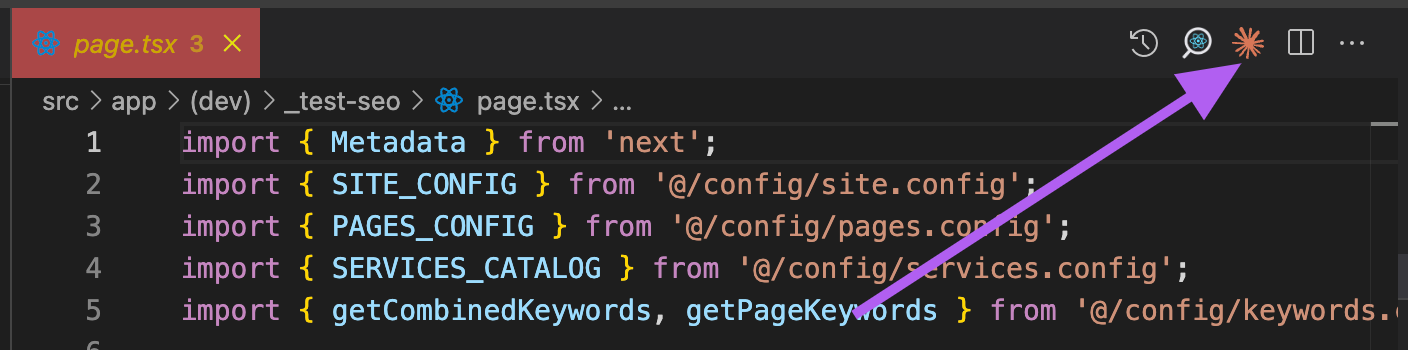
It should be here

notice there is a new version of cursor

Version: 1.2.4 (Universal)
VSCode Version: 1.99.3
Commit: a8e95743c5268be73767c46944a71f4465d05c90
Date: 2025-07-10T16:55:16.443Z
Electron: 34.5.1
Chromium: 132.0.6834.210
Node.js: 20.19.0
V8: 13.2.152.41-electron.0
OS: Darwin arm64 24.2.0

I try to re-install claude but still not working.

  1. /status says extension is installed, but /ide can’t connect to my Cursor. can fix this by Extension: install from VSIX.
  2. still no claude icon and command+esc shortcut.

is anyone use this version and work find?

Try removing it using this command, then reinstall it. Also, find the extension in the Marketplace tab and install it.

npm uninstall -g @anthropic-ai/claude-code

I’m using /migrate-installer so no more claude-code in global installation.
only in /Users/winnies/.claude/local/claude
so I remove claude by rm -rf /Users/winnies/.claude

I tried install extension by manually click install from extension list and Extension: install from VISX.
both binding Cursor successfully.

※ Tip: Use /memory to view and manage Claude memory

 Claude Code Status v1.0.48

  L Session ID: 

 Working Directory 
  L /Volumes/work/webreact

 IDE Integration • /config
 ✔  Connected to Cursor extension
 ✔  Installed Cursor extension

 Account • /login
  L Login Method: Claude Pro Account
  L Organization: 
  L Email: 

 Model • /model
  L Sonnet Sonnet 4 for daily use


 Press Enter to continue…

now I can use terminal input to work with claude code. chat, edit files, …etc, is all worked.
just like using claude-code in warp.
the only not working is IDE integration (it say success, but not).
which cause command+Esc not working and claude icon disappear on top tool bar.

may I ask which version of cursor and claude-code are you using?

My Cursor version is 1.2.4 and Claude Code version is 1.0.48. Cmd + Esc doesn’t work for me either, so I just reassigned it to another shortcut.

I think this issue is solved.
sometime somehow they fixed this issue.

winnies@Mac webreact % cursor -v
1.2.4
winnies@Mac webreact % claude -v
1.0.62 (Claude Code)

extension is not auto installed when type claude. (I think maybe is because it’s not first install)
I’m using Extension: install from VISX.
now claude icon in toolbar and ⌘+esc work fine.

1 Like