Click-to-Source from Browser / Visual Editor (Inspect → Open File & Line)

Feature request for product/service

Cursor IDE

Describe the request

When building frontends, it would be extremely helpful to have a “click-to-source” or “inspect-to-code” feature that bridges the Cursor Browser / Visual Editor directly to the code editor.

The desired workflow:

  1. Run the app in the Cursor Browser or Visual Editor.
  2. Click an element (or use an inspect tool) in the rendered UI.
  3. Cursor automatically opens the file and scrolls to the exact line (or closest definition) that renders that element in the editor.

This is similar to how some visual tools (like Figma’s Make (screenshot below) mode or certain design-to-code tools) let you select an element in a live preview and instantly jump to the underlying source for fast, precise edits.
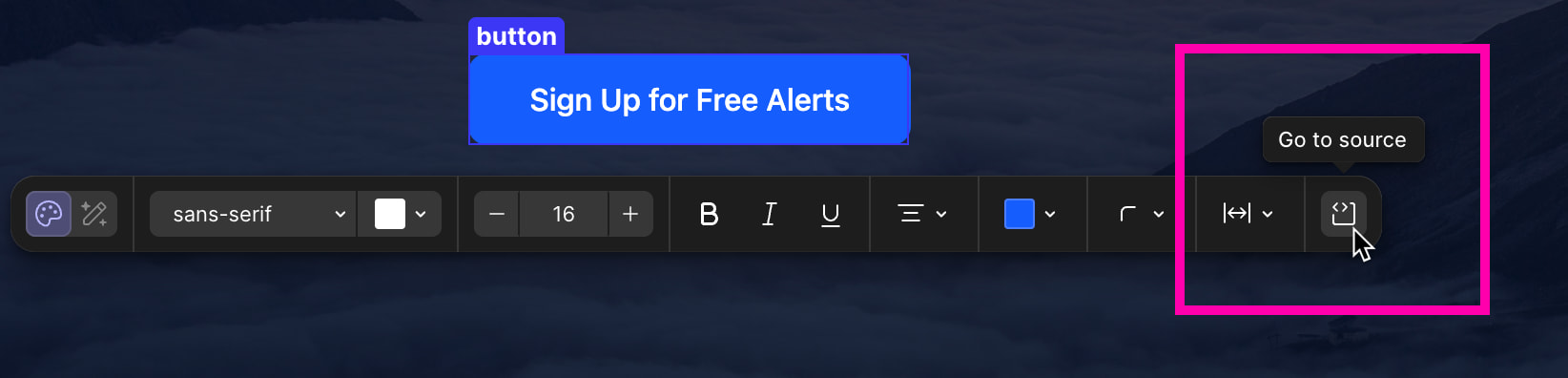
Why this is useful:

  1. Avoids hunting through component trees or doing text searches just to find where a specific button, section, or text is defined.
  2. Great for quick copy edits, style tweaks, and layout adjustments when you already know exactly what you want to change.
  3. Makes Cursor feel like a truly bidirectional UI–code environment: not only can the agent change code based on UI context, but the UI can act as a precise navigator back into code.

Potential behavior details:

Clicking an element in the Browser/Visual Editor could:

  • Open the primary React/Vue/Svelte component (or template) responsible for that DOM node.
  • Highlight the JSX/HTML block or styled component that maps to the selected element.
  • Optionally show a small overlay with “Open source” / “Reveal in editor” / “Jump to component” actions.

If there are multiple candidate sources (e.g., higher-order components, wrappers), Cursor could:

  • Pick the most specific component by default, and
  • Offer a small dropdown or quick-pick list to jump to parent/child components.

How this differs from current behavior

  • Right now, selecting or inspecting an element in the Cursor Browser/Visual Editor mainly feeds that element into the AI context so the agent can infer and apply code changes. That is powerful, but:

– Sometimes the user wants to manually make small edits (e.g., tweak logic, refactor code, adjust a complex style) directly in the file.

–A deterministic “inspect → open file and line” action would complement the AI-driven flow and give more control to users who prefer editing code themselves.

Request

Please add a native feature that allows:

  • Selecting/inspecting an element in the Cursor Browser or Visual Editor.
  • Triggering a command like “Open Source for Selected Element” that opens the corresponding file and positions the cursor at the relevant line.

Even an initial version that is “best effort” (with a quick-pick when ambiguous) would dramatically improve the frontend dev workflow and make Cursor’s visual tools even more powerful.

Vue devtools also has this option, very useful!

This is really important - it’s not very easy to do ‘inspect element’ and find the corresponding class/items in the code. Yes, there are third patry tools to do this, but if the AI can easily find it from the chat, it should be possible to show the files that are referenced in the sidebar too :slight_smile:

sometime just being able to change text directly could help…

+1 This would be extremely useful

Feature request for product/service

Cursor IDE

Describe the request

When I am doing pure UI edits, that the layout is mostly done and I am at the details phase (padding, font sizes, margins, quick copy enhancement..)
I do not want to ask an agent to do the changes bc it’s too slow.
And also, I vibe coded my way up until here, so I have no clue where the code is, and it pains me to look for it.

I would like a click option in the browser that allows me to click a region of the displayed app in the browser, and that takes me to the code for that region, so that I can edit in manually and view detail changes quickly.

The UX I envision is similar to the “select element” option in the browser.

Would love to know if other people think this can be a good addition to the browser experience.

Thanks guys!

Feature request for product/service

Cursor IDE

Describe the request

Cursor’s built-in browser element selector is useful, but in component-based apps it currently works at the DOM level. For Vue, React, Svelte, Angular, etc., the thing developers usually want is not just the selected DOM node, but the framework component that rendered it.
It would be very useful if Cursor’s Browser could integrate with framework devtools-style component inspection so that selecting an element can resolve the owning component and make it available as chat context.
For example:

  • In a Vue app, selecting an element could identify the nearest Vue component instance, such as CategorySection.vue.
  • In a React app, selecting an element could identify the owning React component, such as BarChart.tsx or ResearchPanel.jsx.
  • Cursor could then offer an action like “Add component to chat”, equivalent to manually typing @src/path/Component.vue.
  • The selected browser context could include the component name, source file path, props, route, and relevant DOM snapshot.
    This would make browser-driven debugging and UI iteration much faster. Today, when I inspect an element in the Cursor browser, I still need to manually work out which Vue/React component owns it, then find and @ that file myself. Framework devtools already solve this problem in the browser, so bringing that same component awareness into Cursor’s Browser would make the browser-to-agent workflow much more precise.
    Suggested behavior:
  1. User opens the app in Cursor Browser.
  2. User uses element picker and clicks a UI element.
  3. Cursor resolves the framework component tree for that DOM node.
  4. Cursor shows the owning component and source file path.
  5. Cursor allows adding that component, parent components, or related files directly to chat context.
    Possible implementation ideas:
  • Use framework devtools hooks where available, such as Vue DevTools / React DevTools integration.
  • Fall back to source maps, component display names, DOM markers, or route/module metadata.
  • Expose the selected component as a first-class context item, similar to @Browser or @file.
  • Allow extensions or MCP tools to contribute “component resolver” providers for custom frameworks.
    This would be especially helpful for prompts like:

“Update the component for the element I selected in the browser.”
or:
“Why does this selected button have the wrong spacing?”
Instead of the agent having to infer the source file from DOM/classes/text, Cursor could directly attach the actual framework component responsible for the selected UI.

Any thoughts or questions please let me know!