Cursor 2.0 commit not working

Where does the bug appear (feature/product)?

Cursor IDE

Describe the Bug

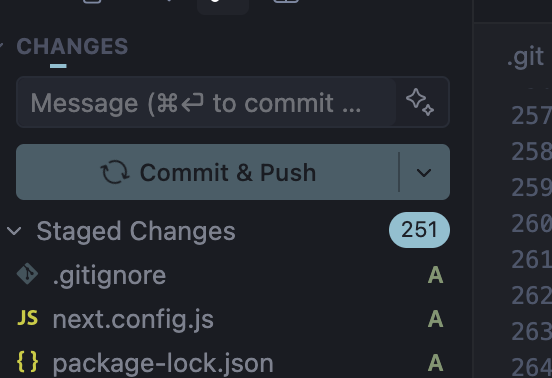
When you go to commit your program it just rotates forever saying “Commit”. Same thing with “Commit & Push”. . .

Steps to Reproduce

Git Symbol > Commit

Screenshots / Screen Recordings
Operating System

MacOS

Current Cursor Version (Menu → About Cursor → Copy)

Version: 2.0.77 (Universal)
VSCode Version: 1.99.3
Commit: ba90f2f88e4911312761abab9492c42442117cf0
Date: 2025-11-13T23:10:43.113Z
Electron: 37.7.0
Chromium: 138.0.7204.251
Node.js: 22.20.0
V8: 13.8.258.32-electron.0
OS: Darwin arm64 25.1.0

Does this stop you from using Cursor

No - Cursor works, but with this issue

Update: Seems it gets hung if no message is provided. With message, it works fine.

Hey, thanks for the report. Glad you found a workaround by adding a commit message.

To help us understand why the button keeps spinning when there’s no message, could you check if there are any errors in the console?

Steps to get console logs:

  1. Open DevTools: Help > Toggle Developer Tools
  2. Go to the Console tab
  3. Try to reproduce the issue (commit without a message)
  4. Share a screenshot of any errors that appear

This will help the team find the root cause. Thanks!

This topic was automatically closed 22 days after the last reply. New replies are no longer allowed.