When launching parallel agents (4×, 8×), they all receive the same prompt. This means they do not coordinate with each other.
This solution automatically assigns each agent a unique task number on launch
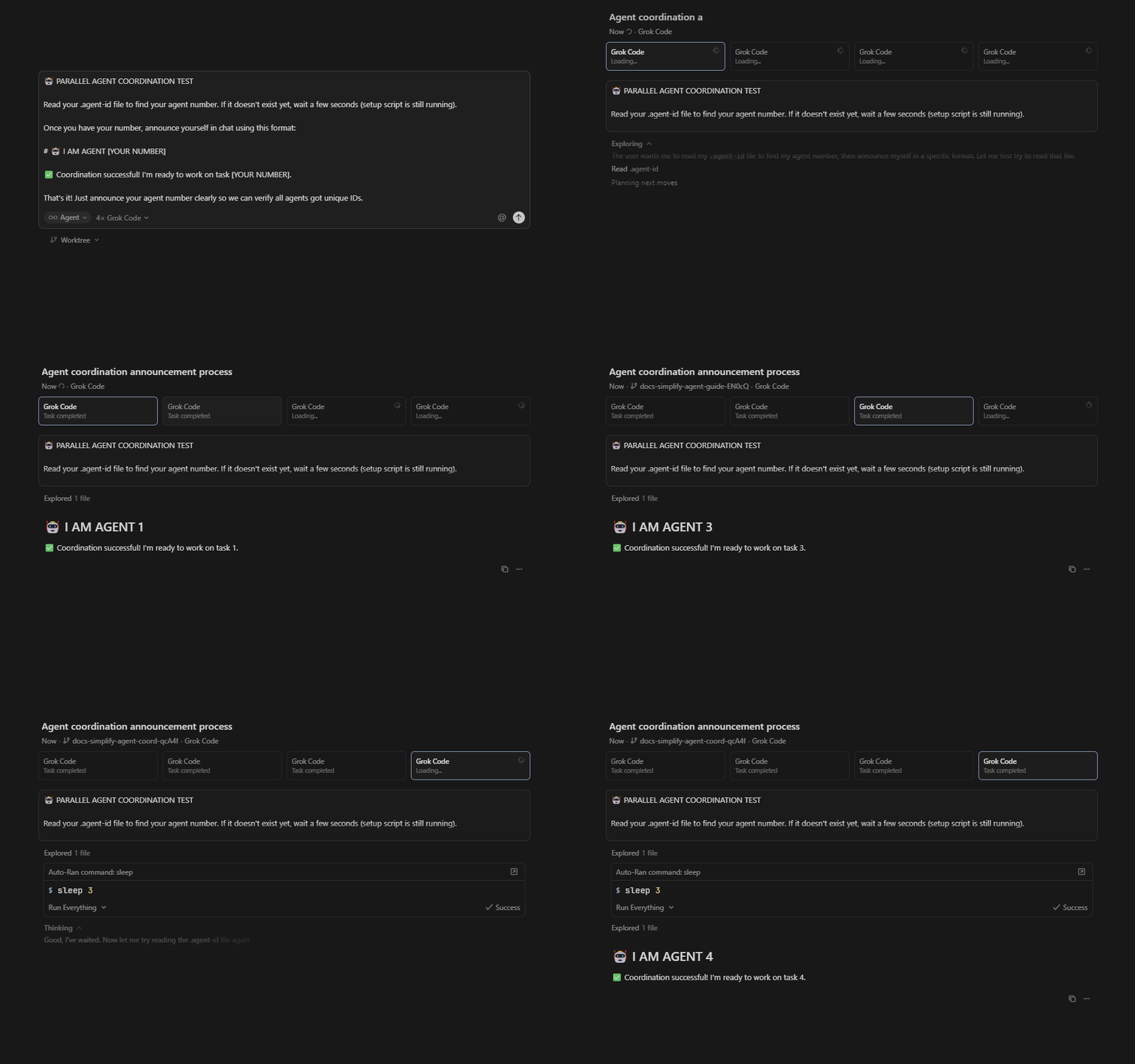
How It Works
When you launch parallel agents:
- Cursor automatically runs a setup script in each worktree
- Each agent claims the next available task number (1, 2, 3, 4…)
- The agent number is saved to an
.agent-idfile - Agents read their ID and work on their assigned task independently
Example Prompt
PARALLEL AGENT COORDINATION

First, read the .agent-id file in your working directory. If it doesn't exist yet,
wait a few seconds and try again (the setup script may still be running).

TASKS:
1. Refactor the authentication module
2. Add dark mode support to the UI
3. Optimize database queries in UserService
4. Write integration tests for PaymentController

Your .agent-id file contains a number (1-4). Execute ONLY the task that matches your number.
Report your agent ID and task completion when done.
Simple as that. Just tell the agents to check their ID file and do the matching task.
Setup
Create .cursor/worktrees.json in your project root:
{
  "setup-worktree-windows": [
    "$coordParent = '..'",
    "$now = Get-Date",
    "Get-ChildItem -Path $coordParent -Directory -Filter '.coord-*' -ErrorAction SilentlyContinue | Where-Object { ($now - $_.CreationTime).TotalSeconds -gt 3600 } | Remove-Item -Recurse -Force -ErrorAction SilentlyContinue",
    "$session = $null",
    "Get-ChildItem -Path $coordParent -Directory -Filter '.coord-*' -ErrorAction SilentlyContinue | Where-Object { ($now - $_.CreationTime).TotalSeconds -lt 10 } | Select-Object -First 1 | ForEach-Object {",
    "  $session = $_.Name -replace '^\\.coord-',''",
    "}",
    "if (-not $session) {",
    "  $session = \"s-$(Get-Date -Format 'yyyyMMddHHmmss')-$PID\"",
    "}",
    "$coordDir = \"$coordParent/.coord-$session\"",
    "New-Item -ItemType Directory -Path $coordDir -Force | Out-Null",
    "$currentWorktree = (Get-Location).Path",
    "Get-ChildItem -Path $coordDir -Filter 'task-*.json' -ErrorAction SilentlyContinue | ForEach-Object {",
    "  try {",
    "    $claim = Get-Content $_.FullName | ConvertFrom-Json",
    "    if (-not (Test-Path $claim.worktree)) {",
    "      Remove-Item $_.FullName -Force",
    "    }",
    "  } catch { }",
    "}",
    "$taskNum = 0",
    "for ($i = 1; $i -le 8; $i++) {",
    "  $lockDir = \"$coordDir/task-$i.lock\"",
    "  $claimFile = \"$coordDir/task-$i.json\"",
    "  try {",
    "    New-Item -ItemType Directory -Path $lockDir -ErrorAction Stop | Out-Null",
    "    if (-not (Test-Path $claimFile)) {",
    "      $taskNum = $i",
    "      $claim = @{ task = $i; worktree = $currentWorktree; claimed_at = (Get-Date -Format 'o'); pid = $PID }",
    "      $claim | ConvertTo-Json | Out-File -FilePath $claimFile -Encoding UTF8",
    "      Remove-Item -Path $lockDir -Force",
    "      break",
    "    }",
    "    Remove-Item -Path $lockDir -Force",
    "  } catch { }",
    "  Start-Sleep -Milliseconds 50",
    "}",
    "$taskNum | Out-File -FilePath '.agent-id' -Encoding UTF8 -NoNewline",
    "$session | Out-File -FilePath '.session-id' -Encoding UTF8 -NoNewline"
  ],
  "setup-worktree-unix": [
    "COORD_PARENT='..'",
    "NOW=$(date +%s)",
    "find \"$COORD_PARENT\" -maxdepth 1 -type d -name '.coord-*' -mmin +60 -exec rm -rf {} + 2>/dev/null || true",
    "SESSION=''",
    "for dir in $COORD_PARENT/.coord-*; do",
    "  if [ -d \"$dir\" ]; then",
    "    CREATED=$(stat -c %W \"$dir\" 2>/dev/null || stat -f %B \"$dir\" 2>/dev/null || echo 0)",
    "    AGE=$((NOW - CREATED))",
    "    if [ $AGE -lt 10 ]; then",
    "      SESSION=$(basename \"$dir\" | sed 's/^\\.coord-//')",
    "      break",
    "    fi",
    "  fi",
    "done",
    "if [ -z \"$SESSION\" ]; then",
    "  SESSION=\"s-$(date +%Y%m%d%H%M%S)-$$\"",
    "fi",
    "COORD_DIR=\"$COORD_PARENT/.coord-$SESSION\"",
    "mkdir -p \"$COORD_DIR\"",
    "CURRENT_WORKTREE=$(pwd)",
    "for claim in \"$COORD_DIR\"/task-*.json; do",
    "  if [ -f \"$claim\" ]; then",
    "    WORKTREE=$(grep -o '\"worktree\":\"[^\"]*\"' \"$claim\" | cut -d'\"' -f4)",
    "    if [ -n \"$WORKTREE\" ] && [ ! -d \"$WORKTREE\" ]; then",
    "      rm -f \"$claim\"",
    "    fi",
    "  fi",
    "done",
    "TASK_NUM=0",
    "for i in 1 2 3 4 5 6 7 8; do",
    "  LOCK_DIR=\"$COORD_DIR/task-$i.lock\"",
    "  CLAIM_FILE=\"$COORD_DIR/task-$i.json\"",
    "  if mkdir \"$LOCK_DIR\" 2>/dev/null; then",
    "    if [ ! -f \"$CLAIM_FILE\" ]; then",
    "      TASK_NUM=$i",
    "      echo \"{\\\"task\\\":$i,\\\"worktree\\\":\\\"$CURRENT_WORKTREE\\\",\\\"claimed_at\\\":\\\"$(date -Iseconds)\\\",\\\"pid\\\":$$}\" > \"$CLAIM_FILE\"",
    "      rmdir \"$LOCK_DIR\"",
    "      break",
    "    fi",
    "    rmdir \"$LOCK_DIR\"",
    "  fi",
    "  sleep 0.05",
    "done",
    "echo \"$TASK_NUM\" > .agent-id",
    "echo \"$SESSION\" > .session-id"
  ]
}
Drop this file in .cursor/worktrees.json and Cursor handles the rest automatically when creating worktrees.
Example
Let’s say you need to migrate all API endpoints from REST to GraphQL. You have 20 endpoints, and each follows the same pattern but touches different files:
Read your .agent-id file. Based on your number, migrate these endpoints to GraphQL:

Agent 1: /api/users, /api/auth, /api/profile, /api/settings, /api/notifications
Agent 2: /api/posts, /api/comments, /api/likes, /api/shares, /api/bookmarks
Agent 3: /api/messages, /api/channels, /api/threads, /api/reactions, /api/uploads
Agent 4: /api/teams, /api/projects, /api/tasks, /api/milestones, /api/activity

Each endpoint needs:

1. Convert REST route to GraphQL resolver
2. Update authentication middleware
3. Add input validation
4. Write integration tests
5. Update API documentation

All agents work in the SAME session, and you manage one chat instead of four separate ones.
Another example but with making tests:
Read your .agent-id file. Based on your number, write unit tests for these components:

Agent 1: Button, Input, Card, Modal, Dropdown, Tooltip, Badge, Avatar, Checkbox, Radio
Agent 2: Table, Tabs, Select, Slider, Switch, Progress, Alert, Toast, Dialog, Popover
Agent 3: Form, TextArea, DatePicker, TimePicker, FileUpload, SearchBar, Pagination, Breadcrumb, Menu, Sidebar
Agent 4: Header, Footer, Navbar, Profile, Settings, Dashboard, Charts, Calendar, Notifications, Activity

For each component:
- Test all props and variants
- Test user interactions
- Test edge cases
- Aim for 80%+ coverage

Work independently and commit when done.
Read more information here: Parallel Agents | Cursor Docs

