Where does the bug appear (feature/product)?
Somewhere else…
Describe the Bug
I connected Cursor to Azure using a GPT-5 mini deployment.
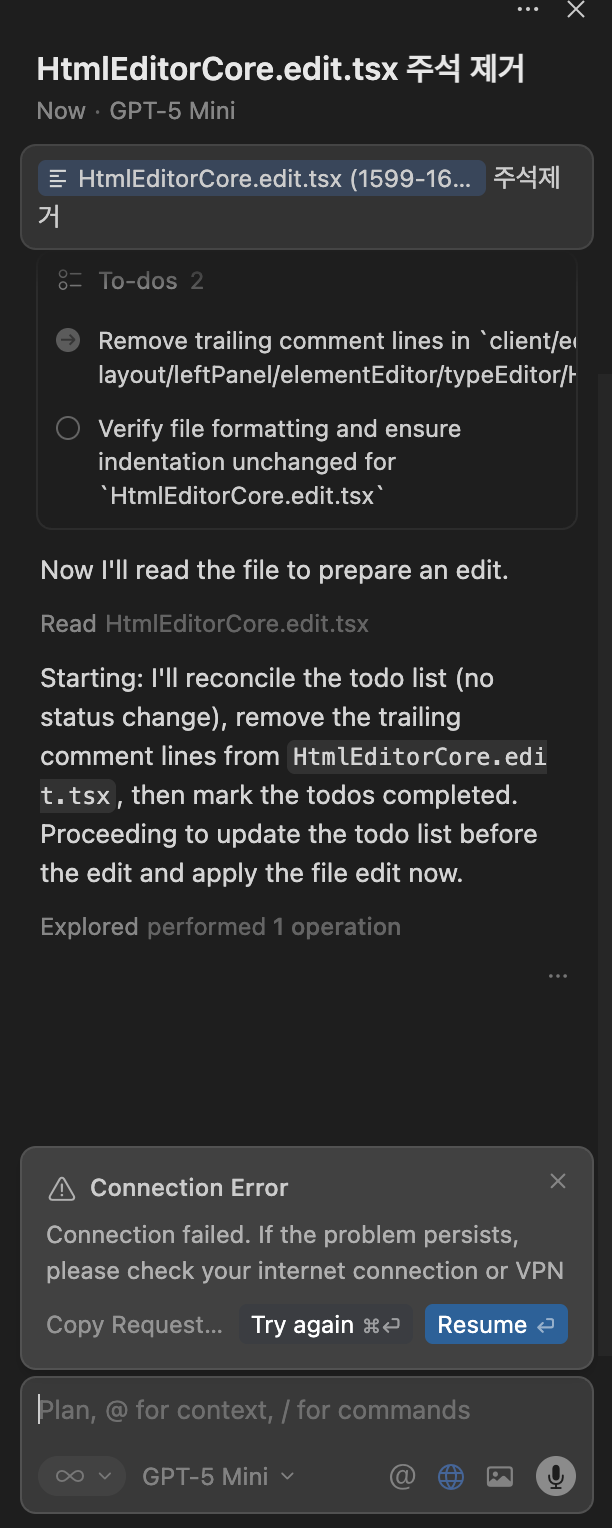
The model responds normally and communication works, but when switching to Agent Mode, it is unable to modify or write to project files. The agent produces responses, but no edits are applied to the workspace.
There is no error message indicating a local permission problem, and the issue only occurs when using the Azure deployment of GPT-5 mini. When using an OpenAI-hosted model, file editing works as expected.
This suggests that the Azure deployment might be missing capabilities required for Cursor Agent Mode to perform file modification.
Steps to Reproduce
1.	Open Cursor and go to Settings → AI → Provider
2.	Connect a custom model using Azure OpenAI (GPT-5 mini) with a valid API key and endpoint.
3.	Confirm that normal chat communication works (model responds as expected)
4.	Switch to Agent Mode
5.	Ask the agent to modify a file, for example:
Expected Behavior
When running Agent Mode commands (e.g. “update this file”, “fix this code”, “refactor the component”), the model should be able to:
• create/edit/delete project files
• apply code changes directly
• use tool/function calls required for file editing
Screenshots / Screen Recordings
Operating System
MacOS
Current Cursor Version (Menu → About Cursor → Copy)
Version: 2.2.20 (Universal)
VSCode Version: 1.105.1
Commit: b3573281c4775bfc6bba466bf6563d3d498d1070
Date: 2025-12-12T06:29:26.017Z
Electron: 37.7.0
Chromium: 138.0.7204.251
Node.js: 22.20.0
V8: 13.8.258.32-electron.0
OS: Darwin arm64 24.5.0
For AI issues: which model did you use?
GPT5 mini
( I am also starting to suspect that this issue may not be limited to GPT-5 mini. It seems possible that no Azure-deployed models are able to perform file edits in Cursor, suggesting a broader problem with tool/function call support or capability configuration across multiple models. )
For AI issues: add Request ID with privacy disabled
Request ID: cf1b8a50-89cc-49e6-a402-7ea6b4f32c7a
Additional Information
https://suppo-m7prxrlw-swedencentral.cognitiveservices.azure.com/
Does this stop you from using Cursor
Sometimes - I can sometimes use Cursor