I can not connect Clone Repo to my GitHub
I tried absolutely everything. Everything. I have Git installed at my PC. All new gear. New downloads.
Clone Repo button is inactive. What do I do ?
Windows 10/11
All new version. Everything is new.
No additional context
Yes - Cursor is unusable
condor
July 31, 2025, 5:14pm
2
hi @DinoCodes and thank you for your bug report.
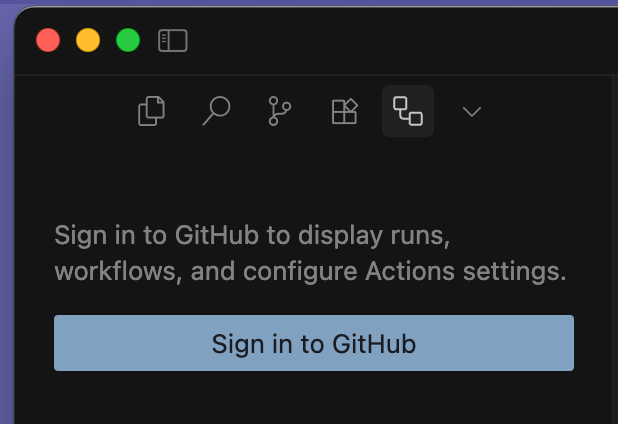
You may need to connect Cursor to Github first. Could you check Github Actions tab?
Thank you. I have done that. I have done everything. Nothing worked.
Can you give me step by step instructions please ? Where is GitHub actions tab? Git Hub shows as connected to Cursor and viceversa.
condor
July 31, 2025, 5:36pm
5
The GitHub Actions tab is shown in the primary sidebar icons menu.
You can access it also by going to Command Palette and searching for “Github Actions”
Once you click to Sign in to GitHub it will open the browser and ask you to sign in, then provide a ‘code’ that is shown in Cursor bottom left to connect it to GitHub
Thank you. Let me try this? Where is this written? They assume that a user should know this ? This is a legal issue .
deanrie
July 31, 2025, 5:39pm
7
Hey, try logging out of your GitHub account in Cursor and then logging back in. There might have been some error.
I have done that about 37 times. No change. I am not sure what hidden tokens and codes they talk about. What is GitHub actions? A command that we are expected to know ? There is some code that I am supposed to look for in Cursor’s bottom left ? Wow, just wow.
Do I type Show GitHub actions into Cursor’s search box ???
Nothing happens when I type in Show GitHub Actions. There is no such command in my search box in Cursor. Can you elaborate more please ? Cursor devs expect users to debug the tool themselves ?
Is the GitHubActions tab the search bar in Cursor ? What left bottom corner hidden code are you talking about ?
condor
July 31, 2025, 5:52pm
12
Just a moment please while I review options.
GitHub functionality is provided builtin by the editor and not something we added.
deanrie
July 31, 2025, 5:54pm
13
GitHub Actions is an extension, but in this case, you don’t need it. Try this first.
Hey, try logging out of your GitHub account in Cursor and then logging back in. There might have been some error.
[image]
I’ve done that an infinite number of times.
Logging in n out of Git, restarting, chaging privacy settings, installing Git on my PC .. I’ve done it all.
deanrie
July 31, 2025, 5:57pm
17
Can you share a screenshot? For me, this button is active, whether I’m logged in or not.
Screen shot of Cursor? Fine
Nothing to see here really. The middle button is inactive NO MATTER what I do. This is a serious and chronic flaw with the tool that thousands of users are sadly experiencing.
Is GitHub actions found in the Search bar of Cursor? What code are you talking about ?
I can try this riddle and look for that mysterious numerical value. I need steps.