Cursor freezes after using Agent Mode and stays stuck on the final step (“Undo all, keep all, or review”). The process becomes completely unresponsive and no action can be taken — the only option is to kill the process. This happens every single time.
I tried launching Cursor with --disable-extensions and also reinstalled it after deleting the %APPDATA% folders, but the issue persists. It’s impossible to work like this. Network test is ok. I tried to change to HTTP Mode compatibility and the same.
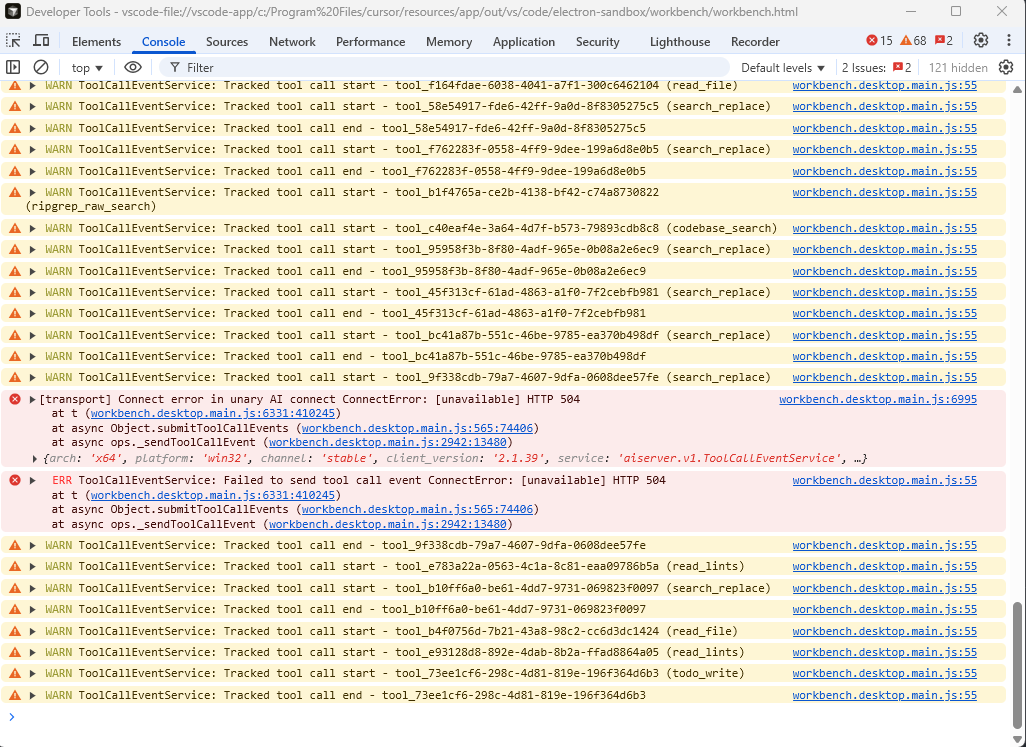
Hey, thanks for the report. I see the root cause - HTTP 504 errors when connecting to the AI backend:
[Transport] Connect error in unary AI connect ConnectError: [unavailable] HTTP 504
ToolCallEventService: Failed to send tool call event ConnectError: [unavailable] HTTP 504
This suggests a network connectivity issue to Cursor’s servers. Please try:
Network environment:
Are you using a VPN? Try disabling it
Corporate network/proxy? Try on a different network (home, mobile hotspot)
Firewall/antivirus? Temporarily disable to test
Share Network Diagnostics results: Cursor Settings > Network > Run Diagnostics → screenshot the full results
Check if intermittent: Does the freeze happen on every Agent request, or only sometimes?
Alternative network troubleshooting:
Try adding to settings: "cursor.general.disableHttp2": true (in addition to the UI setting you already tried)
Restart your router/modem
The HTTP 504 (Gateway Timeout) means requests to the AI backend are timing out. This could be caused by network middleware (VPN, proxy, firewall) or intermittent connectivity issues.
Let me know the diagnostics results and your network setup - this will help the team investigate further.
I only have a firewall WatchGuard. The network test is ok. What I don’t understand is why a timeout on a request freezes the process and I have to reopen it. It’s impossible to work like this.
I dont have any MCP Server.
In all chats Cursor.exe is frozen in the step “Undo All, Keep All or Review”. For example the last test the chatId is: 2dabe56e-aac0-4916-bc66-7778e2a69e55
I’m getting this exact error. I also have no MCP servers configured - it began with me with the version of Cursor that brought the browser tool into cursor rather than spawning the outside process.
Actually, the pattern seems to be if the agent execution ENDS with the focus not being ont he Cursor window is when the lockout on the app occurrs. If I switch back and forth between the window while execution is occurring it doesn’t seem to lock me out.
Same issue here, with Cursor 2.2.20 (user setup). When the agent performs its steps, the Cursor no longer responds. If I switch to another window and back to Cursor, its window does not open, and sometimes an audio signal is emitted (as when windows overlap and you try to click on a lower one). It is necessary to terminate the task and restart the Cursor in this case. It happens often, but not after each conversation with an agent.
I can confirm that the Cursor is currently unusable for me. Today, I killed its task at least 10 times and then gave up and switched to VS Code with GitHub Copilot.
The problem was resolved for me on a few of the more recent updates for Cursor, but the most recent update returned the problem. It’s definitely a vscode/cursor problem.
Hi guys, I am not a Cursor user, however, during resolving my issue with VSC I just found this conversation. Cursor is also based on Visual Studio Code, right?
The problem seems to be a system-level conflict introduced with the Microsoft’s November 2025 Security Update (KB5068861). It introduced a regression in how Windows handles “Toast” notifications and UI overlays. When an app tries to draw an overlay or trigger a notification while it’s not the active foreground window, the WpnUserService (Windows Push Notifications) can hang the parent process.
I’m happy to report that I managed to solve this problem on my computer with two steps:
Disabled Hardware Acceleration in Cursor / VS Code. Steps:
Ctrl + Shift + P.
Type and select: Preferences: Configure Runtime Arguments. This opens argv.json.
Find the line: // “disable-hardware-acceleration”: true,.
Uncomment this line.
Close all instances and restart.
Disabled the Windows Push Notification Service (WPN). Steps:
In PowerShell, run this to stop the service: Stop-Service -Name WpnUserService -Force
Run regedit, navigate to HKEY_LOCAL_MACHINE\SYSTEM\CurrentControlSet\Services\WpnUserService, find Start DWORD, change the value from 2 (Automatic) to 4 (Disabled).
Restart the computer.
Cursor, VS Code, and some other apps that were freezing are now working perfectly again.


 Could be something with the latest Windows updates.