The Cursor editor completely freezes after the AI finishes its response if I switch focus to another application on a second screen while the AI is generating the output

Where does the bug appear (feature/product)?

Cursor IDE

Describe the Bug

When I open the Cursor window maximized, regardless of whether I am working on a complex project or just a single HTML page, I press $Ctrl+I$ to open the AI chat dialog and input any command, whether simple or complex.If I switch to another program before the AI finishes its response (specifically, by directly clicking on any other window on my second screen), the entire Cursor application freezes/crashes once the AI response is complete.At this point, the application becomes completely unresponsive:Neither mouse clicks (left or right) nor any keyboard input works.The input cursor in the text field is still visibly blinking, but pressing any key has no effect.Crucially, it is not just the current Cursor window that freezes; all other open Cursor editor pages (instances) also become stuck (they also show the blinking input cursor but cannot accept any input).The only way to resolve this is to close Cursor via the Task Manager and reopen it.

Steps to Reproduce

Maximize the Cursor editor window on the primary screen.

Open any project (even a minimal file like a single .html page).

Press the shortcut Ctrl + I to open the AI chat/command dialog.

Input a command or prompt (the complexity does not seem to matter).

Crucial Step: Immediately switch focus away from the Cursor window by clicking on any other application window located on the secondary screen.

Wait for the AI to complete its response and render the output back into the Cursor interface.

Actual Behavior (The Bug)
Once the AI response is fully rendered, the entire Cursor application freezes completely:

The UI is locked; mouse clicks are ineffective.

Keyboard input is ignored, even though the text input cursor might still be blinking.

All open instances/windows of Cursor (e.g., other project windows) also freeze simultaneously.

The only solution is to force-close Cursor using the Task Manager.

Expected Behavior

The AI response should complete, and the Cursor window should remain responsive, allowing the user to click, type, and continue editing.

Operating System

Windows 10/11

Current Cursor Version (Menu → About Cursor → Copy)

Version: 2.2.20 (system setup)
VSCode Version: 1.105.1
Commit: b3573281c4775bfc6bba466bf6563d3d498d1070
Date: 2025-12-12T06:29:26.017Z
Electron: 37.7.0
Chromium: 138.0.7204.251
Node.js: 22.20.0
V8: 13.8.258.32-electron.0
OS: Windows_NT x64 10.0.26200

Does this stop you from using Cursor

Yes - Cursor is unusable
2 Likes

Same issue here with MacOS Tahoe 26.1 and cursor 2.2.20

Hangs several times, usually when a new file has been edited/created with code added or changed. The chat itself hangs when this file edition is finished. The changes are cached and not yet applied, no action can be done and you must stop the whole process and start again (it doesn’t matter the AI model you are using).

The same here, experience frequent freeze and stuck today. It went where before. Please fix asap, I don’t want to restart the editor all the time.

Hey, thanks for the report. I’ll pass it to the team.

For me, it was caused by having set workbench.editor.showTabs = single
Cursor please fix.

When will you fix this bug???
I have to close the cursor process hundreds of times a day, which is incredibly frustrating and severely impacts my productivity.

I uninstalled and reinstalled Cursor, but the issue persists. The app freezes if I switch windows before the AI finishes its response.

Fixed by GPU Driver Update

Environment:

  • OS: Windows (win32-x64)

  • Hardware: AMD 780M Integrated Graphics

  • Cursor Version: 2.2.43

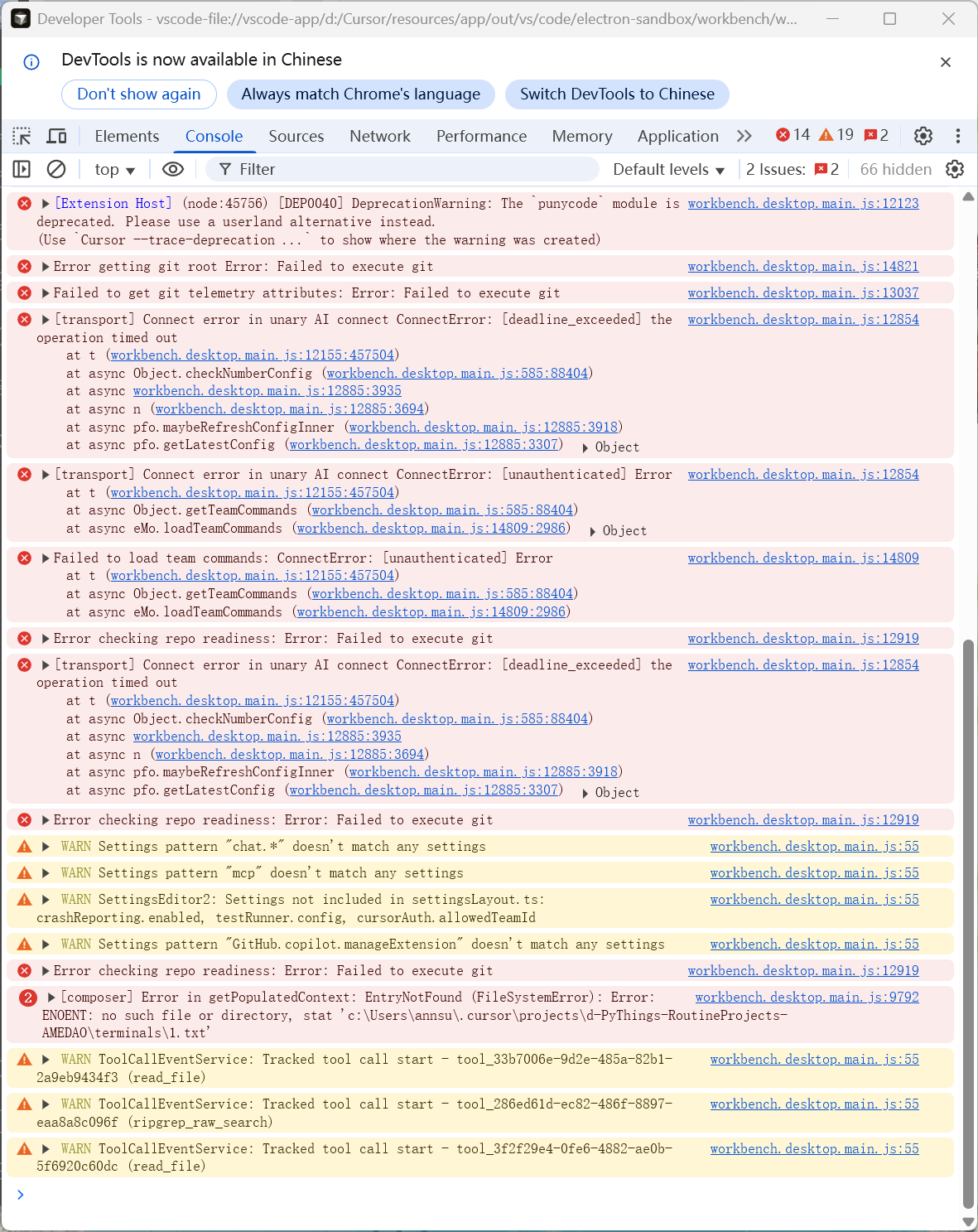
Issue Description: I was encountering multiple errors including AI connection failures (“unauthenticated”, “invalid_argument”) and UI rendering issues. The logs showed “Trusted Type Policy” errors and connection timeouts.

Troubleshooting & Solution: Before finding the fix, I attempted the following without success:

  1. Disabled GPU acceleration (--disable-gpu).

  2. Closed all third-party background software.

  3. Performed a clean reinstall (deleted all configuration files and user data).

The Fix: By analyzing the debug logs, I narrowed it down to a rendering issue. I reinstalled the drivers for my AMD 780M integrated graphics card, and this finally resolved the issue that had persisted for several weeks.

Relevant Log Extracts (for reference):

1. Trusted Type/Renderer Error

Uncaught Error: Failed to execute 'createPolicy' on 'TrustedTypePolicyFactory': Policy with name "tokenizeToString" already exists.

2. AI Connection Failures

[transport] Connect error in unary AI connect ConnectError: [deadline_exceeded] the operation timed out
[transport] Connect error in unary AI connect ConnectError: [unauthenticated] Error

3. Startup Error - Missing Native Module

[CursorProclistService] Native module unavailable; disabling proclist metrics: Error: Cannot find module './build/Release/cursor_proclist.node'