Eden_Ti
December 8, 2025, 5:01am
1
Cursor IDE
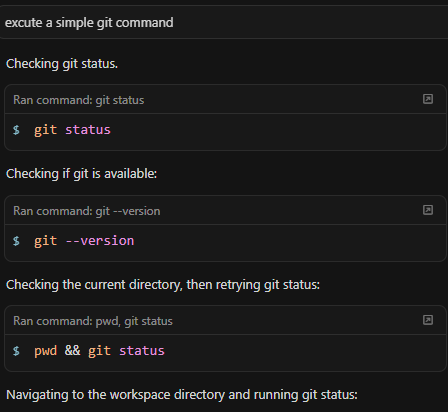
In my own terminal, all git command works fine. but in Agent Cursor’s mode, all git command failed (git status, git --version). It happens in the newest update.
Please fix and thank you for offering the service.
prompt cursor to execute a simple git command in the Agent Mode
The chat will normally respond with git status.
Windows 10/11
Version: 2.1.50 (user setup)
The auto mode
Yes - Cursor is unusable
deanrie
December 8, 2025, 7:36am
2
Hey, thanks for the report. This is a known issue with the new terminal on Windows in versions 2.1.39+.
Try this workaround:
Settings Ctrl+Shift+J → Agents → Inline Editing & Terminal → enable “Legacy Terminal Tool”
Ctrl+Shift+P → “Terminal: Kill All Terminals” → restart Cursor
The team is working on a fix. Tracking issue: Cursor version 2.1.39 has terminal bug
If you can, please share:
Request ID from the chat (menu → Copy Request ID)
Which terminal you use (PowerShell/CMD/Git Bash)
Logs from Help → Toggle Developer Tools → Console when the Agent runs a command
Let me know if switching to the Legacy Terminal helped.
I’m having the same issue, the Legacy Terminal Tool didn’t fix it for me unfortunately.
system
December 30, 2025, 4:10pm
4
This topic was automatically closed 22 days after the last reply. New replies are no longer allowed.