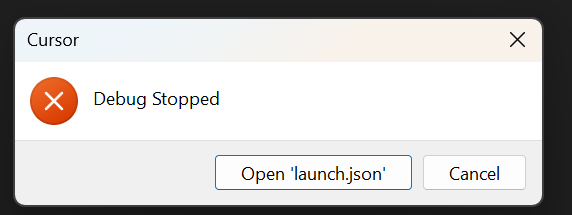
First, thanks for your interest!
Python v2025.6.1 (ms-python)
Python Debugger v2025.14.0 (ms-python)
        ...{
            "name": "Debug Dash App",
            "type": "debugpy",
            "request": "launch",
            "program": "src/apps/dash/app.py",
            "console": "integratedTerminal",
            "cwd": "${workspaceFolder}",
            "justMyCode": false,
            "stopOnEntry": false,
            "python": "${command:python.interpreterPath}",
            "env": {
                "PYTHONPATH": "${workspaceFolder}"
            }
        },...
Actually, these might be relevant before attempting to debug:
ERR [/c:/Users/user/.cursor/extensions/ms-python.vscode-python-envs-1.2.0-win32-x64]: Extension is not compatible with Code 1.99.3. Extension requires: ^1.100.0-20250407.
error @ workbench.desktop.main.js:55
workbench.desktop.main.js:55 ERR [/c:/Users/user/.cursor/extensions/ms-python.vscode-python-envs-1.6.0-win32-x64]: Extension is not compatible with Code 1.99.3. Extension requires: ^1.104.0-20250815.
error @ workbench.desktop.main.js:55
Perhaps also relevant:
ERR An unknown error occurred. Please consult the log for more details.
Object
code
:
“ENOENT”
errno
:
-4058
path
:
“C:\Program Files\Git\usr\bin\bash.exe”
spawnargs
:
(6) [‘-O’, ‘extglob’, ‘-c’, ‘snap=$(command cat <&3) && builtin shopt -s extglo…p_bash_state >&4; builtin exit $COMMAND_EXIT_CODE’, ‘–’, ‘echo test’]
syscall
:
“spawn C:\Program Files\Git\usr\bin\bash.exe”
[[Prototype]]
:
Object
- Reinstalling those two extensions did not help.
- Selecting the global interpreter instead of the venv one did also not help.
- I think that my config is minimal. But here is my test:
{
            "name": "Debug Hello World",
            "type": "debugpy",
            "request": "launch",
            "program": "hello_world.py",
            "console": "integratedTerminal",
            "cwd": "${workspaceFolder}",
            "justMyCode": false,
            "stopOnEntry": false,
            "python": "${command:python.interpreterPath}",
            "env": {
                "PYTHONPATH": "${workspaceFolder}"
            }
        }
#!/usr/bin/env python3
"""
Simple hello world script for testing debugging in Cursor IDE
"""

def main():
    print("Hello, World!")

    # Set a breakpoint here for testing
    name = "Cursor IDE"
    print(f"Hello from {name}!")

    # Another breakpoint target
    numbers = [1, 2, 3, 4, 5]
    total = sum(numbers)
    print(f"Sum of numbers: {total}")

if __name__ == "__main__":
    main()