There are some major bugs in this new 2.0 release!
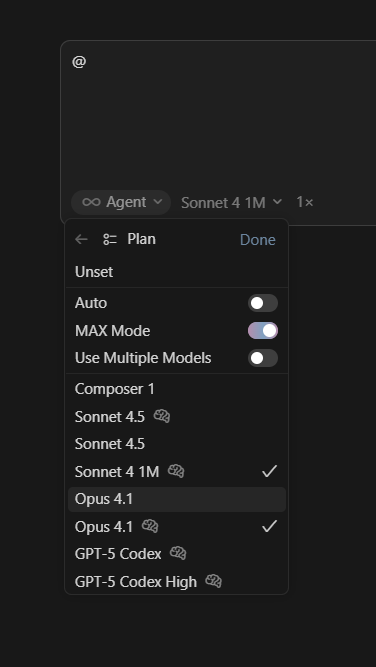
1- Agent settings keep adding models to the agent configuration even when the “Use multiple models” option is not selected.
2- If a model is configured for the Planner agent, the system keeps applying it to the Default agent.
3- Browser automation doesn’t work, even if it is properly configured.
4- Default models for the Cloud agent cannot be edited.
5- GPT-5-pro and GPT-5-codex unavailable for the cloud agents, even when BYOK is activated for those models.
Steps to Reproduce
Open Cursor
Use Cursor
Operating System
Windows 10/11
Current Cursor Version (Menu → About Cursor → Copy)
hi @SMoooo and thank you for the detailed bug report.
Could you be more detailed with the issues, where you see them, how do they manifest and perhaps also with a screenshots.
I recommend closing Cursor completely and then opening one project to ensure no side effects are possible.
Is that in Agents view or Editor view? Do you use Local or Worktrees options?
A screenshot would help here narrow down possible causes or locations.
Is that with multiple parallel projects, or when you switch from Agent to Plan and Plan to Agent?
What issue is there with browser automation? How do you use it step by step?
Screenshot and or video would be very helpful.
Cloud models are selected by Cursor to ensure they work well in that setup. Do you have issue selecting one of the models as default model, or is it that models you would like to have are not available?
BYOK is only configurable Cursor App and only available there.
As you can see in the attached screenshot, even when the “Use Multiple Models” option isn’t activated, there is a bug where multiple models are selected. It seems to me it is a cache configuration bug, because I have noticed it keeps models that were selected via checkbox in cache, and then when the “Use Multiple Models” isn’t activated anymore, it still persists that cache. It happens in both Agents view and Editor view, and it doesn’t matter if I use local or parallel.
I am limited to only 5 models for the cloud agent. Are you saying that GPT-5-codex does not work well in your cloud scaffolding?! This is just bizarre handholding.
I had to read this several times, because I was very confused why you would think I would look for the BYOK in any other place. I am fully aware of the BYOK issues, after 4 months, your support finally emailed me back and apologized for the BYOK issues, but those issues are still mostly there. It has difficulty connecting to Azure openAI, and AWS Bedrock for BYOK model usage. Currently, it only works for Google Gemini API keys.
Could you update to latest Cursor version? We have released several improvements in the meantime.
For multiple models issue: I am not able to reproduce it though I tried in Agents and Editor window on latest Cursor version. Please let me know if this persists after update.
The model selection is independent of Plan / Agent mode.
Please check Settings > Tools & MCP and Custom Executable Path there if Chrome is properly connected and can be opened. This should work well.
Cloud features are being updated. Overall the model behavior and options are partially different in Cloud and Cursor App, therefore not all models are optimized for the Cloud usage yet though we may update them.
We are working on BYOK improvements and the team has received feedback already.
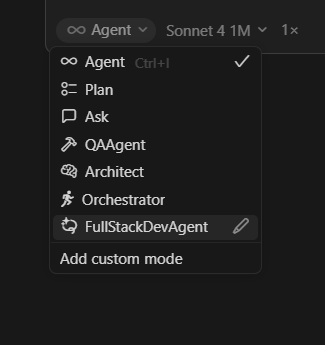
Again, that is an obvious fact. But if you could please pay attention to what I mentioned, I am not selecting models models from the little dropdown to the right of the Agent button, I click on the Agent dropdown > click on the little pencil icon > click on model > model selection glitches badly. Not only that, but it also applies the selected models to the main agent instead of Plan, Ask or any of the custom agents.
My main issue is that these features, minus the browser that is new, and the BYOK, were working fine before. But currently I can’t even use the app with all the bugs!