Cursor IDE
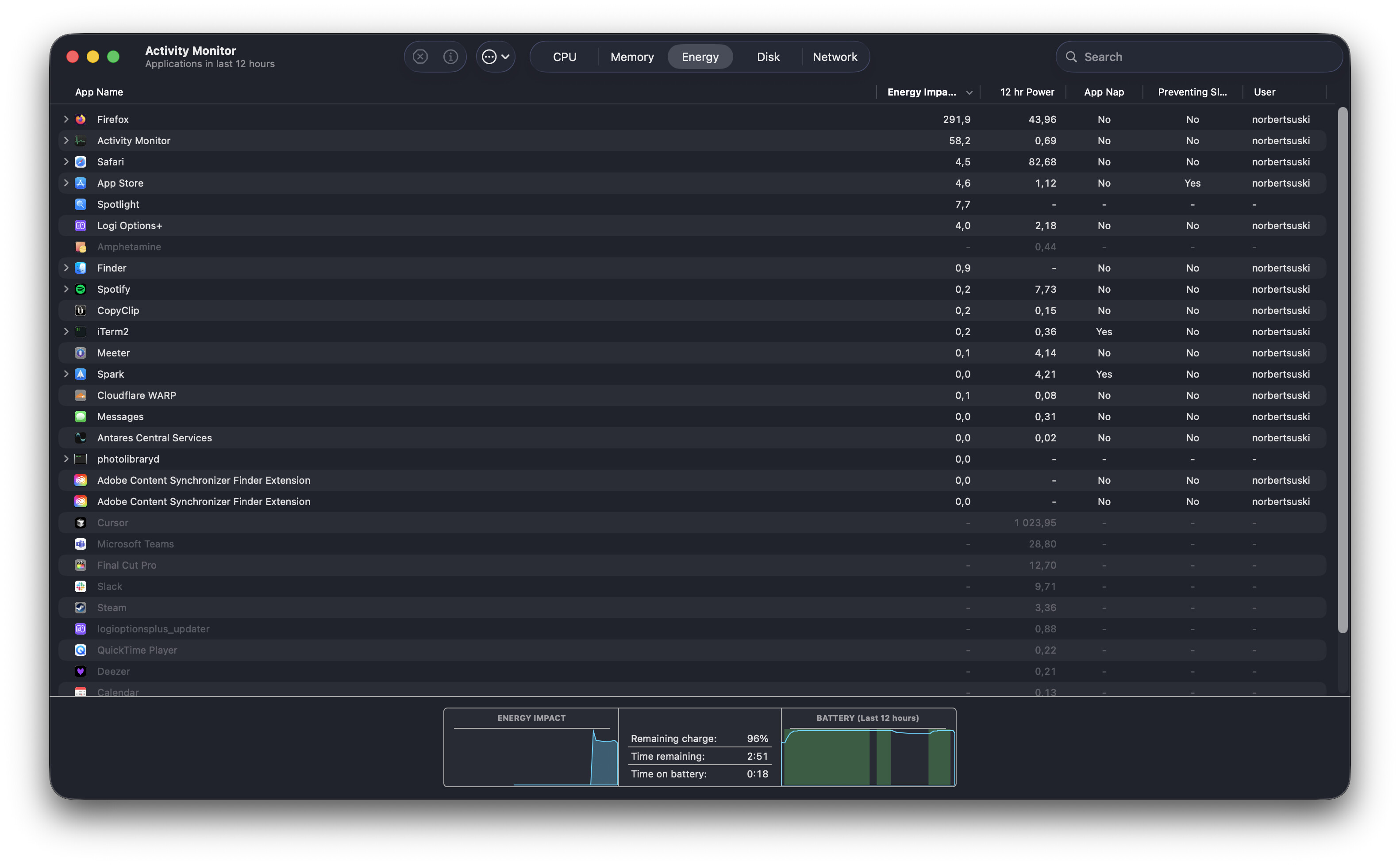
After one of latest updated Cursor IDE is draining battery a lot after close. There is no hanging process in “Force Quit” window, nor any Cursor-related process in activity monitor that can be refered to from the screenshot. It already consumed 5% of battery on my MacBook Air M3 since I started taking screenshot and writing this message. Only restarting the computer helps. The machine is also very hot.
Work with Cursor IDE, use Agents, close the IDE and it’s still there.
Kill all related process.
MacOS
Version: 1.7.44 (Universal)
No - Cursor works, but with this issue
deanrie
October 11, 2025, 3:59pm
2
Hey, thanks for the report. Since there’s no visible Cursor process but your battery is draining, a hidden subprocess might be running.
Could you run these Terminal commands and share the output?
ps aux | grep -i cursorps aux | grep -i electron
Also, in Activity Monitor:
Switch to the Energy tab
Sort by Energy Impact
Share a screenshot of the top processes
As an immediate workaround, you can try:pkill -9 Cursorpkill -9 node
Did this start right after updating to v1.7.44, or was it happening before? Also, what macOS version are you on?
Hi! I had a problem with issue reproduction, but it seems that it may exists only when I’m on battery, and MacBook is not connected to power source.
ps aux | grep -i cursor
norbertsuski 32529 0,0 0,0 468923296 5232 ?? S 9:44 0:00.06 /Applications/Cursor.app/Contents/Frameworks/Electron Framework.framework/Helpers/chrome_crashpad_handler --no-rate-limit --monitor-self-annotation=ptype=crashpad-handler --database=/Users/norbertsuski/Library/Application Support/Cursor/Crashpad --url=https://f.a.k/e --annotation=_productName=Cursor --annotation=_version=1.7.44 --annotation=plat=OS X --annotation=prod=Electron --annotation=ver=34.5.8 --handshake-fd=24norbertsuski 857 0,0 0,1 435430224 18224 ?? S sob.03 0:31.33 /System/Library/PrivateFrameworks/TextInputUIMacHelper.framework/Versions/A/XPCServices/CursorUIViewService.xpc/Contents/MacOS/CursorUIViewServicenorbertsuski 9690 0,0 0,0 410059936 176 s000 R+ 8:09 0:00.00 grep --color=auto --exclude-dir=.bzr --exclude-dir=CVS --exclude-dir=.git --exclude-dir=.hg --exclude-dir=.svn --exclude-dir=.idea --exclude-dir=.tox --exclude-dir=.venv --exclude-dir=venv -i cursor
ps aux | grep -i electron
norbertsuski 9804 0,1 0,0 435299568 1344 s000 S+ 8:11 0:00.01 grep --color=auto --exclude-dir=.bzr --exclude-dir=CVS --exclude-dir=.git --exclude-dir=.hg --exclude-dir=.svn --exclude-dir=.idea --exclude-dir=.tox --exclude-dir=.venv --exclude-dir=venv -i electronhttps://f.a.k/e --annotation=_productName=Cursor --annotation=_version=1.7.44 --annotation=plat=OS X --annotation=prod=Electron --annotation=ver=34.5.8 --handshake-fd=24
Activity Monitor screenshot (Cursor seems to be disabled, but it’s still displayed in “Usingi Significant Energy”)
Unfortunately these don’t help (wait, Cursor disappeared from Using Significant Energy after 2-3 minutes when using these):pkill -9 Cursorpkill -9 node
I think I didn’t have it before with v1.7.44. My macOS version (Tahoe): 26.0.1 (25A362)
deanrie
October 14, 2025, 4:42pm
4
It seems to be a general issue related to the Electron version, which causes high resource usage on macOS Tahoe. The team is already aware of it, and I believe it will be fixed soon.
dprkh
October 15, 2025, 5:02pm
5
Cursor IDE
Cursor is closed but is keeps running in background and draining battery
Cursor is closed but keeps running in background(?) and draining battery
It doesn’t drain battery. No background processes are running.
MacOS
Version: 1.7.44
Yes - Cursor is unusable