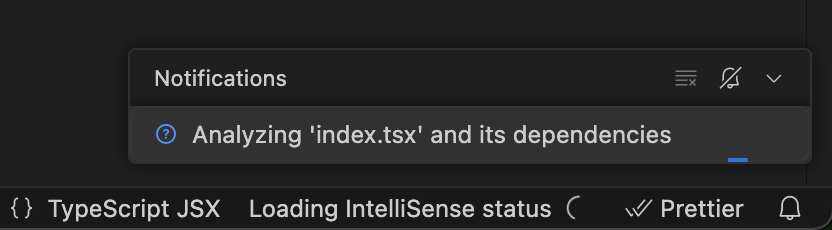
When hovering types and code it just shows “Loading…” and in the bottom status bar it shows “Loading IntelliSense status” with a spinner that never completes. Additionally, “Analyzing ‘file.tsx’ and its dependencies” continues forever.
I’ve tried restarting Cursor, restarting my computer, aligning versions of Typescript, clearing node modules and re-installing, disabling extensions, installing previous versions of Cursor.
Nothing has worked.
Steps to Reproduce
It started after I installed a new version of Cursor and my workspace reloaded.
I cannot use Cursor too, everything is like waiting the ts-server to start and it never starts or could be something that should start before ts-server I don’t know.
Things that breaks:
Typescript Intellisense: when I hover a variable it says “loading…”
Cursor AI chat: I can write text but after send it it stuck loading infinitely.
Search files: the same, I can type but after hit enter it never returns any file and stuck at loading.
Things I tried:
Reload Cursor with extensions disabled.
Re-install Cursor: same problem.
Delete the “.cache/Cursor/User/workspaceStorage/” folder.
Disable TypeScript Intellisense on settings.
Copying all the settings from VSCode (I don’t have this problem on it) to Cursor, same problem.
Restart ts-server: the only things that changes in my screen is that at the status bar it says “Activating extensions” but nothing changes after that.
I noticed that after 8 minutes straight ts-server start working and everything loads correctly but if I reload the window start the problem again.
The TypeScript version Cursor is using is 5.9.2 and I am using Cursor 2.0.34 but I started to have this problem like 4 days ago (before 2.0).
Same after 2.0 install, IntelliSense loading infinitely and getting this error.
It’s a major issue rendering Cursor unusable, might have to switch to other IDE at this point…
Just noticed that all the things that does not work could be because the cursor local extensions (specifically cursor-retrieval) takes 2 and a half minutes to start (if I dont have any other extensions installed).
Has anyone been able to fix this or knows how can I debug this extension to see what’s happening from my side? I tried to read the logs but it does not appears in the “output” tab until it loads after 3 mins
I started to pay Pro plan again because I though that “cursor-retrieval” extension (which is the extension I think is causing all this issue) had a rate limit for free accounts but I still have the same problem.
Every time I open any project I need to wait 3 or 4 minutes for cursor to load all the Cursor local extensions (like I showed in the previous images) so I can not use the IDE until it loads.
Sorry for so many comments but this is so annoying, I’ve had the same problem for 3 weeks.