Describe the Bug
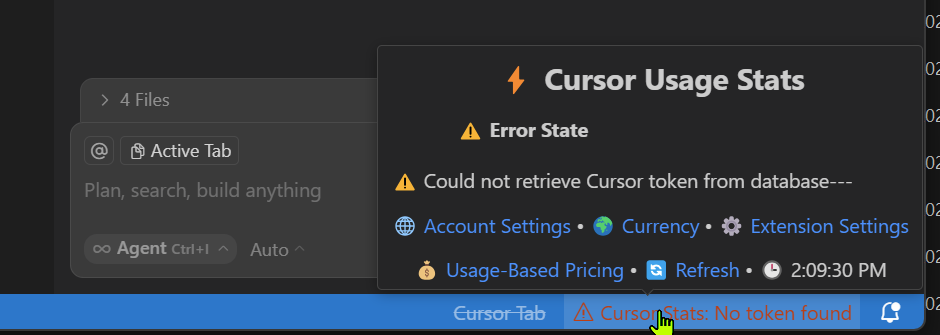
In the Cursor IDE, I am encountering an error state where the Cursor Usage Stats cannot be retrieved. The message displayed is:
“Could not retrieve Cursor token from database”
Additionally, a warning appears in the status bar:
“CursorStats: No token found”
Steps to Reproduce
Open the Cursor extension/editor.
Wait for the Cursor Usage Stats to attempt a refresh (see time in screenshot).
Notice the error pop-up and the warning in the bottom status bar.
Expected Behavior
Cursor should fetch and display usage stats without any error. No warning messages about missing or invalid tokens should be present.
Screenshots / Screen Recordings
Operating System
Windows 10/11
Current Cursor Version (Menu → About Cursor → Copy)
Version: 1.3.9 (user setup)
VSCode Version: 1.99.3
Commit: 54c27320fab08c9f5dd5873f07fca101f7a3e070
Date: 2025-08-01T20:19:30.453Z
Electron: 34.5.1
Chromium: 132.0.6834.210
Node.js: 20.19.0
V8: 13.2.152.41-electron.0
OS: Windows_NT x64 10.0.26100
Does this stop you from using Cursor
No - Cursor works, but with this issue