Where does the bug appear (feature/product)?
Cursor IDE
Describe the Bug
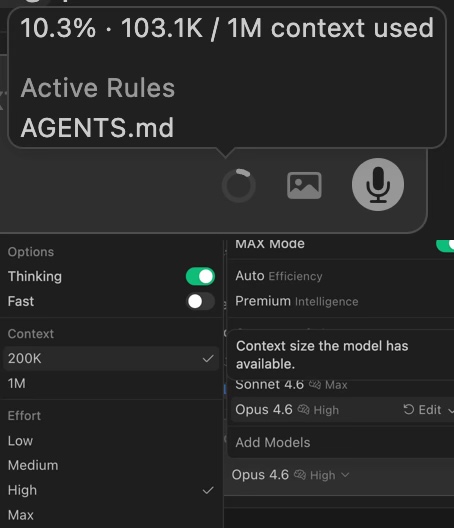
When I set the context size to 200K in model options, the status bar still displays “103.1K / 1M context used”. The denominator does not update. This also means auto-compression won’t trigger at the correct threshold relative to 200K.
Steps to Reproduce
- Select Claude Opus 4.6 as the model
- Open model options, set Context to 200K
- Check the status bar at the bottom of the chat
Expected Behavior
Status bar should show “xxx / 200K context used” and auto-compression should trigger relative to the 200K limit.
Screenshots / Screen Recordings
Operating System
MacOS
Version Information
Version: 2.7.0-pre.158.patch.0
VSCode Version: 1.105.1
Commit: 11e7a0514e3c19ee0ed19b37725c111fe5fb44f0
Date: 2026-03-28T10:42:16.149Z
Layout: editor
Build Type: Stable
Release Track: Nightly
Electron: 39.8.1
Chromium: 142.0.7444.265
Node.js: 22.22.1
V8: 14.2.231.22-electron.0
OS: Darwin arm64 25.4.0
For AI issues: which model did you use?
Claude Opus 4.6
Additional Information
Auto/Premium modes are unaffected. The issue only appears when manually setting context size in model options.
Does this stop you from using Cursor
No - Cursor works, but with this issue