Describe the Bug
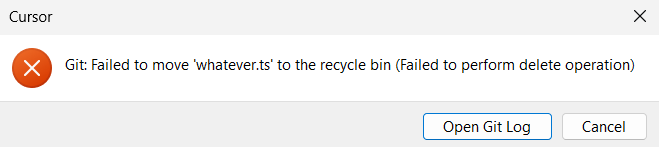
Attempting to discard untracked files results in an error on Windows and prevents the changes from being discarded.
Steps to Reproduce
- Create a new file in a project that uses git.
- Discard all changes → acknowledge prompt.
Expected Behavior
All changes should be discarded, untracked files should get deleted.
(This has always worked in native vscode and still does in 1.102.1.)
Screenshots / Screen Recordings
Operating System
Windows 10/11
Current Cursor Version (Menu → About Cursor → Copy)
Version: 1.2.4 (user setup)
VSCode Version: 1.99.3
Commit: a8e95743c5268be73767c46944a71f4465d05c90
Date: 2025-07-10T17:09:01.383Z
Electron: 34.5.1
Chromium: 132.0.6834.210
Node.js: 20.19.0
V8: 13.2.152.41-electron.0
OS: Windows_NT x64 10.0.26100
Additional Information
This is all that’s in the git log:
2025-07-21 18:40:49.310 [info] > git config --get commit.template [45ms]
2025-07-21 18:40:49.321 [info] > git for-each-ref --format=%(refname)%00%(upstream:short)%00%(objectname)%00%(upstream:track)%00%(upstream:remotename)%00%(upstream:remoteref) --ignore-case refs/heads/master refs/remotes/master [53ms]
2025-07-21 18:40:49.383 [info] > git status -z -uall [59ms]
2025-07-21 18:40:49.384 [info] > git for-each-ref --sort -committerdate --format %(refname)%00%(objectname)%00%(*objectname) [54ms]
Does this stop you from using Cursor
No - Cursor works, but with this issue