Where does the bug appear (feature/product)?
Cursor IDE
Describe the Bug
Hi Cursor Support,
I’m experiencing two consistent issues with Cursor on my Windows 11 machine:
Freezing when manually editing code files
The entire application freezes (becomes completely unresponsive) as soon as I try to manually edit text in a code file.
Multiple duplicate windows opening
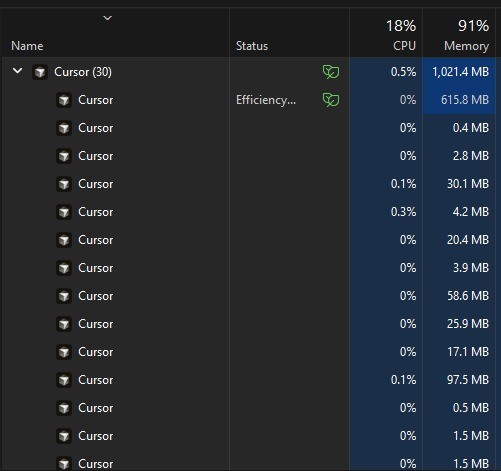
Every time I open or use Cursor, multiple duplicate instances/windows keep spawning. I can see many Cursor processes under Task Manager.
Environment:
Cursor Version: 3.1.10 (user setup)
VSCode Version: 1.105.1
Commit: dacbe9b31599a253763e4910eb6ab38704653320
Date: 2026-04-13T11:39:16.806Z
Build Type: Stable
Electron: 39.8.1
Chromium: 142.0.7444.265
Node.js: 22.22.1
OS: Windows 11 (Windows_NT x64 10.0.26200)
This is happening reliably and makes Cursor very difficult to use.
Could you please help me troubleshoot or provide a fix for these issues?
Thank you!
Steps to Reproduce
Just start cursor and try to access a larger code file maybe a 1000 line code file
Expected Behavior
I should be able to edit files without lag or freeze and task manger should not have duplicate cursor windows opened maybe causing lags while editing code files
Screenshots / Screen Recordings
Operating System
Windows 10/11
Version Information
Version: 3.1.10 (user setup)
VSCode Version: 1.105.1
Commit: dacbe9b31599a253763e4910eb6ab38704653320
Date: 2026-04-13T11:39:16.806Z
Layout: editor
Build Type: Stable
Release Track: Default
Electron: 39.8.1
Chromium: 142.0.7444.265
Node.js: 22.22.1
V8: 14.2.231.22-electron.0
OS: Windows_NT x64 10.0.26200
Does this stop you from using Cursor
Sometimes - I can sometimes use Cursor