I’m experiencing a disruptive bug where multiple cmd.exe windows (Command Prompt) open automatically every time I make a request to the AI (using Composer or Chat).The issue:For every single action or request, a new terminal window spawns.This happens even for simple code generation or file reading tasks.The windows often remain open or flash rapidly, interrupting the workflow.Environment:OS: Windows 10/11Cursor Version: [Inserisci qui la tua versione, la trovi in Help → About]Default Terminal: [Scrivi qui se usi PowerShell o CMD di solito]Steps I’ve already tried (without success):Enabled “Legacy Terminal Tool” in Settings.Set a specific “Default Profile” for the terminal.Disabled “Terminal Command Integration” in AI settings.Ran Set-ExecutionPolicy for PowerShell.Is there a known fix for this “terminal spawning loop” on Windows? It makes the IDE almost unusable when using AI features.Thank you!
This is a confirmed bug. On Windows, the process that handles agent tool calls spawns child processes without the correct flag to keep them hidden, which causes those visible cmd.exe windows on every request.
Unfortunately there isn’t a workaround for this at the moment. Our engineering team has the fix identified and it’s been escalated for resolution.
We’ve been trying to reproduce this internally but haven’t been able to trigger it yet. To help us narrow it down, could you share:
How do you launch Cursor? (Start Menu, desktop shortcut, pinned taskbar, or from a terminal/command prompt?)
A short screen recording showing the cmd.exe windows appearing when you use the agent? Even 15-20 seconds would help.
Your default terminal profile in Cursor — go to the terminal dropdown (the + button) and let us know if it says PowerShell, Command Prompt, or something else.
Regarding your question about where the fix would land: fixes typically ship to nightly first and then make their way to stable. I’ll update this thread once we have more info.
This is a Cursor-side bug in how it spawns background shell processes on Windows. The process is visible regardless of terminal profile settings or MCP configuration.
Excellent detective work with Process Monitor — that’s exactly the kind of diagnostic data we needed.
Your finding confirms the issue is in how Cursor spawns shell integration processes on Windows (the pwsh.exe with shellIntegration.ps1). The creation flags missing CREATE_NO_WINDOW is the key detail. I’ve updated our engineering ticket with your Process Monitor analysis, the video, and your confirmed launch method (Start Menu).
This should help our team pinpoint and fix the issue. I’ll follow up here once a fix ships.
Hi Cursor Support,
I’m experiencing two consistent issues with Cursor on my Windows 11 machine:
Freezing when manually editing code files
The entire application freezes (becomes completely unresponsive) as soon as I try to manually edit text in a code file.
Multiple duplicate windows opening
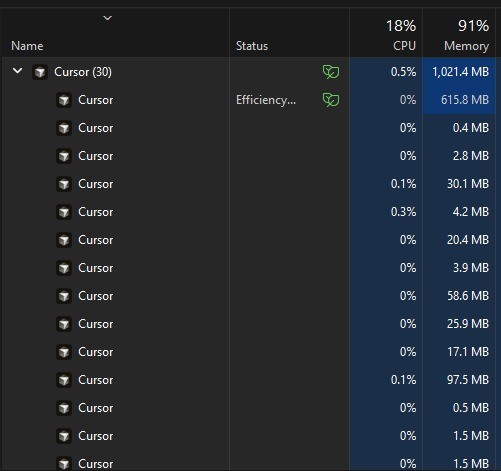
Every time I open or use Cursor, multiple duplicate instances/windows keep spawning. I can see many Cursor processes under Task Manager.
This is happening reliably and makes Cursor very difficult to use.
Could you please help me troubleshoot or provide a fix for these issues?
Thank you!
Steps to Reproduce
Just start cursor and try to access a larger code file maybe a 1000 line code file
Expected Behavior
I should be able to edit files without lag or freeze and task manger should not have duplicate cursor windows opened maybe causing lags while editing code files