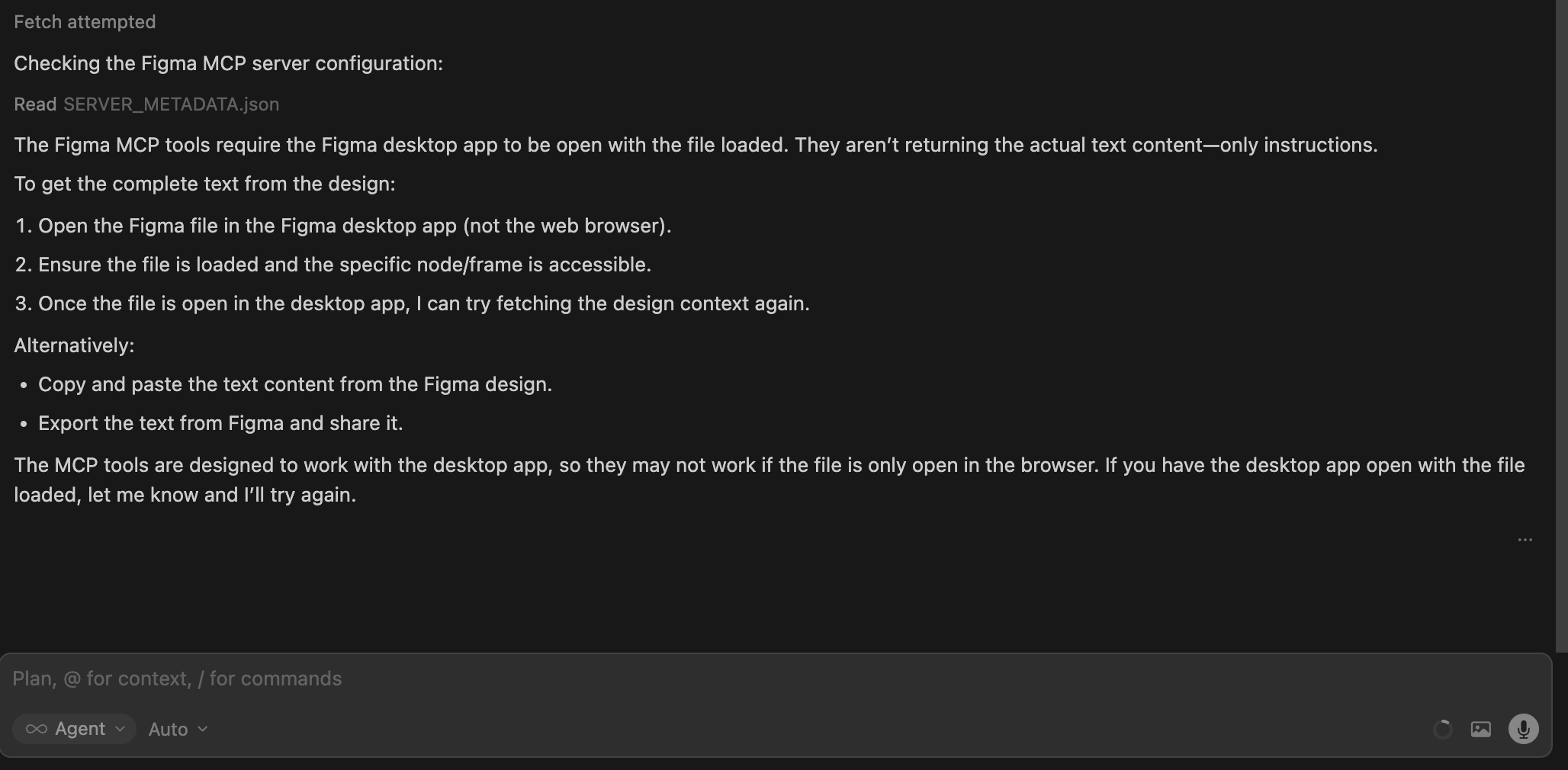
There is a discrepancy between the Figma MCP tool execution and the Cursor AI’s perception. While the Figma MCP tool executes successfully and retrieves the data (confirmed via tool logs), the AI agent claims it cannot access the information or has no data from Figma.
Notably, this same MCP configuration works perfectly in Antigravity IDE, where the AI can successfully parse and use the retrieved Figma data. This suggests the issue is specific to how Cursor handles or passes the MCP output context to the LLM.
Steps to Reproduce
Configure the Figma MCP in Cursor and verify the connection.
Issue a prompt that requires fetching design details or layer information from a Figma file.
Observe that the MCP tool runs and returns data (the tool status shows success/output).
Observe the AI’s response: It ignores the retrieved data and states, “I cannot get the information.”
(Verification) Perform the same steps in Antigravity IDE and observe that it works as expected.
For AI issues: which model did you use?
Model name (e.g., Sonnet 4, Tab…)
For AI issues: add Request ID with privacy disabled
Request ID: f9a7046a-279b-47e5-ab48-6e8dc12daba1
For Background Agent issues, also post the ID: bc-…
Additional Information
Add any other context about the problem here.
Does this stop you from using Cursor?
Yes - Cursor is unusable
Sometimes - I can sometimes use Cursor
No - Cursor works, but with this issue
The more details you provide, the easier it is for us to reproduce and fix the issue. Thanks!
When using the Figma Desktop MCP server with an MCP client (Cursor IDE), the core design extraction tools get_metadata and get_design_context do not return any usable design data, despite the server being reachable, tools being discovered, and parameters being validated successfully.
Environment:
OS: macOS
Figma Desktop Stable: 125.11.6
Figma Desktop Beta: 126.1.0
MCP Transport tested: /sse and /mcp
MCP Client: Cursor IDE
MCP Server URL: http://127.0.0.1:3845/sse (also tested with /mcp)
Observed Behavior:
The MCP server starts correctly and is reachable.
Cursor successfully connects to the server, enumerates available tools, and validates tool arguments.
Calls to get_metadata with a valid explicit nodeId consistently return only an instructional string (e.g., “IMPORTANT: After you call this tool, you MUST call get_design_context…”) instead of the expected XML metadata (node hierarchy, bounds, layout, etc.).
Calls to get_design_context with the same valid explicit nodeId consistently terminate with Error: Aborted, without returning any design context payload, partial output, or actionable error information.
This behavior occurs even when:
Passing an explicit valid nodeId
Using minimal parameters (nodeId only)
Using schema-correct parameters (clientFrameworks and clientLanguages as strings)
Testing both Figma Desktop Stable and Beta
Testing both /sse and /mcp transports
Expected Behavior:
get_metadata should return structured XML metadata describing the selected node (type, hierarchy, bounds, layout, etc.).
get_design_context should return a design context payload (layout, spacing, typography, colors, and other design properties), or at minimum return a clear, actionable error if generation fails.
Why this appears to be a bug:
The tools are callable and pass schema validation, but return no data.
The instructional strings appear to be fallback guidance text rather than actual tool results.
The Error: Aborted response from get_design_context indicates a server-side termination after the request is accepted.
The issue is reproducible across Figma Desktop versions, transports, and parameter combinations, strongly indicating a server-side Figma Desktop MCP implementation issue, not a client or configuration problem.
Impact:
This prevents any design-to-code or metadata extraction workflows using the Figma Desktop MCP server, leaving get_screenshot as the only functional tool and forcing visual inference instead of structured design data.
Anyone found a workaround for this? If so, please share it here. We’ll keep an eye on this thread. I’ve burned like 40$ credits just trying to fix this shiyt.
This looks like a known issue. Cursor mishandles MCP tools that return JSON arrays at the top level. Only the last item in the array gets passed to the model, and the rest are dropped.
get_metadata returns only instructions instead of XML
get_design_context fails with Error: Aborted
Only get_screenshot works
This looks like a bug in the Figma Desktop MCP server itself, not on Cursor’s side. Have you tried a different Figma Desktop version, maybe Beta, or a different transport (/sse vs /mcp)?
Can you share an example of the raw response from the Figma MCP tool (if it shows up in the logs)? It’ll help confirm whether the issue is the array format.
The exact same Figma file, same selected node, same desktop app, and same MCP server work end-to-end in Antigravity, which strongly suggests that the Figma Desktop MCP server itself is functioning correctly.
In Cursor specifically, I consistently observe:
get_metadata returning only instruction strings
get_design_context failing with Error: Aborted
Only get_screenshot completing
Cursor auto-reinvoking get_design_context with forceCode: true and entering a retry loop
Given your note about Cursor mishandling top-level JSON arrays (only last item passed through), this aligns very closely with what I’m seeing. My understanding is that get_design_context returns a large structured payload (often arrays / streamed chunks), which Cursor appears to either truncate or abort while consuming.
Since:
The same MCP server works correctly in Antigravity
The failure mode matches known Cursor MCP array/stream handling issues
Reinstalling Cursor and switching /sse vs /mcp does not resolve it
This strongly points to a Cursor MCP client issue, not a Figma Desktop MCP server bug.
If helpful, I can try to capture raw MCP responses from Cursor logs, but at this point the cross-tool comparison (Cursor vs Antigravity) already isolates the issue to Cursor’s MCP handling.
Happy to provide anything else that helps the team debug this further.
Thanks for the detailed clarification about Antigravity, it’s really helpful.
The team is aware of the issue. There’s no fix yet, but your report, especially the comparison with Antigravity, helps us prioritize it. I’ll link your report to the existing ticket.
Is there any ETA or target version for fixing the “only last item in array passed to model” behavior?
Same issue here with Feishu Project MCP: get_workitem_brief returns a content array (work item attributes + log_id); only the last block (log_id) reaches the model, so the AI doesn’t see the actual work item data.
Would be great to have a rough timeline so we can decide whether to work around it on the MCP server side (e.g. merging into a single content block) or wait for the Cursor fix. Thanks.