Hovering Over Model Selector Issue

Where does the bug appear (feature/product)?

Cursor IDE

Describe the Bug

Hovering over a model to view details on cost does not appear over the dropdown.

Steps to Reproduce

Hovering over Agent/Model select menu

Expected Behavior

Hover state next to the selection.

Screenshots / Screen Recordings

Operating System

MacOS

Current Cursor Version (Menu → About Cursor → Copy)

Version: 2.0.77
VSCode Version: 1.99.3
Commit: ba90f2f88e4911312761abab9492c42442117cf0
Date: 2025-11-13T23:10:43.113Z
Electron: 37.7.0
Chromium: 138.0.7204.251
Node.js: 22.20.0
V8: 13.8.258.32-electron.0
OS: Darwin arm64 25.1.0

Does this stop you from using Cursor

No - Cursor works, but with this issue

1 Like

Hey, thanks for the report. This is a known z-index issue with the browser tab. It has the same root cause as the bug described here: Context menu not working properly on browser tab

The browser tab content is rendering above other UI elements such as tooltips, context menus, and dropdowns.

The dev team is aware of this and is already working on a fix!

1 Like

Thanks for the update!

1 Like

Where does the bug appear (feature/product)?

Cursor IDE

Describe the Bug

In the macOS version of Cursor, the model selection dropdown opens significantly displaced to the left, far from the model selector control. This results in a visually disconnected and inconvenient user experience when choosing a model.

Steps to Reproduce

  1. Open Cursor on macOS.
  2. In the right-side chat panel, click the model selector (e.g., “Composer 1”, “Opus 4.5”, “GPT-5 Codex”).
    3)The dropdown menu appears — but it is positioned far on the left side of the window, not under the selector.

Expected Behavior

The dropdown should open directly below the model selector, within the same right-hand panel.

Positioning should respect the layout container and cursor location.
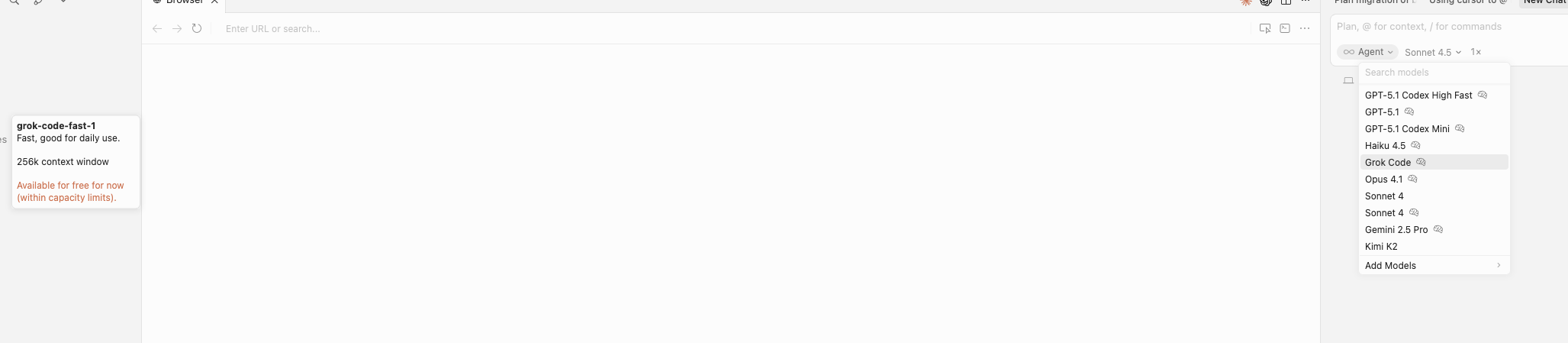
Screenshots / Screen Recordings

Operating System

MacOS

Current Cursor Version (Menu → About Cursor → Copy)

OS: macOS (Darwin arm64 25.1.0)

Cursor Version: 2.1.42

VSCode Version: 1.105.1

Commit: 2e353c5f5b30150ff7b874dee5a87660693d9de0

Build Date: 2025-12-01

Electron: 37.7.0

Chromium: 138.0.7204.251

Node.js: 22.20.0

V8: 13.8.258.32-electron.0

Does this stop you from using Cursor

No - Cursor works, but with this issue