Where does the bug appear (feature/product)?
Cursor IDE
Describe the Bug
There are a number of instances in Cursor where a dropdown menu opens and there’s absolutely nothing I can do to use it or read it’s contents. Here’s the two examples that re-occurred already in the latest version.
- Pressing
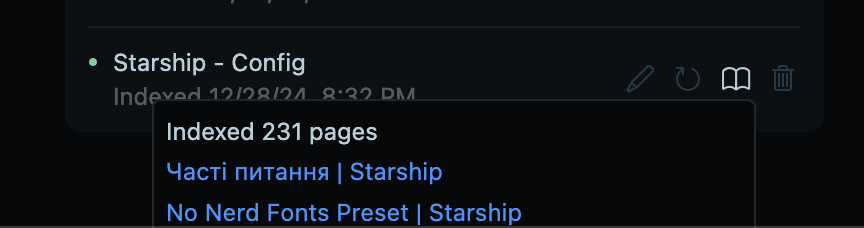
CMD + /opens the loop between models dropdown which is cut off and unusable. - Going to Docs & Indexing and hovering over the book icon of a resource near the bottom of the screen gets cut off and I can’t see all of the pages that were scraped.
Steps to Reproduce
Open a long chat where the prompt input is on the bottom, press CMD + / or go into Docs & Indexing when there are many docs that have been indexed and click the book icon on the last indexed docs.
Expected Behavior
To be able to see and use the menu’s
Screenshots / Screen Recordings
Operating System
MacOS
Current Cursor Version (Menu → About Cursor → Copy)
Version: 2.1.39 (Universal)
VSCode Version: 1.105.1
Commit: 60d42bed27e5775c43ec0428d8c653c49e58e260
Date: 2025-11-27T02:30:49.286Z
Electron: 37.7.0
Chromium: 138.0.7204.251
Node.js: 22.20.0
V8: 13.8.258.32-electron.0
OS: Darwin arm64 23.2.0
Does this stop you from using Cursor
No - Cursor works, but with this issue