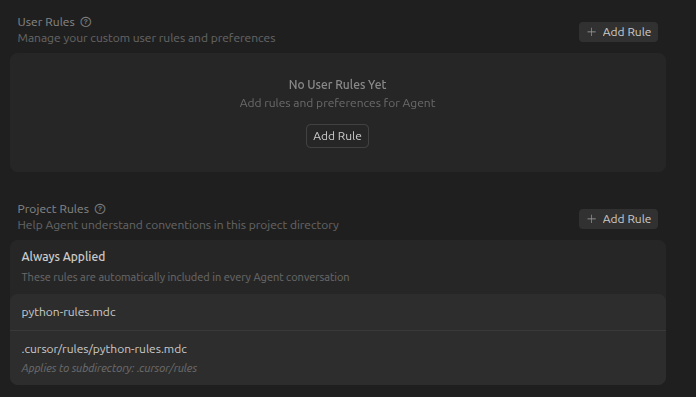
I defined coding rules in .cursor/rules, but they are not followed by cursor when generating code. Afterwards I can ‘remind’ cursor like “What are our rules on…?” and it will find the rule and apply it. But why do I have to remind cursor, and why doesn’t it follow my rules without that?
Steps to Reproduce
Create a rule file like .cursor/rules/python-rules.mdc, with content such as:
---
alwaysApply: true
---
IMPORTANT! When coding in python, always apply these rules. Never not apply these rules.

- don't add default values to parameters in function signatures, unless specifically instructed to do so
...

Structure imports in the following manner:

- don't put imports into functions or anywhere after the initial import section on the top of the script file
...
And then see it generate code against these rules like:
function foo(bar=baz)
    import fubar
    ...
Afterwards when I tell Cursor: “But what are our rules on function parameter default values?” it will readily find the rule and fix it. So it knows the rule, but doesn’t apply it at first.
Expected Behavior
When cursor generates new functions, I expect that it follows the rules, in the above case it doesn’t add default values into function signatures and does put import statements inside functions, e.g. doesn’t do this:
function foo(bar=baz)
    import fubar
    ...
but instead this:
import fubar

function foo(bar)
    ...
Operating System
Linux
Current Cursor Version (Menu → About Cursor → Copy)
Ive never had much luck with the rules files, I just use the AGENTS.md and as a fail safe always attach it to new converdsations as a “blob” of context that I know will be respected by the agent.
I know its not a good answer to the question but thats what I do anyway
The code in question is generged via the chat in agent mode. Cursor chat window on the right side of the IDE. Here is t he full contents of the rules file:
```
---
alwaysApply: true
---
IMPORTANT! When coding in python, always apply these rules. Never not apply these rules.

- don't add default values to parameters in function signatures, unless specifically instructed to do so
- don't add hard-coded default values into the code
- when accessing dict members, don't use dict.get(), but use dict[]
- don't catch Exceptions just to silently ignore them (or ignore them with a WARNING printout)
- when a code would fail, let it fail - that's what exceptions are for
- function parameters should be ordered semantically, from the most important to the least important, with possible output parameters at the very end
- when making function definition changes, ensure that all calls to the function are updated everywhere in the project

Structure imports in the following manner:

- simple import statements on top (import foo)
- 'import as' statements aftwards (import foo as bar)
- 'from .. import ..' statements afterwards (from foo import bar)
- local imports at the end
- the order of imports should be from more generic library to less generic library
- put an empty line between these blocks of imports
- don't put imports into functions or anywhere after the initial import section on the top of the script file


No backward compatibility: When making changes to the code, we don't maintain backward
compatibility to past configuration file formats, other file formats or function
signatures or anything else. We update all the code, config files, etc. for the current,
most recent expectations.


IMPORTANT! When coding in python, always apply these rules. Never not apply these rules.
one of the request IDs: ccbd9acf-9737-46ce-9f86-7df94f64b7b7 (this is where I remind Cursor about the rules and it obliges)
Yes, they’ll work differently. User Rules in Settings → Rules are global, plain text, always added to Agent Chat across all projects. They’re lower priority but more reliable than .mdc auto-apply. Docs: Rules | Cursor Docs