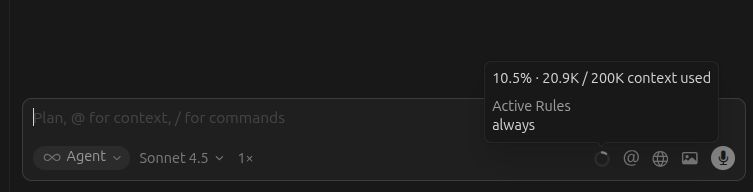
Being forced to manually include rules makes AI worfklows borderline unusable for me as I am working with multiple very different repos that require very different rules so I need a way to have them apply at least by globs - which is currently broken for all the main AI-s.
Hey, thanks for the report. This is a known issue-rules apply inconsistently, especially with glob patterns and intelligent context.
Important note: Rules with alwaysApply: false are conditional-they won’t always show in the “Active Rules” tooltip since they only trigger under specific conditions. That’s expected behavior.
Different models handle rules differently (as you noticed):
Composer 1 often ignores conditional rules
GPT-5.1 and Sonnet 4.5 handle them better, but not always
Workarounds for now:
Explicitly mention key rules at the start of your request
Use @.cursor/rules/filename.mdc to add them manually
Simplify rules-avoid complex structures, simpler is better
If you can, share the Request ID (chat menu > Copy Request ID) from the example where rules failed-I’ll pass it to the engineers with your test repo. Let us know what happened.
It was my expectation that rules with globs are not conditional in the sense they ALWAYS apply when any of the files matching the pattern are accessed by AI. This seems like something that could (and should) be done deterministically as file accesses presumably happen through API calls.
Honestly, I don’t understand what the idea with havivng globs is at all if the rules do not work that way. If the rules file does not have a description, just globs, how is AI supposed to decide if it should or should not include it?
Regarding simplifying rules: the repo I link is a toy example that has the simplest imaginable rules. For instance, linked.mdc is just:
At the end of every response, **ALWAYS** recommend a new type of ehtnic cusine in two sentences
and the other two rules are basically the same, just for milk products and breads. This is a toy example intended to test the most basic rules following with no fear of context collapse and the fact that most AI-s fail spectacularly is worrying.
I would also like to point out that there is a distinct bug in that the context tooltip NEVER shows any other rules loaded for me, even if the AI does actually decide to read these rules and follow them. Only the alwaysApply rules make it into that tooltip, ever. Even if the rules loading situation is indeterministic, this should still be considered a proper bug, right?
I’m happy to share the request ID if it helps: a1f015f9-840d-4d69-9c63-42533fa49116
This is with “auto” AI (the default) ignoring all the rules in the repo. And currently it is consistently repeatable.
Honestly, what I’m describing here seems way more like an actual bug than a mild inconsistency in AI judgement, especially the rules not being listed in context tooltip even if followed.
It would Really be useful if we could inspect the raw full context window of the Agent chat, as that would make it very easy to tell if it is an issue with AI not loading the rule vs just deciding not to follow them. Is it possible to do that somehow so I could continue debugging the issue on my own?
Hey, sorry for the delay. Thanks for the detailed analysis and links - this is very helpful.
Regarding tooltip bugs: I completely agree. This is a separate UI bug - “Active Rules” should show all applied rules (including conditional ones with globs/description), not just alwaysApply: true. I’ll note this for the team.
On glob patterns and auto-application: This is confirmed as a known issue. Your test repo perfectly demonstrates the problem.
From experience:
Composer 1 often ignores conditional rules (globs + alwaysApply: false)
GPT-5.1/Sonnet 4.5 are better, but don’t always follow them
Even alwaysApply: true sometimes doesn’t apply automatically on the first request (related discussion)
Temporary workarounds for your workflow:
For critical rules - use alwaysApply: true
Temporarily mention explicitly: “Follow globs.mdc, linked.mdc” or add @.cursor/rules/globs.mdc manually
Simplify rule structure - complex JSON/Markdown works less predictably, plain text is better
On inspecting context: There’s no built-in way. At most Help > Toggle Developer Tools > Console during a request, but the raw prompt isn’t output there.
I’ll pass your minimal repro (with simplest rules) to the engineers - this will really help with the fix.