Where does the bug appear (feature/product)?
Cursor IDE
Describe the Bug
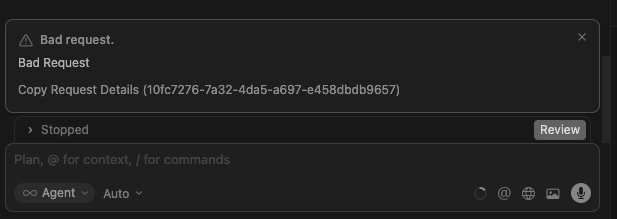
Can’t chat with agent anymore. Getting bad request (see below copy). Tried duplicate Agent, same issue
Tried reboot, same issue
Tried disable http/2, same issue
Tried turn off MCP, same issue (have no MCP configured)
Tried Cursor support, fast response but no solution
Tried reboot laptop, same issue
An older agent, for an unrelated topic, still works fine…
Any tips?
(Request ID: 10fc7276-7a32-4da5-a697-e458dbdb9657
{“error”:“ERROR_BAD_REQUEST”,“details”:{“title”:“Bad request.”,“detail”:“Bad Request”,“isRetryable”:false,“additionalInfo”:{},“buttons”:,“planChoices”:},“isExpected”:true}
ConnectError: [invalid_argument] Error
at szc.$endAiConnectTransportReportError (vscode-file://vscode-app/Applications/Cursor.app/Contents/Resources/app/out/vs/workbench/workbench.desktop.main.js:12375:456006)
at xBo._doInvokeHandler (vscode-file://vscode-app/Applications/Cursor.app/Contents/Resources/app/out/vs/workbench/workbench.desktop.main.js:13027:22831)
at xBo._invokeHandler (vscode-file://vscode-app/Applications/Cursor.app/Contents/Resources/app/out/vs/workbench/workbench.desktop.main.js:13027:22573)
at xBo._receiveRequest (vscode-file://vscode-app/Applications/Cursor.app/Contents/Resources/app/out/vs/workbench/workbench.desktop.main.js:13027:21335)
at xBo._receiveOneMessage (vscode-file://vscode-app/Applications/Cursor.app/Contents/Resources/app/out/vs/workbench/workbench.desktop.main.js:13027:20152)
at zLt.value (vscode-file://vscode-app/Applications/Cursor.app/Contents/Resources/app/out/vs/workbench/workbench.desktop.main.js:13027:18244)
at Ee._deliver (vscode-file://vscode-app/Applications/Cursor.app/Contents/Resources/app/out/vs/workbench/workbench.desktop.main.js:49:2962)
at Ee.fire (vscode-file://vscode-app/Applications/Cursor.app/Contents/Resources/app/out/vs/workbench/workbench.desktop.main.js:49:3283)
at Tvt.fire (vscode-file://vscode-app/Applications/Cursor.app/Contents/Resources/app/out/vs/workbench/workbench.desktop.main.js:12360:12156)
at MessagePort. (vscode-file://vscode-app/Applications/Cursor.app/Contents/Resources/app/out/vs/workbench/workbench.desktop.main.js:15027:18433)
Steps to Reproduce
Open cursor, select agent with issue (or duplicate) and start to chat. The text starts uploading, but then times out with ‘bad request’ error.
Screenshots / Screen Recordings
Operating System
MacOS
Current Cursor Version (Menu → About Cursor → Copy)
Version: 2.2.43 (Universal)
VSCode Version: 1.105.1
Commit: 32cfbe848b35d9eb320980195985450f244b3030
Date: 2025-12-19T06:06:44.644Z
Electron: 37.7.0
Chromium: 138.0.7204.251
Node.js: 22.20.0
V8: 13.8.258.32-electron.0
OS: Darwin arm64 25.1.0
For AI issues: which model did you use?
Any model
For AI issues: add Request ID with privacy disabled
Request ID: 10fc7276-7a32-4da5-a697-e458dbdb9657
{“error”:“ERROR_BAD_REQUEST”,“details”:{“title”:“Bad request.”,“detail”:“Bad Request”,“isRetryable”:false,“additionalInfo”:{},“buttons”:,“planChoices”:},“isExpected”:true}
ConnectError: [invalid_argument] Error
at szc.$endAiConnectTransportReportError (vscode-file://vscode-app/Applications/Cursor.app/Contents/Resources/app/out/vs/workbench/workbench.desktop.main.js:12375:456006)
at xBo._doInvokeHandler (vscode-file://vscode-app/Applications/Cursor.app/Contents/Resources/app/out/vs/workbench/workbench.desktop.main.js:13027:22831)
at xBo._invokeHandler (vscode-file://vscode-app/Applications/Cursor.app/Contents/Resources/app/out/vs/workbench/workbench.desktop.main.js:13027:22573)
at xBo._receiveRequest (vscode-file://vscode-app/Applications/Cursor.app/Contents/Resources/app/out/vs/workbench/workbench.desktop.main.js:13027:21335)
at xBo._receiveOneMessage (vscode-file://vscode-app/Applications/Cursor.app/Contents/Resources/app/out/vs/workbench/workbench.desktop.main.js:13027:20152)
at zLt.value (vscode-file://vscode-app/Applications/Cursor.app/Contents/Resources/app/out/vs/workbench/workbench.desktop.main.js:13027:18244)
at Ee._deliver (vscode-file://vscode-app/Applications/Cursor.app/Contents/Resources/app/out/vs/workbench/workbench.desktop.main.js:49:2962)
at Ee.fire (vscode-file://vscode-app/Applications/Cursor.app/Contents/Resources/app/out/vs/workbench/workbench.desktop.main.js:49:3283)
at Tvt.fire (vscode-file://vscode-app/Applications/Cursor.app/Contents/Resources/app/out/vs/workbench/workbench.desktop.main.js:12360:12156)
at MessagePort. (vscode-file://vscode-app/Applications/Cursor.app/Contents/Resources/app/out/vs/workbench/workbench.desktop.main.js:15027:18433)
Does this stop you from using Cursor
Yes - Cursor is unusable
 no idea why that is.