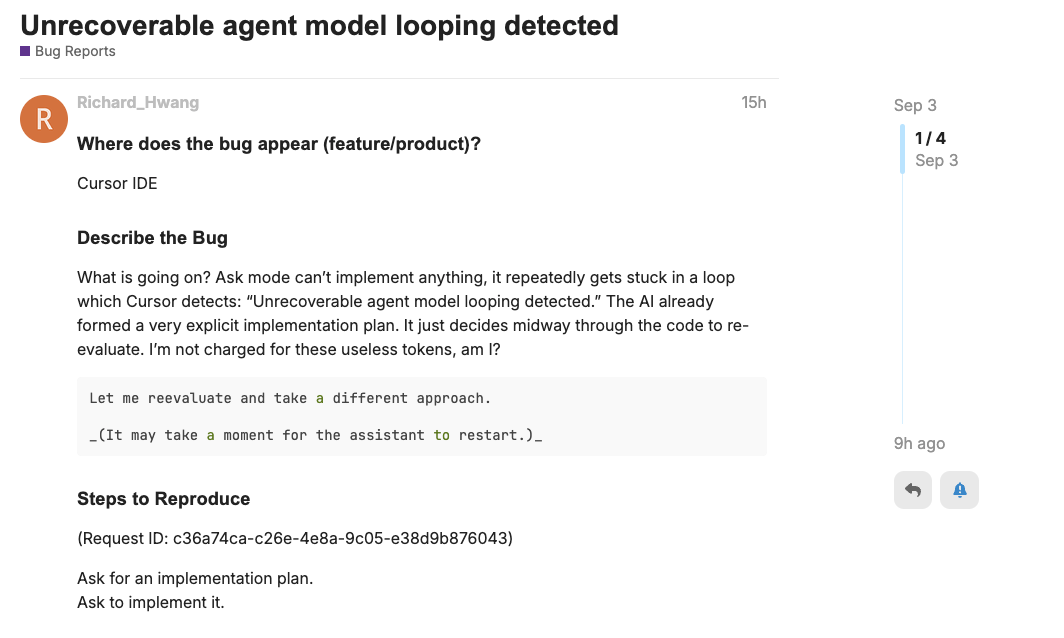
What is going on? Ask mode can’t implement anything, it repeatedly gets stuck in a loop which Cursor detects: “Unrecoverable agent model looping detected.” The AI already formed a very explicit implementation plan. It just decides midway through the code to re-evaluate. I’m not charged for these useless tokens, am I?
Let me reevaluate and take a different approach.

_(It may take a moment for the assistant to restart.)_
Hey, thanks for the report. Could you let me know which model you’re using? Also, could you share the request ID? For this, you need to disable privacy mode if it’s enabled, then reproduce the issue when it happens again and copy the ID.
I’m too optimistic. We’re back! Apparently even the LLM-favored task of writing new boilerplate code from scratch was too much.
Request ID: 017295e0-5d35-4055-b0bb-31b8b1aa8c60
{“error”:“ERROR_CUSTOM_MESSAGE”,“details”:{“title”:“Unrecoverable agent model looping detected”,“detail”:“Unrecoverable agent model looping detected.”,“additionalInfo”:{},“buttons”:,“planChoices”:},“isExpected”:true}
ConnectError: [aborted] Error
at nol.$endAiConnectTransportReportError (vscode-file://vscode-app/Applications/Cursor.app/Contents/Resources/app/out/vs/workbench/workbench.desktop.main.js:4814:319459)
at egr._doInvokeHandler (vscode-file://vscode-app/Applications/Cursor.app/Contents/Resources/app/out/vs/workbench/workbench.desktop.main.js:488:211942)
at egr._invokeHandler (vscode-file://vscode-app/Applications/Cursor.app/Contents/Resources/app/out/vs/workbench/workbench.desktop.main.js:488:211684)
at egr._receiveRequest (vscode-file://vscode-app/Applications/Cursor.app/Contents/Resources/app/out/vs/workbench/workbench.desktop.main.js:488:210449)
at egr._receiveOneMessage (vscode-file://vscode-app/Applications/Cursor.app/Contents/Resources/app/out/vs/workbench/workbench.desktop.main.js:488:209271)
at O_t.value (vscode-file://vscode-app/Applications/Cursor.app/Contents/Resources/app/out/vs/workbench/workbench.desktop.main.js:488:207365)
at ye._deliver (vscode-file://vscode-app/Applications/Cursor.app/Contents/Resources/app/out/vs/workbench/workbench.desktop.main.js:49:2962)
at ye.fire (vscode-file://vscode-app/Applications/Cursor.app/Contents/Resources/app/out/vs/workbench/workbench.desktop.main.js:49:3283)
at Prt.fire (vscode-file://vscode-app/Applications/Cursor.app/Contents/Resources/app/out/vs/workbench/workbench.desktop.main.js:4801:12154)
at MessagePort. (vscode-file://vscode-app/Applications/Cursor.app/Contents/Resources/app/out/vs/workbench/workbench.desktop.main.js:6983:18168)
How do I get a refund for the money and time I’ve wasted? Just email [email protected] and get a response from a useless support bot and never talk to a human. Sounds great
Sorry you are seeing this issue! While rare, models can sometimes get stuck into unrecoverable loops, which is the error you are seeing.
Are you able to share a request ID with privacy mode disabled, so we are able to see an example of a conversation that caused such a loop?
In the meantime, I’d recommend either not using Ask mode (the model may get confused as it tries to use a tool it’s used before in Agent mode, but is unable to use now), or attempting to switch to a specific, trusted model like Sonnet or Gemini!
Getting the same error after few file edits while using gpt-5-high and claude-4-sonnet.
Request ID: 9f7b49ca-9fd4-43a1-8299-37aeb7c04e2c
{“error”:“ERROR_CUSTOM_MESSAGE”,“details”:{“title”:“Unrecoverable agent model looping detected”,“detail”:“Unrecoverable agent model looping detected.”,“additionalInfo”:{},“buttons”:,“planChoices”:},“isExpected”:true}
ConnectError: [aborted] Error
at iol.$endAiConnectTransportReportError (vscode-file://vscode-app/Applications/Cursor.app/Contents/Resources/app/out/vs/workbench/workbench.desktop.main.js:4814:319459)
at Zhr._doInvokeHandler (vscode-file://vscode-app/Applications/Cursor.app/Contents/Resources/app/out/vs/workbench/workbench.desktop.main.js:488:212075)
at Zhr._invokeHandler (vscode-file://vscode-app/Applications/Cursor.app/Contents/Resources/app/out/vs/workbench/workbench.desktop.main.js:488:211817)
at Zhr._receiveRequest (vscode-file://vscode-app/Applications/Cursor.app/Contents/Resources/app/out/vs/workbench/workbench.desktop.main.js:488:210582)
at Zhr._receiveOneMessage (vscode-file://vscode-app/Applications/Cursor.app/Contents/Resources/app/out/vs/workbench/workbench.desktop.main.js:488:209404)
at O_t.value (vscode-file://vscode-app/Applications/Cursor.app/Contents/Resources/app/out/vs/workbench/workbench.desktop.main.js:488:207498)
at ye._deliver (vscode-file://vscode-app/Applications/Cursor.app/Contents/Resources/app/out/vs/workbench/workbench.desktop.main.js:49:2962)
at ye.fire (vscode-file://vscode-app/Applications/Cursor.app/Contents/Resources/app/out/vs/workbench/workbench.desktop.main.js:49:3283)
at Prt.fire (vscode-file://vscode-app/Applications/Cursor.app/Contents/Resources/app/out/vs/workbench/workbench.desktop.main.js:4801:12154)
at MessagePort. (vscode-file://vscode-app/Applications/Cursor.app/Contents/Resources/app/out/vs/workbench/workbench.desktop.main.js:6983:18168)
Having used and had issues with Cursor for more than a year, I expect a helpful human response (you can have fun with email support bot if you want).
For what it’s worth, I’ve migrated a lot (not all) of my workflows directly to model providers (ie ChatGPT). For very well-defined implementation tasks in Cursor, it does seem like you can fiddle with the prompt and model and get it through within a few attempts usually.
Same here, in agent mode with auto model selection, stuck in a loop for editing the file, or sometimes says the edit_file tool is not found, and cannot do a single job. In my experience, manually selecting a model such as GPT-5 or claude-sonnet-4 will be okay and have no errors at all.
Request ID: 2f93b765-800b-4863-b41e-a0998e5e9ba8
Yes, it still does. Just happened to me.
Simple request of editing html element. Claude Sonnet 4
Request ID: a6ec3fb0-6268-4e34-842b-6012054b4fdb
{“error”:“ERROR_CUSTOM_MESSAGE”,“details”:{“title”:“Unrecoverable agent model looping detected”,“detail”:“Unrecoverable agent model looping detected.”,“additionalInfo”:{},“buttons”:,“planChoices”:},“isExpected”:true}
ConnectError: [aborted] Error
at wyl.$endAiConnectTransportReportError (vscode-file://vscode-app/c:/Users/pheno/AppData/Local/Programs/cursor/resources/app/out/vs/workbench/workbench.desktop.main.js:4910:339807)
at Zvr._doInvokeHandler (vscode-file://vscode-app/c:/Users/pheno/AppData/Local/Programs/cursor/resources/app/out/vs/workbench/workbench.desktop.main.js:487:36019)
at Zvr._invokeHandler (vscode-file://vscode-app/c:/Users/pheno/AppData/Local/Programs/cursor/resources/app/out/vs/workbench/workbench.desktop.main.js:487:35761)
at Zvr._receiveRequest (vscode-file://vscode-app/c:/Users/pheno/AppData/Local/Programs/cursor/resources/app/out/vs/workbench/workbench.desktop.main.js:487:34526)
at Zvr._receiveOneMessage (vscode-file://vscode-app/c:/Users/pheno/AppData/Local/Programs/cursor/resources/app/out/vs/workbench/workbench.desktop.main.js:487:33348)
at WCt.value (vscode-file://vscode-app/c:/Users/pheno/AppData/Local/Programs/cursor/resources/app/out/vs/workbench/workbench.desktop.main.js:487:31442)
at ye._deliver (vscode-file://vscode-app/c:/Users/pheno/AppData/Local/Programs/cursor/resources/app/out/vs/workbench/workbench.desktop.main.js:49:2962)
at ye.fire (vscode-file://vscode-app/c:/Users/pheno/AppData/Local/Programs/cursor/resources/app/out/vs/workbench/workbench.desktop.main.js:49:3283)
at Vot.fire (vscode-file://vscode-app/c:/Users/pheno/AppData/Local/Programs/cursor/resources/app/out/vs/workbench/workbench.desktop.main.js:4895:12154)
at MessagePort. (vscode-file://vscode-app/c:/Users/pheno/AppData/Local/Programs/cursor/resources/app/out/vs/workbench/workbench.desktop.main.js:7028:18292)
Request ID: 54d43790-cc5c-4183-8968-333dfcb530f7
{“error”:“ERROR_CUSTOM_MESSAGE”,“details”:{“title”:“Unrecoverable agent model looping detected”,“detail”:“Unrecoverable agent model looping detected.”,“additionalInfo”:{},“buttons”:,“planChoices”:},“isExpected”:true}
ConnectError: [aborted] Error
at Pyl.$endAiConnectTransportReportError (vscode-file://vscode-app/Applications/Cursor.app/Contents/Resources/app/out/vs/workbench/workbench.desktop.main.js:4910:339807)
at lbr._doInvokeHandler (vscode-file://vscode-app/Applications/Cursor.app/Contents/Resources/app/out/vs/workbench/workbench.desktop.main.js:487:36019)
at lbr._invokeHandler (vscode-file://vscode-app/Applications/Cursor.app/Contents/Resources/app/out/vs/workbench/workbench.desktop.main.js:487:35761)
at lbr._receiveRequest (vscode-file://vscode-app/Applications/Cursor.app/Contents/Resources/app/out/vs/workbench/workbench.desktop.main.js:487:34526)
at lbr._receiveOneMessage (vscode-file://vscode-app/Applications/Cursor.app/Contents/Resources/app/out/vs/workbench/workbench.desktop.main.js:487:33348)
at UCt.value (vscode-file://vscode-app/Applications/Cursor.app/Contents/Resources/app/out/vs/workbench/workbench.desktop.main.js:487:31442)
at ye._deliver (vscode-file://vscode-app/Applications/Cursor.app/Contents/Resources/app/out/vs/workbench/workbench.desktop.main.js:49:2962)
at ye.fire (vscode-file://vscode-app/Applications/Cursor.app/Contents/Resources/app/out/vs/workbench/workbench.desktop.main.js:49:3283)
at Hot.fire (vscode-file://vscode-app/Applications/Cursor.app/Contents/Resources/app/out/vs/workbench/workbench.desktop.main.js:4895:12154)
at MessagePort. (vscode-file://vscode-app/Applications/Cursor.app/Contents/Resources/app/out/vs/workbench/workbench.desktop.main.js:7028:18292)
Hey all, as mentioned in my earlier message, this can happen occasionally with all models due to the way they function. Two things to note:
Certain conversations can cause this to happen more frequently (e.g. if it got close to being stuck in a loop earlier in a conversation, it’s more likely to happen again). If you see this happening a lot, I’d recommend starting a new chat to stop it from happening.
A new chat session should almost always stop this. If it doesn’t, while it’s possible a Project Rule, Memory, or MCP server could cause this, please do share any examples and request IDs if you are regularly seeing this error across new chats and regardless of the model you pick!