Where does the bug appear (feature/product)?
Cursor IDE
Describe the Bug
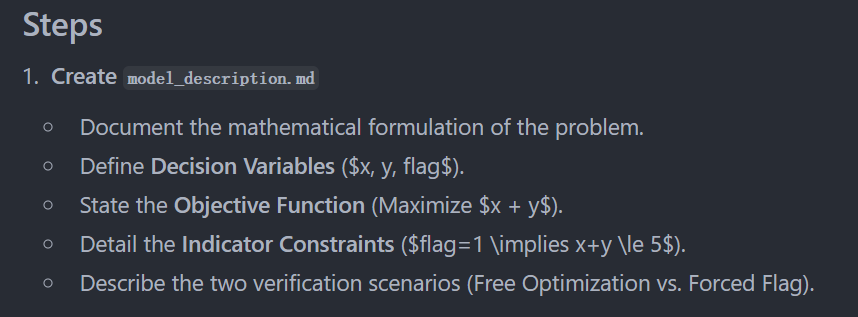
The LaTeX mathematical symbols in plan mode cannot be displayed properly
Steps to Reproduce
- Use plan mode
- Generate a plan containing mathematical symbols
- The symbols cannot be rendered properly
Expected Behavior
The symbols should render correctly
Screenshots / Screen Recordings
Operating System
Windows 10/11
Current Cursor Version (Menu → About Cursor → Copy)
Version: 2.1.20
Commit: a8d8905b06c8da1739af6f789efd59c28ac2a680
Date: 2025-11-22T14:51:59.472Z
Browser: Mozilla/5.0 (Windows NT 10.0; Win64; x64) AppleWebKit/537.36 (KHTML, like Gecko) Cursor/2.1.20 Chrome/138.0.7204.251 Electron/37.7.0 Safari/537.36
Does this stop you from using Cursor
No - Cursor works, but with this issue

