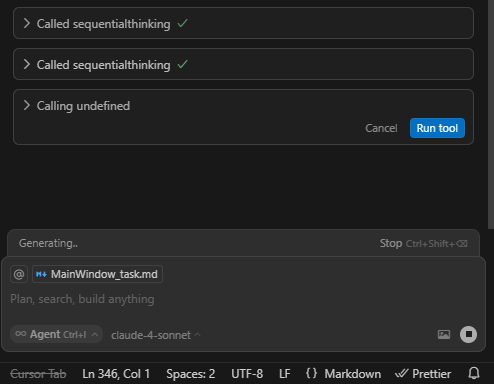
I recently observed that Cursor is having a hard time calling the correct tool. It would show ‘Calling undefined’ before showing the correct mcp server tool after few seconds (sometimes reaching 10 seconds of waiting or more). If you click ‘Run tool’ while it is in Undefined state, then cursor will just freeze in waiting mode and I just have to stop the chat when that happens.
Steps to Reproduce
I primarily uses Sonnet 4 and I observed this behavior while using this model.
In a new chat, write a new prompt. Say “I need you to investigate the cause of the issue in our dashboard, use sequential thinking mcp server”. But it is not limited to this mcp server. Every mcp server I had has this issue. It will then attempt to call the tool but will first display ‘Calling undefined’ before displaying the correct tool and you can now run the tool.
Expected Behavior
Previously, I don’t have this issue in cursor. When mcp servers are called it will instantaneously show the the tool name and be able to run with it. No more waiting time, no freezes.
I observed it when using Claude llm, primarily sonnet 4. I have not made intensive testing to this model or others as it would waste tokens, a luxury I need to save.
I just realized that this might be model specific issue. Using gemini models, the calling of any tool is just instantaneous. But using Claude models will have few delays calling tools.
same issue using the various sonnet models the “undefined” takes a good while and it acts like it wants me to hit “run” even though I have given permission for AI to run any MCP
For now, I just wait for it to show the actual tool name just to be sure. And that will cost few seconds, maybe 10sec at most.
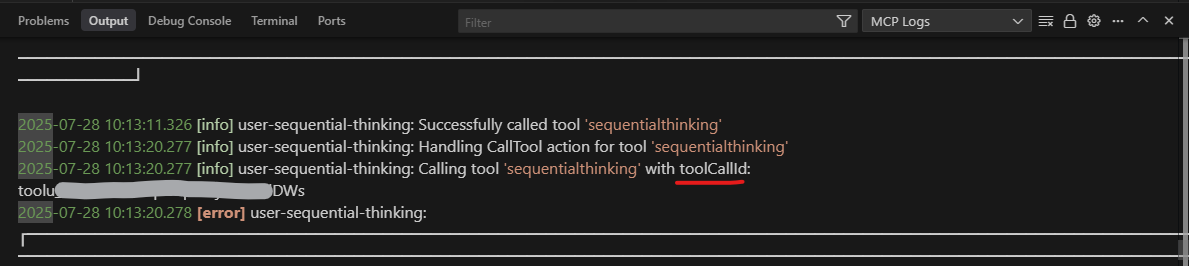
Based on my observation, Claude models are having a hard time invoking the toolcall id function or something causing it to be delayed. But this was not an issue few weeks ago. It might be a cursor and/or model problem but I don’t really know.
I faced this issue recently, I have been using Auto mode (model are claude, gpt, gemini), I enabled only gemini just to test, it gives me the same behaviour.
But the interesting piece, I am facing it for one of the MCP. more details are here.
But the same MCP works fine previously.
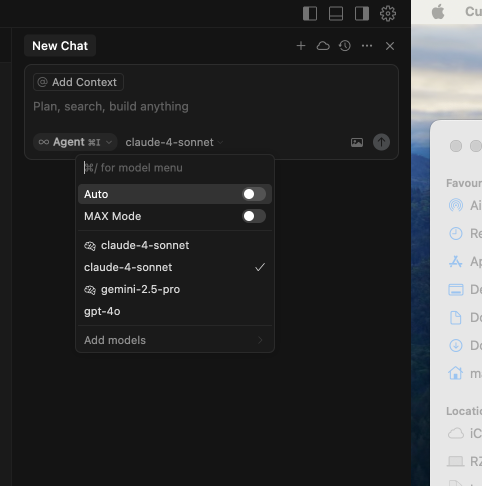
What do you mean you are in auto but enabled only on gemini? I thought auto can’t choose a specific model. Sorry for the question I’m on legacy pricing since I opt out before. I haven’t tried auto as well in my setup due to the fact I can’t choose a model there. Can you test it in specific models other than auto. I think Cursor has made several things in auto and we can’t be sure what model we are using there.
4 models are added in our enterprise plan, when I select “Auto”, the agent picks one of the model I guess. I tried disabling the “Auto” and enabled “gpt-4o” (also with claude), but the behaviour is same.
Just a thought, I am using semgrep MCP here, the semgrep mcp actually take the code from agent (CODE_FILES), because of the nature that it has to take/read a code from environment/chat interface, is that delay making this behaviour?
Reason I am thinking, the other MCP doesn’t pull anything from environment, it directly calls the tool. In the sequential thinking mcp (which is in the discussion) also it read the current state to take necessary step further. so cursor reads some info from the env and then calling the right tool, that delay cause this behaviour?
No, that is not how Auto works. Now matter how many individual models you add it will NOT select from there. The decision of what model to use in auto is coded in cursor, but they claimed they are serving frontier models for the task. And yeah, Claude and openAI models do have delays in my case. Also, my example is about sequential thinking, but I can confirm that this issue is present to all my mcp servers: sequentialthinking, playwrite, context7, and jinni if I use models from Claude or OpenAI. On the other hand, tool calls in gemini models have no delays in my experience. I will test semgrep mcp in my setup if the same behavior is observed.
Update on this issue:
I’m in version 1.4.5 now. This time it will no longer show Calling Undefined but instead Calling MCP Tool. That is better than showing undefined.
Word of caution: Don’t click run tool button when it is still showing Calling MCP Tool as it will still make Cursor freeze in waiting mode, the same as initially reported. Also, it is still model specific, with gemini calling tools faster, followed by open-ai model (especially gpt 5 - heavily tested during free week), and lastly claude models are the slowest in mcp tool calling. This is as per my own experience only.