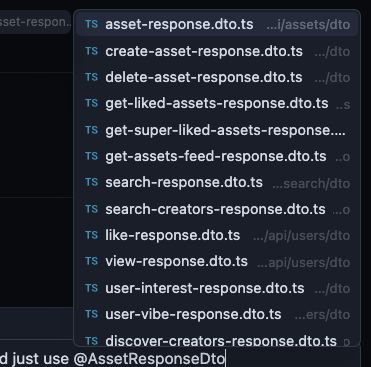
Prior to 2.0, it was possible to add not just files, but references to specific types, functions, classes, etc. to context. This helped narrow down the context target. This no longer appears to be possible in 2.0, which only seems to allow file context. ALL code-level context is unavailable in 2.0 as far as I can tell. I use code-level references all the time.
Many of my files have multiple types defined in them, so just being able to reference the whole file is insufficient to the specificity of my prompt and the necessary context.
Steps to Reproduce
Reference a specific type, function, class, etc. in your prompt…
Context palette no longer shows anything but files.
Expected Behavior
Please restore the prior range of context selections that we had before, files as well as code-level specifics.
Operating System
MacOS
Current Cursor Version (Menu → About Cursor → Copy)
Found this thread as I was looking for the same thing.
Previously we could pass as context by name a given function, class etc… (part of code) and not waste whole file of context, when a targeted part is enough.
It is also better for the LLM to be specific.
Right now it’s tedious to manually select/copy/paste every time
I know you have removed some @contexts but this one is different and probably was caught in the crossfire.
In cursor <2 I was able to reference variables from code in the chat when typing with “@” character: “@variableNa…” and it would pick it up. Now it’s not.
Is it not working or is it working some other way now?
Steps to Reproduce
Open Chat
Type “@”
Try to reference variable name
Fail
Operating System
MacOS
Current Cursor Version (Menu → About Cursor → Copy)
@rohovdmytro It’s not working for everyone at the moment, they, accidentally I believe, removed @code from context when they did the 2.0 cleaning, it’s in the docs but not working in the IDE: @ Symbols | Cursor Docs
In cursor <2, I was able to reference functions/methods and variables from code in the chat when typing with the “@” character: “@fnfn…” and it would pick it up. Now it’s not.
I checked the doc, I can see it is meant to be working without tying the @code (but I think that was the issue), since it was removed, maybe the context from it was also removed, making it difficult to reference the function
Steps to Reproduce
Open Chat
Type “@”
Try to reference the variable name
Fail
Operating System
MacOS
Current Cursor Version (Menu → About Cursor → Copy)
for last 2 months, I did not updated Cursor because of this,
but last week it forced me to update, just checking,
is there any updates on this ?
or is there any way to enable this ?
I have also been delaying the update from 1.7 to 2.x until now. And now I found out that in 2.x I cannot reference classes, methods or other code parts.
For me, this is a very important feature, because the results of the agent’s work on a more complex project are much better if I explicitly tell it what to consider when making changes. And it uses less context window this way.
We can still write names of methods manually, of course, but we need to look them up in source files first. Previously, if we knew a class name or the beginning of the method, this feature suggested a list of names and we just selected the correct one.
I think it should be noted that, even though we can specify the types manually in the prompt, its not the same thing as attaching specific context to the prompt. When you simply have the name IN the prompt, but not as context, the agent/model have to research the codebase to FIND the relevant code. This is more costly, literally, than being able to attach the context directly.
It is a very big step back from the standpoint of being able to keep the agent operating efficiently, using as few tokens as possible. While also making sure the agent knows EXACTLY what I want it to work on, in very explicit terms. I feel like the whole entire redesign of the prompt editor was basically intended to boost token usage, which is to Cursor (and the model provider’s) benefit, and to the detriment of the user. It wastes tokens, wastes money.
This is the same deal with the destruction of the @DocsDocs feature. W@Docsen @Docs worked, the model and agent were VASTLY more efficient at solving problems and implementing optimal code, and doing so with a fraction of the tokens it takes to solve the same problems without @Docs. Starting to wonder at the pattern here…
Cursor is in a very frustrating state right now. Really starting to wonder WHAT THE HECK is going on.