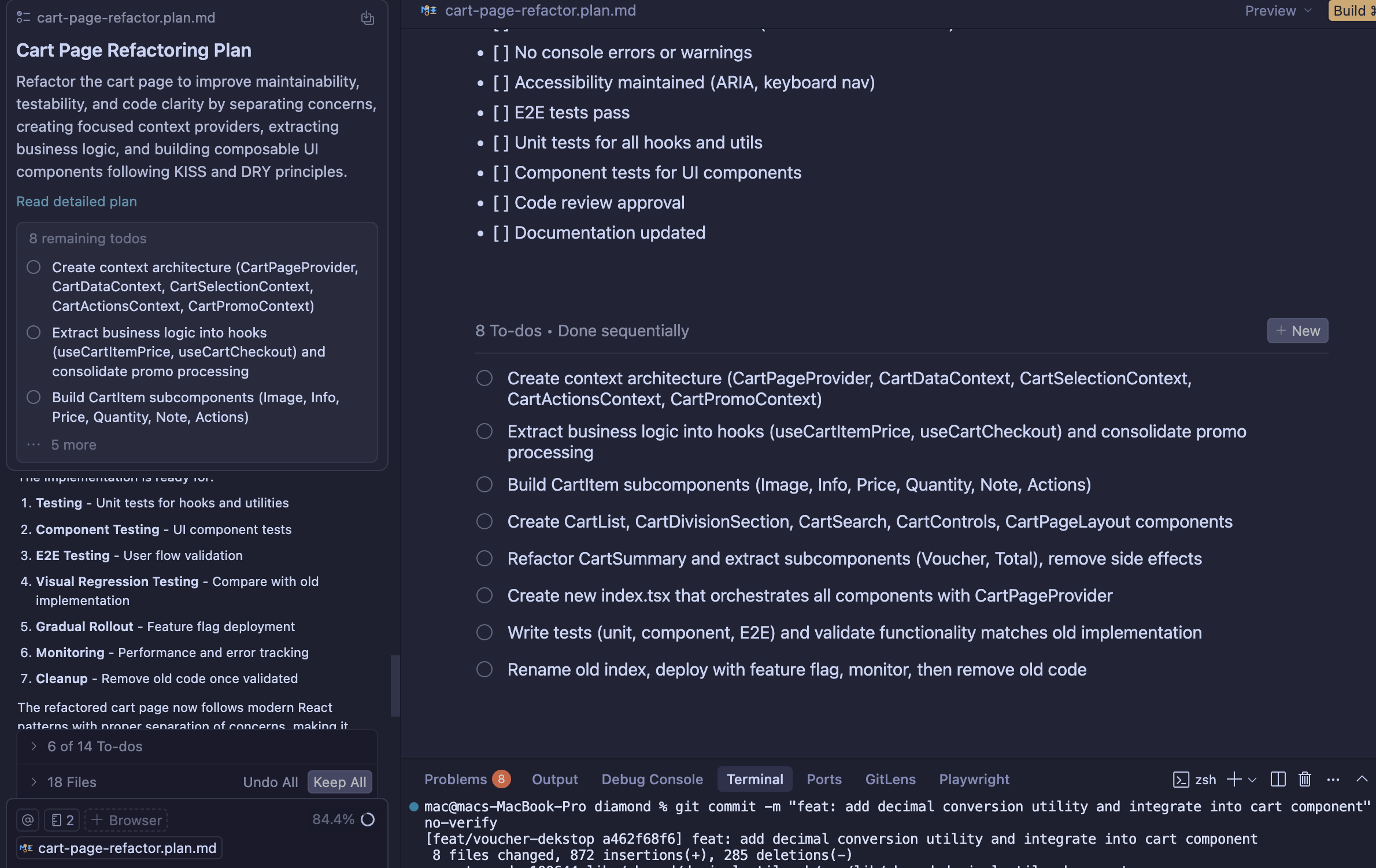
It seems to me, that Plan mode is struggling to update the ToDo list after the plan builder produces the initial plan. I agree some changes with the agent, he changes the written part of the plan, but not the ToDo list.
Steps to Reproduce
Just ask to produce a plan and try to remove part of the plan and see how it reflects in the ToDo of the plan mode.
Operating System
MacOS
Current Cursor Version (Menu → About Cursor → Copy)
Hey, thanks for the report. This is a known issue with ToDo sync in Plan mode, and the team is already investigating. Sometimes the ToDo list doesn’t update after the initial plan, even when the agent suggests changes.
Temporary workaround: some users keep tasks in separate markdown files outside Cursor’s internal system (example: Plan mode save to workspace workaround).
We’re actively improving Plan mode. Your clear repro steps were very helpful, thank you.
I have a plan.md file that was saved after the build process was completed. Since some minor code changes involved the content of the existing plan.md file, I asked the Agent to update the text of the plan. However, I found that this plan has now changed to a pending build state and listed new todos. This is quite troublesome, and there is a risk of accidental re-building again.
Steps to Reproduce
Finish a plan and save to a md file
update plan using agent
Operating System
Windows 10/11
Current Cursor Version (Menu → About Cursor → Copy)
usually, after user create plan, and make todo in that plan. Change into Agent for implement. Model will checklist todo item that already done. but sadly, its not. so task done but todo not update
At about 18% context on sonnet-4.5 thinking max, and it keeps trying to update the plan for a few seconds, then stops, no messages. I ask why it tries again. And just stops. Told it to not use any of the plan tools and isntead just update a .md file and it’s working on its merry way, so something busted in the plan tools.
Steps to Reproduce
Dunno – work with a plan for awhile.
Operating System
MacOS
Current Cursor Version (Menu → About Cursor → Copy)
also the plan files created in plan mode are in a hidden location, so it appears you cannot edit or save them. Nor reference them from other tabs, which is not great;
After plan mode creates a plan based on my prompt, subsequent prompts asking to update the existing plan doesn’t actually update the plan.
This seems like a very obvious feature/behavior to have, can it please be added?
Thanks
Steps to Reproduce
Enter plan mode in the chat and prompt it to make a plan. While still in plan mode, ask the chat to make a change to the generated plan and the plan will remain unchanged.
Expected Behavior
Ideally the plan mode would be able to update the plan upon further elaborations in the chat.
Operating System
MacOS
Current Cursor Version (Menu → About Cursor → Copy)
I have the issue with todos not updating as well. I am on cursor 2.0. Also most of the time I ask for a plan change it doesn’t even change the plan file. I have to tell it explicitly “you did not change the plan, update the plan” after it fails once. Then it works, but never updates todos with any changes, those stay locked to first version of the plan. Happens with all models, even new composer 1
I’ve seen the old TO-DOs persist even when I asked for a new plan. The only solution that works consistently is to start a new AI tab from scratch, or the suggestion to keep the tasks in a separate file mentioned in this thread.
I’m receiving a lot of “Received invalid string to replace in plan” when prompting to evaluate and update a previously created .plan.md
The plan update failed because I tried to replace text that didn’t match exactly. Let me use the create_plan tool to update specific sections with old_str and new_str parameters. I need to update the plan with the research findings.

Actually, looking at the error, it seems like the plan format stored by the tool is different from what I see. Let me try a different approach - I’ll provide a new_str to update a smaller, more precise section.

Let me update the executive summary to add the research findings.