Python Play Button Dissapeared

Describe the Bug

there used to be a play button to run my python files in the top right and its gone in the new build
on Linux using appfile

Steps to Reproduce

always present on load

Expected Behavior

button appears when clicking a python file in browser

Operating System

Linux

Current Cursor Version (Menu → About Cursor → Copy)

2.1.9
vsCode Version 1.105.1

Does this stop you from using Cursor

Yes - Cursor is unusable

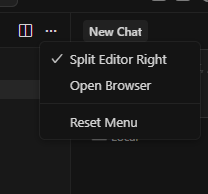
Hey, it looks like this was hidden in the latest update. Here’s my reply on that topic - you can also bring the button back.

Where does the bug appear (feature/product)?

Cursor IDE

Describe the Bug

Hi.

I updated Cursor IDE, and I was surprised to find that the Python run button had disappeared. Previously, whenever I opened any Python file with Cursor, the Python run button would be there. But now it’s gone.

Steps to Reproduce

Open a Python file with Cursor IDE, and you’ll find that there is no longer a button for running Python programs in Cursor IDE.

Screenshots / Screen Recordings

Operating System

Windows 10/11

Current Cursor Version (Menu → About Cursor → Copy)

Version: 2.1.20 (system setup)
VSCode Version: 1.105.1
Commit: a8d8905b06c8da1739af6f789efd59c28ac2a680
Date: 2025-11-22T14:51:59.472Z
Electron: 37.7.0
Chromium: 138.0.7204.251
Node.js: 22.20.0
V8: 13.8.258.32-electron.0
OS: Windows_NT x64 10.0.19045

Does this stop you from using Cursor

No - Cursor works, but with this issue

Where does the bug appear (feature/product)?

Cursor IDE

Describe the Bug

Run / Play button for Python file disappeared from editor tab after recent update

Steps to Reproduce

Open Cursor on Windows 11.

Create or open a simple Python file, for example run_editor.py with print(“test”).

Look at the top of the editor tab where the Run (Play) button normally appears.

The Run button is missing and there is no way to run the file from the editor header.

Expected Behavior

For Python files, there should be a Run (Play) button in the editor tab/header so I can run the current file with one click, as it worked before the recent update.

Screenshots / Screen Recordings

Screenshot 2025-11-24 123026.png

Operating System

Windows 10/11

Current Cursor Version (Menu → About Cursor → Copy)

Version: 2.0.77 (system setup)
VSCode Version: 1.99.3
Commit: ba90f2f88e4911312761abab9492c42442117cf0
Date: 2025-11-13T23:10:43.113Z
Electron: 37.7.0
Chromium: 138.0.7204.251
Node.js: 22.20.0
V8: 13.8.258.32-electron.0
OS: Windows_NT x64 10.0.26100

Additional Information

The issue happens in all workspaces and for any .py file I open.
It started recently (most likely after an update).
I haven’t changed my Python or run configuration manually before the button disappeared.

Does this stop you from using Cursor

No - Cursor works, but with this issue

But inside i dont have settings for Play button

Hey, do you have a Python file open? The play button only shows up when a specific file is open. Please try opening a Python file and then check the menu again.

Ofcourse its .py file

I see this thread caught on. no new input on my end I just wanted to say thank you guys for actually giving feedback and updates. As a fellow engineer I appreciate it.