Where does the bug appear (feature/product)?
Cursor IDE
Describe the Bug
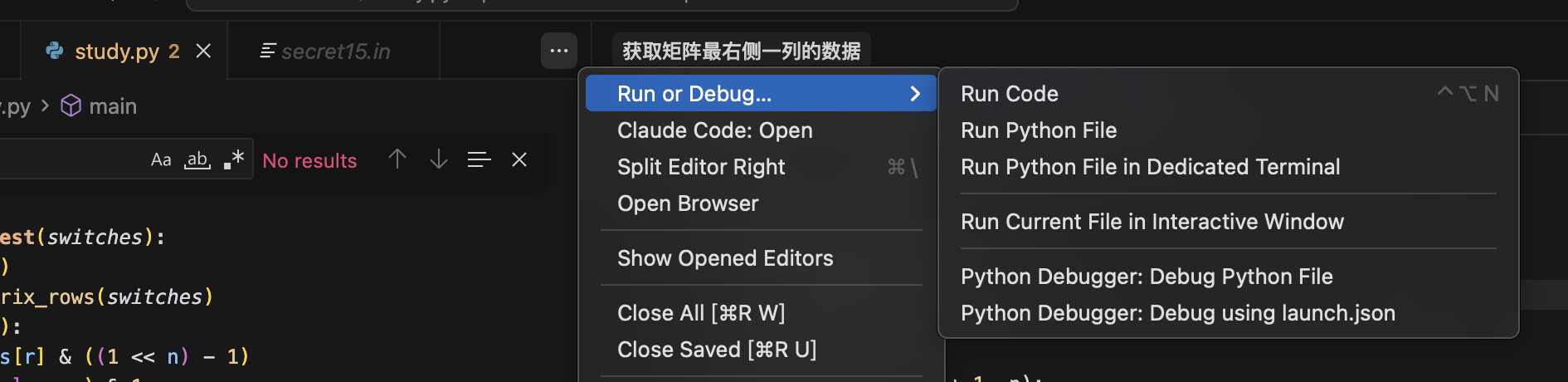
Hi, after I upgraded to Cursor 2.1, the Run Code button was hidden behind the ... on the top right of the editor.
It can show up when I open a file that cannot run(eg.txt and settings), and it disappears when I open a Python file that can be run.
It’s really important to have a run button in a convenient place.
Steps to Reproduce
open cursor 2.1
open a .py file
the run code option will be in ...
Expected Behavior
The run code button should be at the left of ...
Screenshots / Screen Recordings

Operating System
MacOS
Current Cursor Version (Menu → About Cursor → Copy)
Version: 2.1.19
VSCode Version: 1.105.1
Commit: 39a966b4048ef6b8024b27d4812a50d88de29cc0
Date: 2025-11-21T22:59:02.376Z (4 hrs ago)
Electron: 37.7.0
Chromium: 138.0.7204.251
Node.js: 22.20.0
V8: 13.8.258.32-electron.0
OS: Darwin arm64 24.5.0
Does this stop you from using Cursor
Sometimes - I can sometimes use Cursor