Rules are not loaded

Where does the bug appear (feature/product)?

Cursor IDE

I’m running it on Window 11 and opening a project in WSL2 running Ubuntu.

Describe the Bug

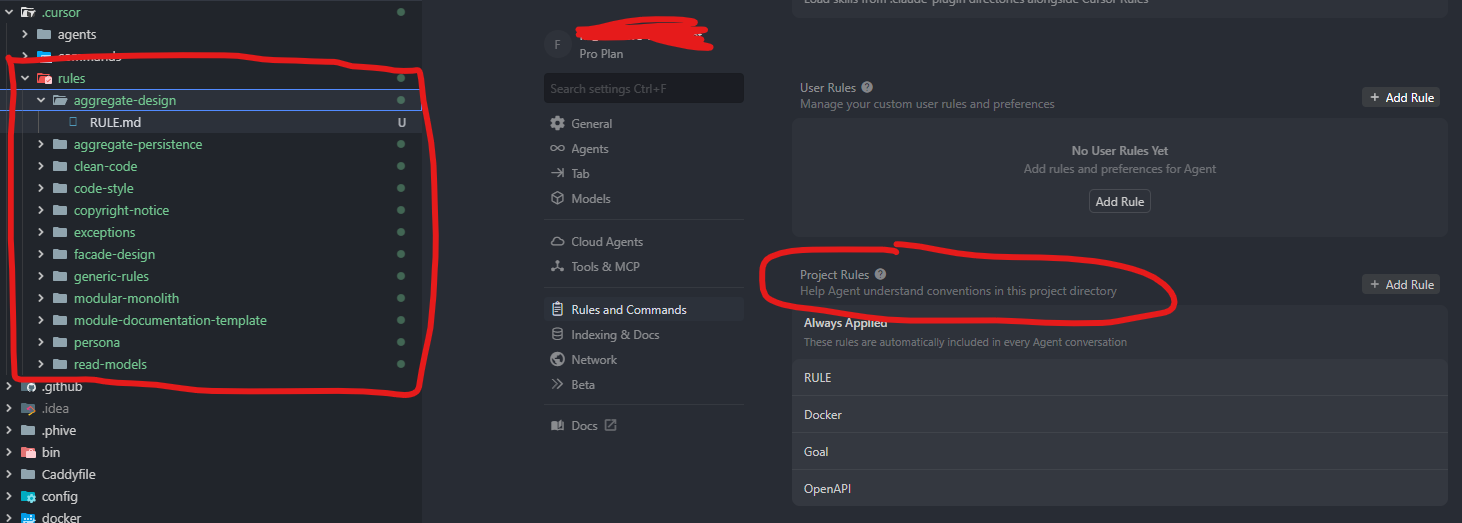
I have cursor rules in the seemingly correct location and the rules are not loaded or show in the settings.

Steps to Reproduce

Create rules, check the rules section in the settings

Expected Behavior

The rules to appear there

Operating System

Windows 10/11

Current Cursor Version (Menu → About Cursor → Copy)

Version: 2.2.20 (user setup)
VSCode Version: 1.105.1
Commit: b3573281c4775bfc6bba466bf6563d3d498d1070
Date: 2025-12-12T06:29:26.017Z
Electron: 37.7.0
Chromium: 138.0.7204.251
Node.js: 22.20.0
V8: 13.8.258.32-electron.0
OS: Windows_NT x64 10.0.26100

Does this stop you from using Cursor

No - Cursor works, but with this issue

Thanks for the report - this is a known issue in version 2.2.x where the folder-based RULE.md format isn’t being recognized. As a workaround, use the legacy .mdc format by placing files directly in .cursor/rules/ (e.g., .cursor/rules/my-rule.mdc) instead of folders. The team is tracking this bug and working on a fix.

1 Like

A post was merged into an existing topic: Project Rules: Documented RULE.md folder format not working, only undocumented .mdc format works

Neither legacy mdc or new folder/RULE.md files are loading for me in WSL since a recent update

Version: 2.2.36 (user setup)
VSCode Version: 1.105.1
Commit: 55c9bc11e99cedd1fb93fbb7996abf779c583150
Date: 2025-12-18T06:25:21.733Z
Electron: 37.7.0
Chromium: 138.0.7204.251
Node.js: 22.20.0
V8: 13.8.258.32-electron.0
OS: Windows_NT x64 10.0.26200

Thanks so much for this report - we found a condition where a new rules update (to support Agent Skills https://agentskills.io/ and more) would cause older rules to not load in some cases. It should be fully resolved now, even on the current versions.
This topic was automatically closed 22 days after the last reply. New replies are no longer allowed.