But don’t expect me to reply every time someone asks me that
It might make more sense for you to just assume it is still working for me, and post instead an explanation why it is not working for you - then sometime might be able to help you with your problem, instead of me just replying “yes it is” to your question here which doesn’t really help you or anybody else in this forum
Also, I’ll admit I didn’t fully understand loubacker’s suggestion, but figured maybe someone could see an issue I missed here. It does run using node instead of npx as well.
The solution below ended up working for me. However, there was a key detail I needed to figure out before it did:
wsl commands are run in the default distro, which for me ended up being my docker integration. So for me all looked normal, all the while the commands were sent to the docker WSL. Make sure your distro is default!
This is the way, works with python MCP servers as well even with a venv. The 2 key points in case anyone is still struggling with this:
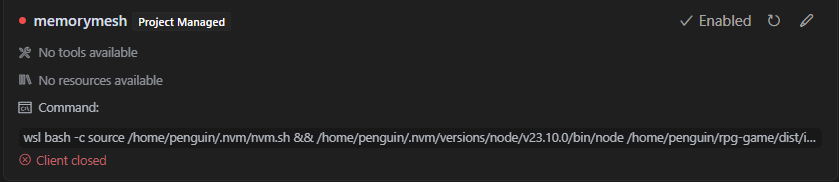
When the wsl command is run, it’s not in the context of a login shell so your PATH is not configured. That means that for something like nvm, you need to first source nvm using <absolut path to your home dir>/.nvm/nvm.sh and then the rest of the command needs to be within the same session, using && to chain commands in the same context.
For python, if the MCP server requires uvx to run, <path-to-home>/.local/bin/uvx(or whatever the path is when you run which uvx). For a venv it will be similar if using the python interpreter in the venv: /path/to/venv/bin/python && <rest of command>
This is the thing that tripped me up. Everything after bash -c needs to be in a single quoted string that is inside of a double quoted string. Notice in @Miikka example above everything is inside of a single quoted string, that is also surrounded by double quotes(") since double quotes are required for JSON.
For those who don’t understand but are curious, the reason for the single quotes is that we need to pass the entire command to BASH without interpreting any symbols. If you don’t use the single quotes, then when WSL receives the command bash -c source /home/miikka/.nvm/nvm.sh && /home/miikka/.nvm/versions/node/v22.15.0/bin/npx -y @upstash/context7-mcp@latest it will send source /home/miikka/.nvm/nvm.sh to Bash to execute and then interpret the && as a second command to run after the bash -c ... command.
I have this fixed and will get it out ideally in 50.4 (we’re rolling out 50.3 now
If anyone would like to beta test to verify it works (running mcp stdio servers in the WSL environment) please let me know
If I open up my terminal and run deno run -A mcp/server.ts, the file runs and I can tell because the console.log gets output. I also have test cases using @modelcontextprotocol/sdk client testing that it works.
I accidentally found this, but if I add ./ to the start of the file path, it works in cursor now.
They probably added some detection that if you are using a remote desktop like WSL, it would try to execute the MCP server commands inside the WSL instance instead of the main OS.