Run w/ coverage is missing in Test Explorer for Python

Where does the bug appear (feature/product)?

Cursor IDE

Describe the Bug

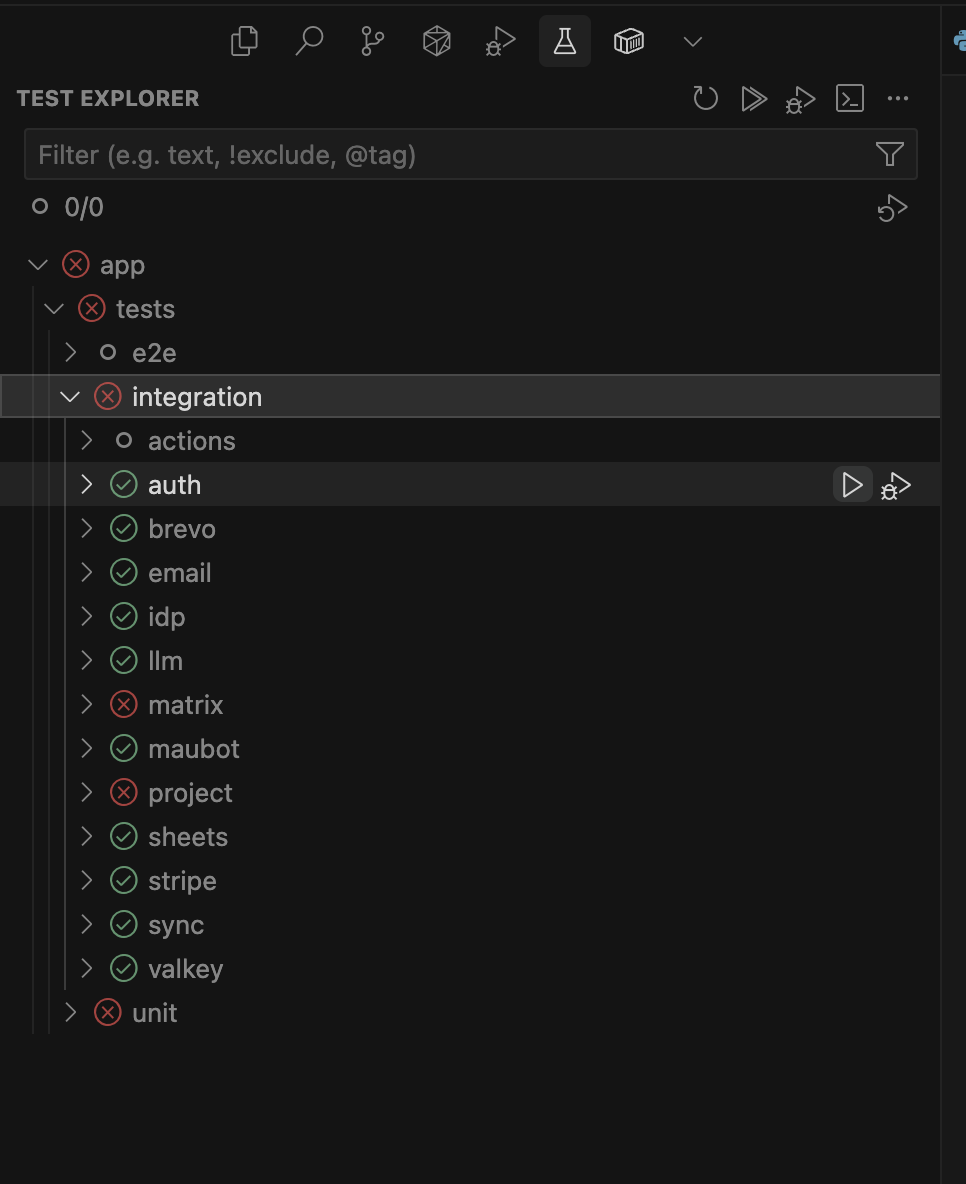
No matter what i try I cannot get Test Explorer to show run with coverage

Steps to Reproduce

Go to test explorer - test with coverage is missing

Expected Behavior

Test with coverage button

Operating System

Windows 10/11

Current Cursor Version (Menu → About Cursor → Copy)

Version: 1.7.46 (user setup)
VSCode Version: 1.99.3
Commit: b9e5948c1ad20443a5cecba6b84a3c9b99d62580
Date: 2025-10-14T01:21:46.830Z
Electron: 34.5.8
Chromium: 132.0.6834.210
Node.js: 20.19.1
V8: 13.2.152.41-electron.0
OS: Windows_NT x64 10.0.26100

Does this stop you from using Cursor

No - Cursor works, but with this issue
1 Like

Hey, thanks for the report. To help with diagnostics, please share:

  • Python extension version: open Extensions → search “Python” → note the installed version
  • Test framework: are you using pytest or unittest?
  • Coverage package: do you have pytest-cov or coverage.py installed? Check with: pip list | grep cov
  • Test Explorer screenshot: a snapshot of what you currently see in Test Explorer
  • Workspace settings: any Python testing settings from .vscode/settings.json

The “Run with Coverage” button usually appears when the Python extension detects configured coverage tools. This will help determine whether it’s a configuration issue or a missing feature in Cursor.

Pythin 3.12.11

Pytest

venv) root@b0027da77bb2:/app# uv pip show coverage
Using Python 3.12.11 environment at: /opt/venv
Name: coverage
Version: 7.10.1
Location: /opt/venv/lib/python3.12/site-packages
Requires:
Required-by: pytest-cov
(venv) root@b0027da77bb2:/app# uv pip show pytest-cov
Using Python 3.12.11 environment at: /opt/venv
Name: pytest-cov
Version: 6.2.1
Location: /opt/venv/lib/python3.12/site-packages
Requires: coverage, pluggy, pytest
Required-by:

“python.testing.pytestEnabled”: true,

“python.testing.unittestEnabled”: false,

“python.testing.nosetestsEnabled”: false,

“python.testing.pytestArgs”: ,

“python.testing.cwd”: “/app”,

and in pyproject.toml

[tool.pytest.ini_options]

testpaths = [“tests”]

python_files = [“test_*.py”]

python_classes = [“Test*”]

python_functions = [“test_*”]

addopts = “-n auto”

markers = [

“unit: Unit tests”,

“integration: Integration tests”,

“e2e: End-to-end tests (expensive operations)”,

“uat: User acceptance tests (E2E with pubsub simulation)”,

“slow: Slow running tests”,

“serial: Tests that must run serially”

]

filterwarnings = [

“ignore::DeprecationWarning”,

“ignore::PendingDeprecationWarning”,

“ignore::pytest.PytestUnknownMarkWarning”

]

1 Like

This topic was automatically closed 22 days after the last reply. New replies are no longer allowed.