[info] Resolving ssh remote authority ‘155.212.216.169’ (Unparsed ‘ssh-remote+7b22686f73744e616d65223a223135352e3231322e3231362e313639227d’) (attempt #1)
[info] SSH askpass server listening on port 65416
[debug] hostname: 155.212.216.169, remote platform map: {“[email protected]”:“linux”}
[debug] hostname: 155.212.216.169, remote server install map: {}
[debug] hostname: 155.212.216.169, server port range map: {}
[info] Using askpass script: c:\Users\КП.cursor\extensions\anysphere.remote-ssh-1.0.36\dist\scripts\launchSSHAskpass.bat with javascript file c:\Users\КП.cursor\extensions\anysphere.remote-ssh-1.0.36\dist\scripts\sshAskClient.js. Askpass handle: 65416
[info] Launching SSH server via shell with command: type “C:\Users\BF7D~1\AppData\Local\Temp\cursor_remote_install_945bcbbf-a750-4bad-b977-9321922c8927.sh” | ssh -T -D 65418 155.212.216.169 bash --login -c bash
[info] Establishing SSH connection: type “C:\Users\BF7D~1\AppData\Local\Temp\cursor_remote_install_945bcbbf-a750-4bad-b977-9321922c8927.sh” | ssh -T -D 65418 155.212.216.169 bash --login -c bash
[info] Started installation script. Waiting for it to finish…
[info] Waiting for server to install. Timeout: 120000ms
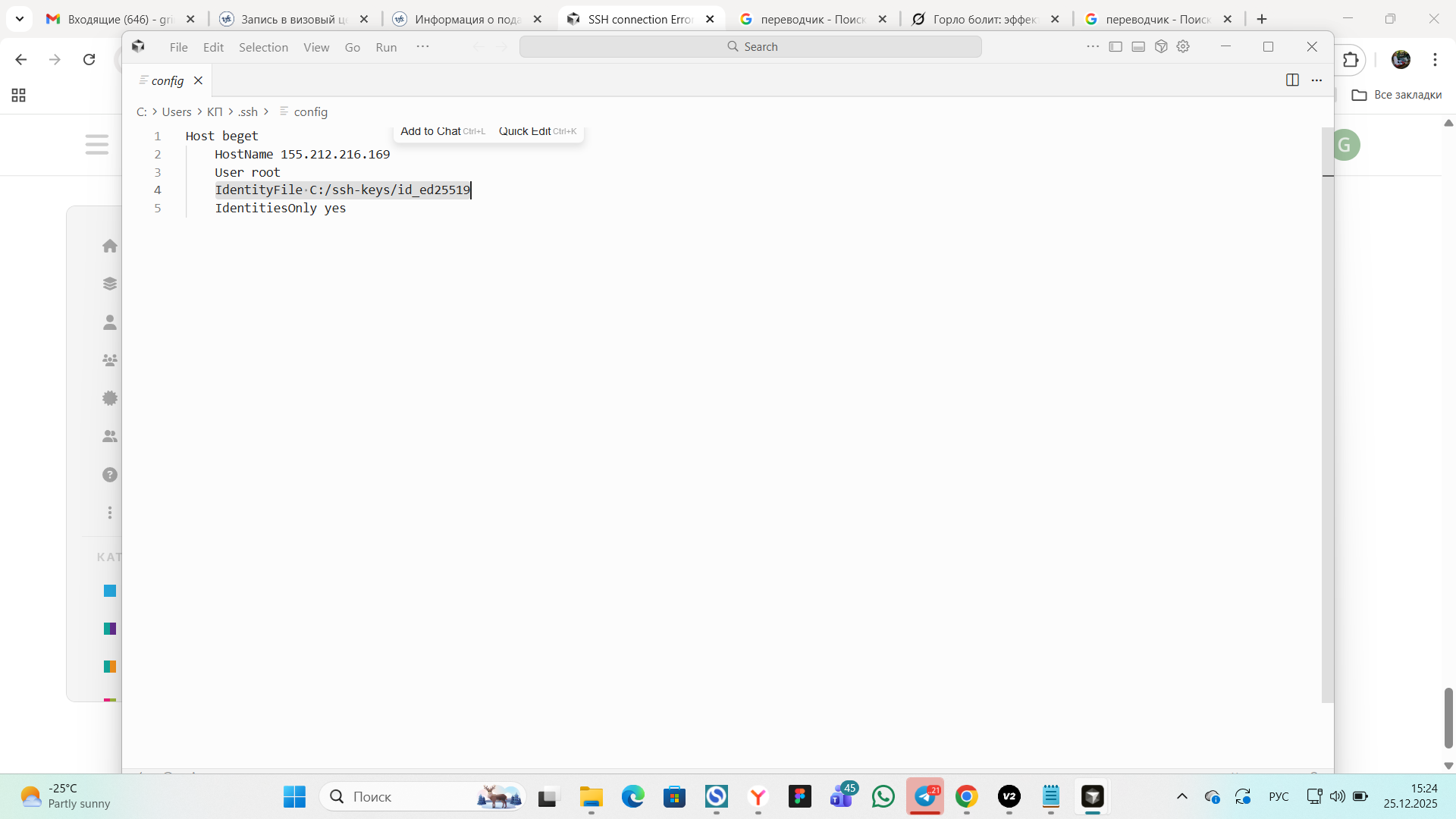
[info] (ssh_tunnel) stderr: no such identity: C:\Users\\320\232\320\237\.ssh\id_ed25519: No such file or directory
[info] (ssh_tunnel) stderr: CreateProcessW failed error:2
[info] (ssh_tunnel) stderr: ssh_askpass: posix_spawnp: No such file or directory
[info] (ssh_tunnel) stderr: Permission denied, please try again.
[info] (ssh_tunnel) stderr: CreateProcessW failed error:2
[info] (ssh_tunnel) stderr: ssh_askpass: posix_spawnp: No such file or directory
[info] (ssh_tunnel) stderr: Permission denied, please try again.
[info] (ssh_tunnel) stderr: CreateProcessW failed error:2
[info] (ssh_tunnel) stderr: ssh_askpass: posix_spawnp: No such file or directory
[info] (ssh_tunnel) stderr: [email protected]: Permission denied (publickey,password).
[info] (ssh_tunnel) stderr: ����⪠ ����� � ���������騩 �����.
[error] Error installing server: [Error: Failed to connect to the remote SSH host. Please check the logs for more details.
at t.installCodeServer (c:\Users\КП.cursor\extensions\anysphere.remote-ssh-1.0.36\dist\main.js:2:956162)
at process.processTicksAndRejections (node:internal/process/task_queues:105:5)
at async c:\Users\КП.cursor\extensions\anysphere.remote-ssh-1.0.36\dist\main.js:2:407565]
[debug] hostname: 155.212.216.169, remote platform map: {“[email protected]”:“linux”}
[info] Selected platform linux for remote host 155.212.216.169
[info] Deleting local script C:\Users\BF7D~1\AppData\Local\Temp\cursor_remote_install_945bcbbf-a750-4bad-b977-9321922c8927.sh
[info] Using askpass script: c:\Users\КП.cursor\extensions\anysphere.remote-ssh-1.0.36\dist\scripts\launchSSHAskpass.bat with javascript file c:\Users\КП.cursor\extensions\anysphere.remote-ssh-1.0.36\dist\scripts\sshAskClient.js. Askpass handle: 65416
[info] Launching SSH server via shell with command: type “C:\Users\BF7D~1\AppData\Local\Temp\cursor_remote_install_7799769a-d6e9-4b70-9758-ad4d7af3cfe4.sh” | ssh -T -D 65429 155.212.216.169 bash --login -c bash
[info] Establishing SSH connection: type “C:\Users\BF7D~1\AppData\Local\Temp\cursor_remote_install_7799769a-d6e9-4b70-9758-ad4d7af3cfe4.sh” | ssh -T -D 65429 155.212.216.169 bash --login -c bash
[info] Started installation script. Waiting for it to finish…
[info] Waiting for server to install. Timeout: 120000ms
[info] (ssh_tunnel) stderr: no such identity: C:\Users\\320\232\320\237\.ssh\id_ed25519: No such file or directory
[info] (ssh_tunnel) stderr: CreateProcessW failed error:2
[info] (ssh_tunnel) stderr: ssh_askpass: posix_spawnp: No such file or directory
[info] (ssh_tunnel) stderr: Permission denied, please try again.
[info] (ssh_tunnel) stderr: CreateProcessW failed error:2
[info] (ssh_tunnel) stderr: ssh_askpass: posix_spawnp: No such file or directory
[info] (ssh_tunnel) stderr: Permission denied, please try again.
[info] (ssh_tunnel) stderr: CreateProcessW failed error:2
[info] (ssh_tunnel) stderr: ssh_askpass: posix_spawnp: No such file or directory
[info] (ssh_tunnel) stderr: [email protected]: Permission denied (publickey,password).
[info] (ssh_tunnel) stderr: ����⪠ ����� � ���������騩 �����.
[error] Error installing server: [Error: Failed to connect to the remote SSH host. Please check the logs for more details.
at t.installCodeServer (c:\Users\КП.cursor\extensions\anysphere.remote-ssh-1.0.36\dist\main.js:2:956162)
at process.processTicksAndRejections (node:internal/process/task_queues:105:5)
at async c:\Users\КП.cursor\extensions\anysphere.remote-ssh-1.0.36\dist\main.js:2:407565]
[info] Deleting local script C:\Users\BF7D~1\AppData\Local\Temp\cursor_remote_install_7799769a-d6e9-4b70-9758-ad4d7af3cfe4.sh
[error] Error resolving SSH authority [Error: Failed to connect to the remote SSH host. Please check the logs for more details.
at t.installCodeServer (c:\Users\КП.cursor\extensions\anysphere.remote-ssh-1.0.36\dist\main.js:2:956162)
at process.processTicksAndRejections (node:internal/process/task_queues:105:5)
at async c:\Users\КП.cursor\extensions\anysphere.remote-ssh-1.0.36\dist\main.js:2:407565]
[info] Saved platform linux for remote host 155.212.216.169