Suggested Inline Edits UI Button Not Appearing in Chat

Where does the bug appear (feature/product)?

Cursor CLI

Describe the Bug

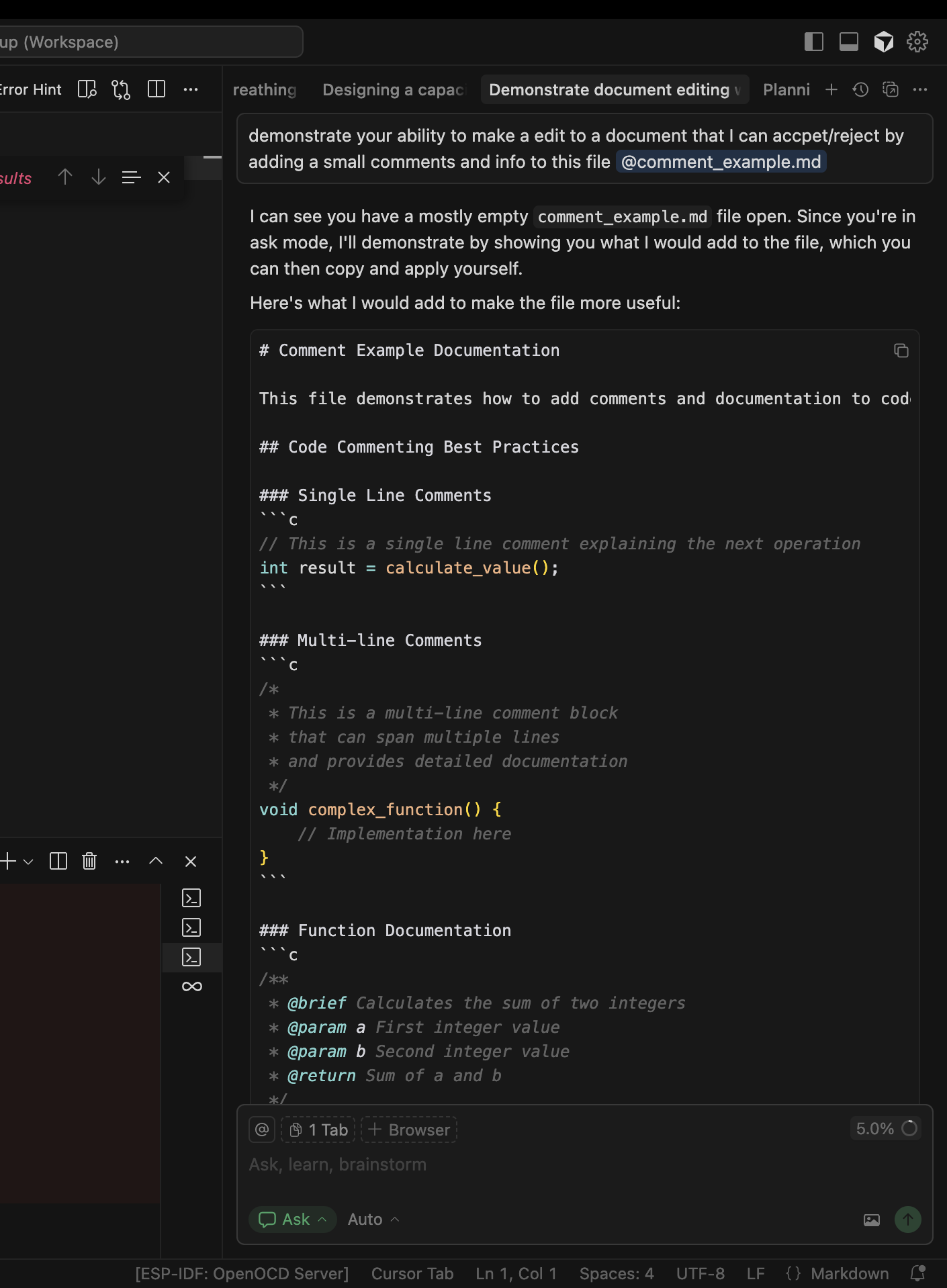
I no longer have the functionality or UI for suggested code edits that I can accept/reject in the chat pane when using Auto. Changes are only suggested with the AI functionality and visible in the document itself but not in the chat pane

Steps to Reproduce

Any chat long or short, new or old, no longer has this UI functionality

471b38ae-7dcd-47d5-8e59-54d84135c5f0

Expected Behavior

I would expect to see highlighted in green/red suggested code edits to files that I can accept with a button in the chat pane

Screenshots / Screen Recordings

Operating System

MacOS

Current Cursor Version (Menu → About Cursor → Copy)

Version: 1.7.39 (Universal)
VSCode Version: 1.99.3
Commit: a9c77ceae65b77ff772d6adfe05f24d8ebcb2790
Date: 2025-10-08T00:33:20.352Z
Electron: 34.5.8
Chromium: 132.0.6834.210
Node.js: 20.19.1
V8: 13.2.152.41-electron.0
OS: Darwin arm64 24.6.0

For AI issues: add Request ID with privacy disabled

471b38ae-7dcd-47d5-8e59-54d84135c5f0

Does this stop you from using Cursor

Sometimes - I can sometimes use Cursor

Hey, thanks for the report. From your screenshot, you’re in Ask mode. It’s read-only and shows suggestions you can copy manually.

For accept/reject with inline diffs (green/red changes), you need:

  • Agent mode Cmd/Ctrl + I
  • These modes show changes directly in your files with accept/reject buttons
  • Switch modes using the dropdown at the bottom-left it currently shows “Ask”

Try this:

  • Click the mode dropdown (where it says “Ask”) → select “Agent”
  • Or use Composer Cmd/Ctrl + I for multi-file edits with a full diff view

Ask mode is intentionally limited to suggestions only. Agent modes provide the inline editing with accept/reject that you’re looking for.

Is that what you were looking for?

Previously I would also see the suggested edits in ASK mode, not just in Agent. Was there a change?

Yeah, there were changes. Previously, Ask mode showed inline diffs with accept/reject buttons, but that functionality was moved to Agent mode to make a clearer split between read‑only suggestions and editable changes.

Now Ask is only for tips and explanations that you apply manually. The accept/reject flow you’re used to is now in the inline chat Cmd + K and the Agent Cmd + I.
This topic was automatically closed 22 days after the last reply. New replies are no longer allowed.