Describe the Bug
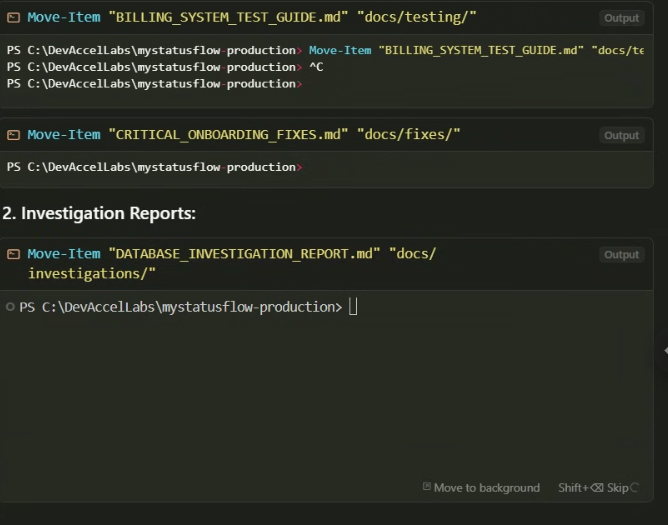
Seems like the terminals in the chats are stuck on running way after the command finnished.
Steps to Reproduce
“move theese files to a different folder” or somth idk
Expected Behavior
not get stuck on loading
Screenshots / Screen Recordings
Operating System
Windows 10/11
Current Cursor Version (Menu → About Cursor → Copy)
Version: 1.2.4 (user setup)
VSCode Version: 1.99.3
Commit: a8e95743c5268be73767c46944a71f4465d05c90
Date: 2025-07-10T17:09:01.383Z
Electron: 34.5.1
Chromium: 132.0.6834.210
Node.js: 20.19.0
V8: 13.2.152.41-electron.0
OS: Windows_NT x64 10.0.26100
Does this stop you from using Cursor
Sometimes - I can sometimes use Cursor
3 Likes
This is a common issue, the only solution now is to click “Move to background” to make the agent continue working.
This bug should already be tracked by the Cursor devs.
Describe the Bug
There are a lot of related posts/bugs about terminal not working properly, but none properly describes what is happening or offer solutions.
The problem: When Agentic mode is running terminal commands, sometimes it does not show output and stalls forever, preventing the agent continuing working.
I do not completely know how the terminal execution works in Cursor, bu it seems like it’s often trying to re-use the previous terminal to execute additional commands. This is when thi…
MrDebugger
(Ijaz Ur Rahim )
July 15, 2025, 3:51pm
3
Instead of Clicking “Move to Background”, I would suggest to click Skip as the command is already completed but the agent is not able to close the terminal thus getting stuck forever.
Clicking “Skip” most of time ends all the agent’t work, it says “The user has cancelled the command. What do you want to do next?” and sometimes gives a few examples what it can do.
I have found clicking “Move to background” more effective, as the agent immediately continues working on the task without ending.
system
(system)
Closed
August 6, 2025, 9:41pm
5
This topic was automatically closed 22 days after the last reply. New replies are no longer allowed.