Where does the bug appear (feature/product)?
Cursor IDE
Describe the Bug
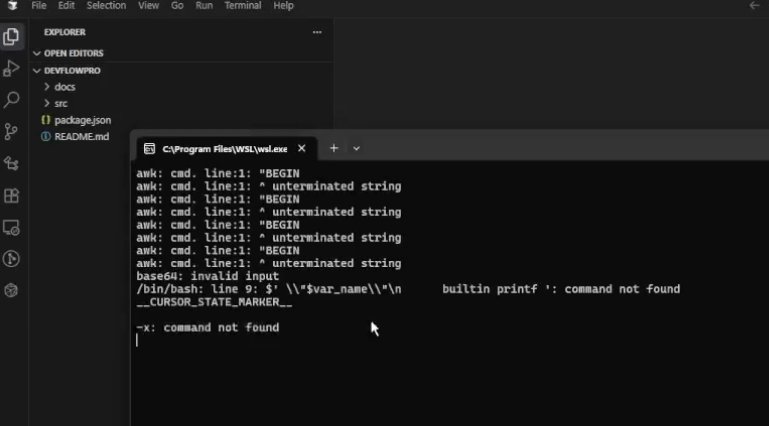
Every time I open Cursor on Windows, a terminal window automatically pops up showing bash/WSL command errors, even though I’m using Windows Command Prompt
Error messages shown:
awk: cmd. line:1: "BEGIN
awk: cmd. line:1: ^ unterminated string
awk: cmd. line:1: "BEGIN
awk: cmd. line:1: ^ unterminated string
base64: invalid input
/bin/bash: line 9: $‘\r’: command not found
builtin printf ': command not found
To run a command as administrator (user “root”), use “sudo ”.
See “man sudo_root” for details.
CURSOR_STATE_MARKER
-x: command not found
Steps to Reproduce
- Open Cursor and the terminal appear
What I’ve tried:
- Running Cursor in safe mode with cursor --disable-extensions - issue still occurs
- Setting terminal profile explicitly to Command Prompt in settings.json
- Disabling WSL integration in settings
- Disabling shell integration features
Screenshots / Screen Recordings
Operating System
Windows 10/11
Current Cursor Version (Menu → About Cursor → Copy)
Version: 1.6.35 (user setup)
VSCode Version: 1.99.3
Commit: b753cece5c67c47cb5637199a5a5de2b7100c180
Date: 2025-09-19T17:39:38.846Z
Electron: 34.5.8
Chromium: 132.0.6834.210
Node.js: 20.19.1
V8: 13.2.152.41-electron.0
OS: Windows_NT x64 10.0.22631