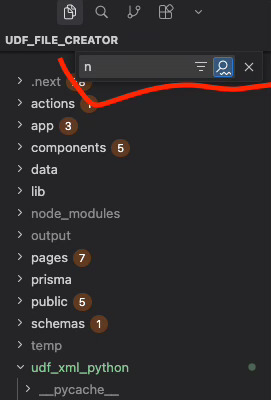
In Cursor version 2.2.14, the Explorer (file browser) cannot use Vim extension navigation keys (ijkl) for movement. The same Vim extension works correctly in VSCode.環境資訊
I also added new keybindings that should override everything, but even those are ignored because the Explorer always activates its “Find” mode first.
Why this looks like a Cursor regression
This behavior does not happen in:
VS Code
Zed
Antigravity
Older Cursor versions
Only Cursor 2.2.14+ forces the Explorer into a type-to-search state and consumes all keyboard events before user keybindings or Vim can process them.
Impact
Impossible to navigate Explorer with custom keys
Impossible to bind n → new file, or j/k for up/down
Explorer steals every keypress, making keyboard workflows unusable
Not related to Vim at all — the Explorer input handler is intercepting keys globally
Expected behavior
When “workbench.list.automaticKeyboardNavigation” is disabled, Explorer should not automatically open the Find bar, and user keybindings should take priority.
This looks like a regression in the Explorer/list navigation layer introduced in the latest update.
After updating to Cursor 2.1.49+, VSCodeVim’s hjkl navigation keys stopped working in the Explorer panel.
Keyboard Shortcuts Troubleshooting Log:
[KeybindingService]: / Soft dispatching keyboard event
[KeybindingService]: \ Keyboard event cannot be dispatched
Info: [J]
      From 3 keybinding entries, no when clauses matched the context
It’s not fixed for me on the latest build. I am using the vs-code neovim extension and cannot navigate my file tree with this auto search behaviour happening. I tried setting “workbench.list.typeNavigationMode”: “trigger” but that hasn’t helped
Is not resolved for me.
Steps to Reproduce
Open the file tree, try to use h j k l to navigate with vscode-neovim extension installed
Operating System
MacOS
Current Cursor Version (Menu → About Cursor → Copy)