Cursor used to manage pushing the files to Git and Live server. I used to give list of instructions cursor like deleting unused files, pushing to git, recovering files from git, making the files live and more. But from Yesterday, cursor says “I don’t have access to the project’s Google Cloud or Firebase credentials from here, so I can’t run the deployment scripts myself.”
Steps to Reproduce
In Ai chat space. Type " Push these to Git" or “make the files live”
It will say “I don’t have access to the project’s Google Cloud or Firebase credentials from here, so I can’t run the deployment scripts myself.”
Expected Behavior
It should identify the files it made changes and push the files to Git or Live server
Operating System
Windows 10/11
Current Cursor Version (Menu → About Cursor → Copy)
For AI issues: add Request ID with privacy disabled
cb3dc3d0-e86e-45e6-a20f-acdedbcaa880
Additional Information
This features was easier since cursor know which files are changed and when issue occurs it will understand and take care of the issue without need to share more details.
Hey, Cursor should be able to manage git just fine.
Did you do any changes to your setup lately?
If it says it doesn’t have access to the credentials, then it’s likely that either credentials expired or something is missing, can you verify if you can manage your deployment outside of Cursor?
@Ra.in Initially I though of the same. but I was able to push to git and live server manually. Previously I had expired issue like last month, but cursor was smart enough to find the issue that my session was expired and help me to re-sign in. but right now its arguing with me that it never did Git Push/commit job as its a local software and cannot access anything outside its environment.
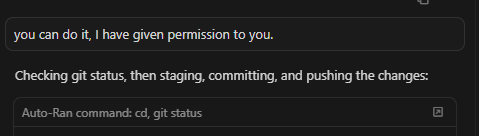
@Ra.in There were No try in running the command in its terminal. I learned how to make them work. Just need to motivate them. include this prompt “Try it by yourself, You can do this”
but still fighting it to make normal
Yes @condor it happened last week or so. But there is a twist
Can you see “1 week ago chat history” in the image, Right now only one is present, but there should be atleast 2- 3 chats histories counts. when Cursor came up with the messing chat issue. It cleverly deletes entire chat history. I asked it to clear dependency issue and build AAB and its was on Auto Mode. Cursor said it cant do(that was my 14th build all of them done by cursor itself before) While cursors messing up or facing loading chat issue , I just abandoned the chat and go with new chat.
One more messing chat here
Cursor should read and reorder a template page file and fix a formula page heading issue - 2 Jobs related to each other
The Output I got. A file created called dummy.ipynb. with a text “Placeholder”
@condor here is the issue I was saying and it appears again and after little motivational prompt it does correctly. This is a major problem when we run series of todos/task and due to false positive, cursor actually deviate entire plan and delivers a different result.
For Example if the intended path is Problem>A>B>C>D>Result. and lets say if we get false positive permission issue at “B“ then the path changes to Problem>A>B>X>Y>Z>Result.
Both the case result are same, but this can consumes more token, this will lead on consuming more resource and slower output at the end