2.0 doesn’t change core agent behavior in a significant way. Would never expect it to product worse results or consume more tokens. Any specific prompts where you find this?
I agree the product is heading in the wrong direction. My reasons differ from others.
Developers mostly use Cursor. They use it to be more productive. We have become more productive. But we also waste time fixing our IDE. Many bugs appeared in version 2.0. For example, the activity bar settings were hidden. The sidebar width was also an issue. Chat windows overlapped. Many other problems existed.
It seems like this:
Cursor is based on VSCode.
Then Cursor breaks VSCode’s main features.
Then Cursor fixes those things.
So, Cursor focuses on developers. But it neglects its own product.
How can this be? You create features for developers. Then you damage the product itself.
I used VS Code for years. I only reported four issues. Two were misunderstandings. One was a feature request. For Cursor, I had too many issues. I did not know which one to report. In three to four months, I spent more time fixing Cursor bugs. This is more time than fixing VS Code issues over two to four years.
I still believe Cursor is a good product. But it does not boost overall productivity much (As an Enthusiasts, who expect things to work normally).
I think I have created 2/3 issues in cursor. But the reason to create those issues was lets give Cursor another try before canceling the subscription.
It’s new ability to gather its own context, including stuff that is not relevant to what you ask causing it to become distracted by all the extra stuff in the context window, making it go off on some tangent that you didn’t ask it to. Like asking it to summarize csv log files, and instead it tries to write python code to summarize the files for my Java project. while if I was allowed to only give it access to the csv files like in 1.7 its able to do the request easily. I’m using sonnet 2.5 by the way. so yes, you did change the agent behavior in a significant way, via changing the context
Yes, it does, significantly.
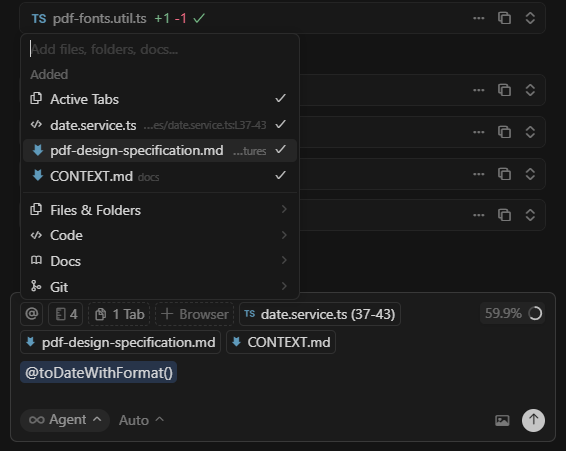
As a senior developer, I have completely lost control over the use of contextual tools and functions, such as previous chats, @methods(), quick context for better and more effective use with the model, even in the use of % context. Have you ever developed in Cursor with a large codebase ?
This makes no sense. Right now, it’s dumber than ever, and that’s why it takes 3 to 8 times longer to solve a problem. This product used to be effective for real development. Now it’s expensive software that consumes tokens for non-programming users, with less control over the tool. This new version has destroyed one of its best features, and now you have to pay much more because the tools they’ve left, don’t deliver the expected results. Selling agents that work in parallel for the same problem because it’s now less effective? Anyone who understands what they’re doing would think it’s a scam.
The “Agent” view isn’t the solution on my end, i like the Editor, that i can fully see the whole code being made etc.
I also want to hide the option to toggle between “Agent” and “Editor” on the top bar.
Alright. Since I’ve been struggling with the same issue of not being able to curate context as before (which for me also feels crucial inside large codebases), I now found one way to get a similar result like before: using drag and drop.
Before, I would open all tabs that seemed relevant to the task and then just add them all to the context via “Add Open Files.”
Now, you can drag and drop files from either the file explorer, the git change tree or even directly from the open tabs into the prompt input. Dragging multiple files works as well.
Simplified example below:
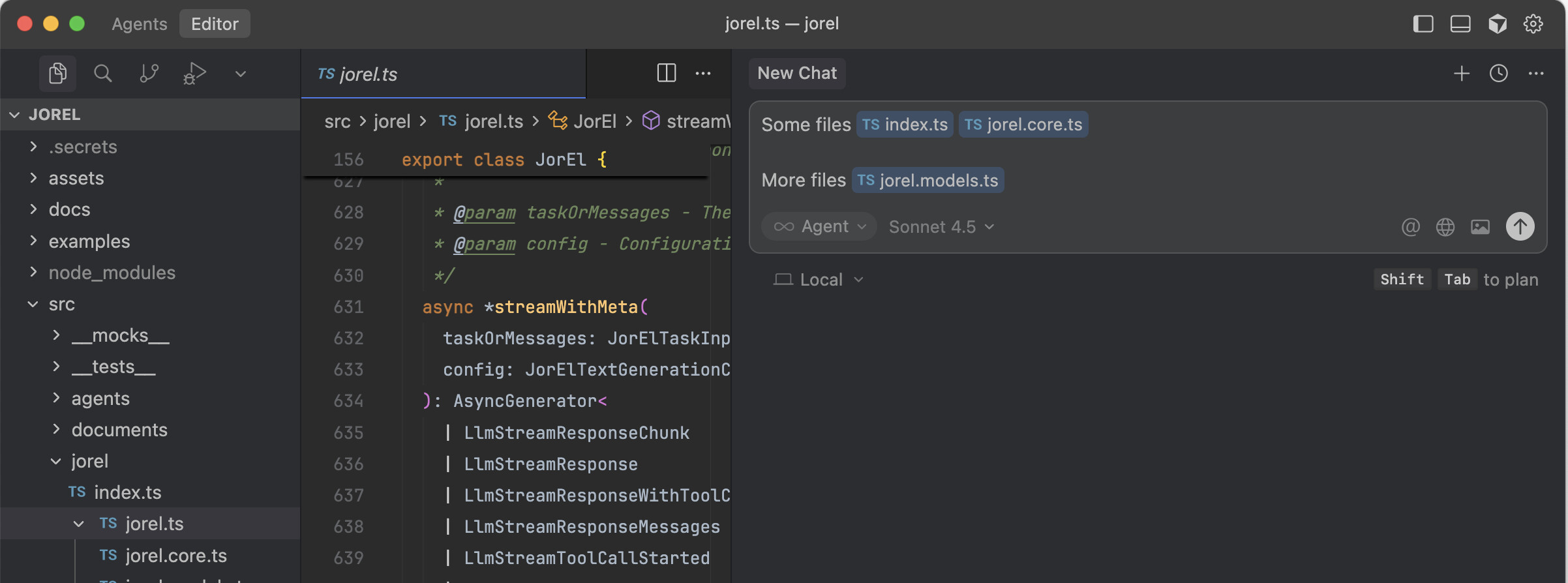
Took me a while to adjust my workflow, but it still works similarly in terms of agent performance (which to be honest is the main thing I care about).
It would have been nice if this feature would have been communicated better, or the previous way would have been more gradually deprecated (to avoid the impacts on everyone’s productivity who relied on these features). But to be honest, I’m actually starting to prefer it to the slash commands (though slash commands to add context would still be great to have).
By the way, I really like the idea of having multiple agents run in parallel, but not in the “vibe coding” kind of way.
What would be awesome is if Cursor had a dropdown at the top that switches everything inside the editor into a new branch of a Git worktree. That way, you could several tasks locally and easily switch between these environments.
Not agent versus editor, but essentially parallel versions of the editor, where the editor stays fully interactive, and I can keep or undo every single change the agent made directly in the main code view.
This would make it possible to work on several features at once while maintaining full control over the code - which to me would be a huge productivity boost.
the only problem is that the old agents panel was removed in the Editor view, so I cannot use it the same way anymore
Please allow users to select different models separately for the inline editor and the agent editor. Also, let users customize the order of the models. It’s inconvenient that we can’t use cost-effective reasoning models like Grok code in the inline editor.
++i need configuring the order of models too
There is no auto-run list anymore. There is simply the sandbox terminal. Which runs everything. But the sandbox behaves weirdly.
You guys really need to listen to your users here. Sandbox is not for everyone. Not everyone can work in a read-only terminal environment. Not everyone wants every command that an agent tries to run to run…MANY commands are just BAD!! PERIOD. PERIOD.
You guys need to add the allowlist back to the default terminal mode. It looks like there is a “Legacy” terminal mode, which uses the allowlist like it used to work. The way you guys do business, and the fact that you have named this “Legacy”, gives me GREAT CONCERN that it will be removed in the future.
I DO NOT like the sandbox terminal. I will NEVER, EVER allow the agent to run any old command it wants, without limitation, sandboxed or not. If you guys don’t restore the classic allowlist mode, then that relegates people like me, to being stuck approving every single stinking command.
Guys, Sandbox mode IS NOT a replacement for allowlist! It is not! It does not work the same way, and I have seen agents do CRAZY things to get themselves out of the sandbox, and since that mode allows them to run any and every command… This is NOT a viable alternative. And you guys seem insistent on saying “the terminal already uses your allowlist” without actually HEARING what your customers, your PAYING customers, are telling you:
Sandbox is NOT A REPLACEMENT for allowlist! (It isn’t even a viable alternative!)
Please, hear this. This is so critically important for so many of us.
2 months ago I had a variant of this ‘parallel Cursor instances per worktree’ workflow working well.
I’d run one instance of Cursor per background agent.
The processing power was being handled in the cloud (by their equivalent of GitHub Codespaces).
So I had the parallel versions of the editor, but my MacBook could handle it, and battery life was better.
Then background agents broke, and it hasn’t been fixed since.
It’s frustrating that it broke 2 months ago, and even though @deanrie said the team are working on a fix, there hasn’t been one.
Meanwhile, Cursor 2.0 has been released  .
.
I wish broken things would be fixed before flashy 2.0 releases.
Hey… we are still trying to understand a very specific case where it is degraded. The model should retry outside of the sandbox automatically. Are you seeing it not retry?
…I…am not sure I quite understand the question… When you say the model should retry outside of the sandbox… IS there any way you could give me a more specific, explicit breakdown of how the terminal should work?
Thus far, my experience with the sandboxed terminals has not been good. It is confusing, it has limited if any write access, sometimes the models try to end-run around sandbox limitations, etc. I am extremely wary of the Sandboxed terminals. Even IF they were working exactly as designed, I plain and simply do not, EVER, want the agent/model to run cetain commands without my manual approval, ever. I don’t really care how secure the standbox is supposed to be nominally, I just don’t trust it, and if the agents ever can find a way to escape out of the sandbox, because that MODE allows any and all commands to just be run…. Nope. Just nope.
I just want a non-sandboxed, allowlist terminal mode. It worked perfectly for me. I am not interested in being forced into a nanny-state style “We are going to protect you from yourself” mandatory sandbox model, and the “You must approve every single command” model is far too fussy and interactive for my needs…I need more automation than that, but safe and secure automation that I am in control of.
@andrewh what do you no get her? He being very clear
related post: Tool/command allow-list gone in 2.0?
In nightly version released today, this switch’s gone, and you will need to goto cursor settings for switcing back
@andrewh will there be any acknowledgement or at least a comment from the Cursor team on this cluster of concerns? Or just radio silence? As far as I have seen you have only ever said that “these functions didn’t work before / worked unreliably” and therefore you deleted them to let agents “figure things by themselves”.
This is not a solution. I want just to type the name of the function within a large file via typing @… in the chat window to point an agent to the specific ■■■■ function it should concern (e.g., within a large file). I don’t want to wait for agent to think and then grep and sed its way into something that may or may not give it a full code of the function in the context.
In the version below, it seems that the new “review” is messed up.
There is now always a “review” button at the chat box after running the “plan” once.
And it refuses to go away!
All i can do is make a new chat, then it disappears for that chat.

Version: 2.1.0-pre.12.patch.0 (user setup)
VSCode Version: 1.99.3
Commit: ff124d1f223e9497e4c790a15fe4a7b2a582ca10
Date: 2025-11-07T16:39:11.428Z
Electron: 37.7.0
Chromium: 138.0.7204.251
Node.js: 22.20.0
V8: 13.8.258.32-electron.0
OS: Windows_NT x64 10.0.26200
The apply feature not diffing an entire file when I apply a suggestion
The allowlist replaced by sandbox issue was there before 2.0. I reported this a few minutes after I upgraded to that version and saw an agent run git commit when I didn’t have it allowed: Dangerous change in last update! - #4 by RafeSacks