As of October 31, 2025, the latest version of the AL Language Extension for Visual Studio Code, version 16.2.1869542 (extension ID ms-dynamics-smb.al), cannot be installed directly from the Extensions menu. In earlier versions, this process worked normally, but the current release will not load properly when installed through the Marketplace interface.
After downloading the file, open the Command Palette in Visual Studio Code (Cmd + Shift + P on macOS, or Ctrl + Shift + P on Windows), type “Extensions: Install from VSIX,” and select the downloaded file to complete the installation.
In summary, the AL Language Extension must currently be installed manually from a VSIX file rather than through the normal Extensions menu.
Steps to Reproduce
Try to upgrade. Nothing happens. Does not auto update. Ask for new version and message is there is no other version.
Expected Behavior
Automatically upgrades
Operating System
MacOS
Current Cursor Version (Menu → About Cursor → Copy)
hi @JimAtWye and thank you for the detailed bug report. Sorry to hear you experience an issue with this extension.
I am unable to find that extension in the marketplace which is powered by OpenVSX.
In case a VSCode marketplace extension is not found in our marketplace or is not up-to-date please contact the developer of the extension as they may need to upload it to OpenVSX.
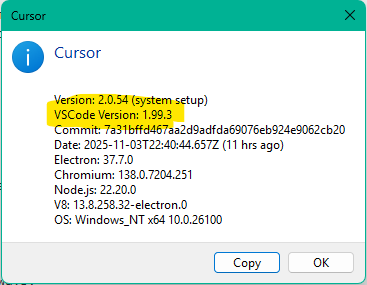
Hi, I am also facing this issue. If I download the most recent version, 17.0.1869541 from 23/10/2025, I get an error saying the vscode version is too old. And indeed, cursor says it is based on a vscode build much older than the current vscode build:
Thanks for the heads-up on V17 (the current pre-release of the AL Language Extension). VS Code 1.105.0 was released on September 15, 2025. Based on past updates, it’ll probably make its way into Cursor around March or April 2026 — though Cursor may prioritize AI integrations first.
hi @JimAtWye
yep it is really unfortunate, that’s a long time away. For now we can install 17.0.1825603, or one version before or after that, though if you’re developing for NextMajor release of BC (28) I am pretty sure this one won’t work (that one is not compatible with Runtime 17, you might get around it by setting to 16 in app.json, but I have not tried it). I don’t use Cursor for work so I wouldn’t know, but this info might help.
Before I ran into this issue, I was actually preparing to advocate for wider adoption of Cursor within my team. I really prefer Cursor over VS Code with Copilot — it’s a more focused, thoughtfully designed experience. And the founders seem like genuinely cool people; I first learned about Cursor from their Lex Fridman interview.
The issue first appeared when trying to install an extension, but of course using newer AL Language features would probably trigger linter errors if the AL Language extension isn’t compatible with the older VS Code version used in Cursor. Other extensions for other languages are probably impacted too.
Choosing to base Cursor on VS Code was a great decision, but offering very fast integrations of new VS Code versions could become critical in today’s intensely competitive landscape. One could dream of just having AI handle the merge overnight.
I understand prioritization is difficult, but speeding up VS Code merges might be strategically important. Since VS Code is open source, upcoming changes might be visible in advance — perhaps there’s a way to streamline or parallelize updates to narrow the gap. The competition in AI-assisted coding is moving fast, and I’d love to keep recommending Cursor as my primary editor.