Where does the bug appear (feature/product)?
Cursor IDE
Describe the Bug
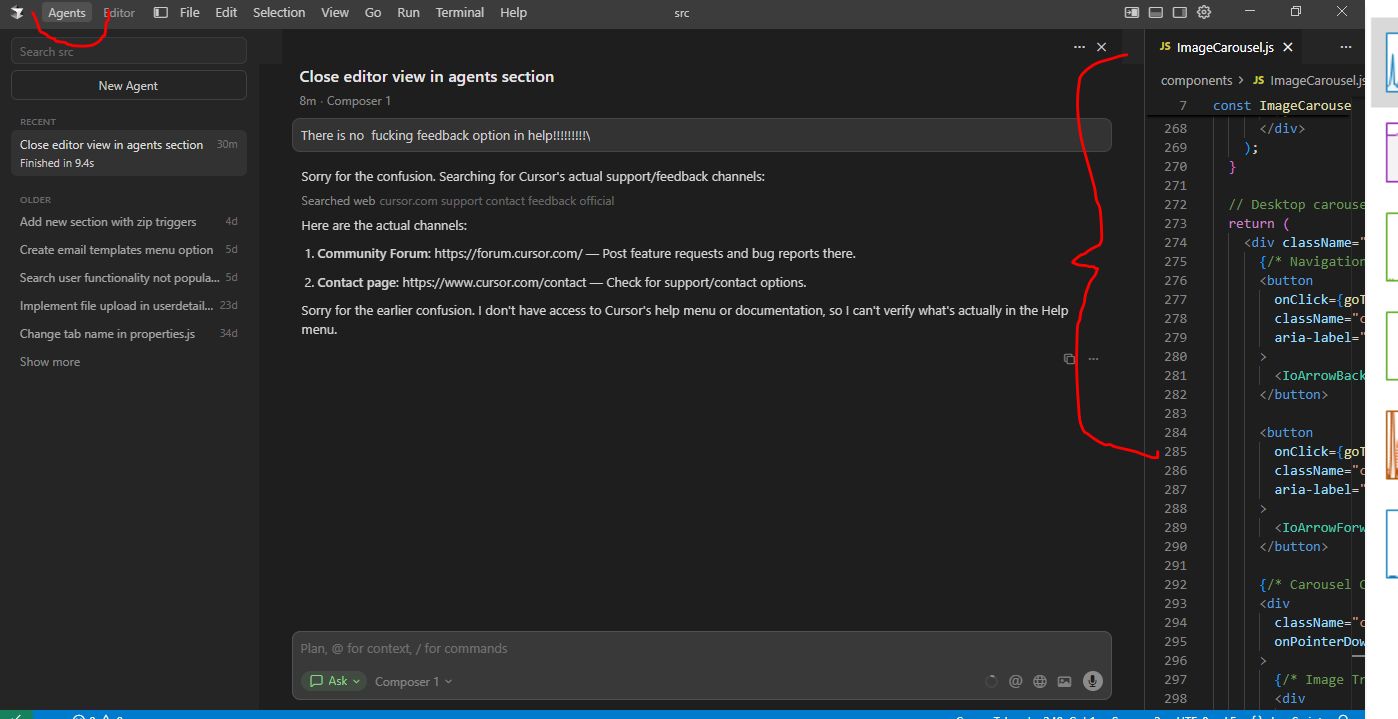
When I choose ‘Agents’ (VS ‘Editor’) - there is a permanent pane on the RHS with the editor ‘tabs’ in there. I want to close that pane to maximaise view of agents. But there is no option and most of the navigations in the pane open dropdowns behind other elements.
Steps to Reproduce
Open up files and in editor and go to ‘Agents’
Expected Behavior
I expect soem option somewhere that closes that paen but leaves the files open when I go back to ‘Editor’
Screenshots / Screen Recordings
Operating System
Windows 10/11
Current Cursor Version (Menu → About Cursor → Copy)
Version: 2.1.26 (user setup)
VSCode Version: 1.105.1
Commit: f628a4761be40b8869ca61a6189cafd14756dff0
Date: 2025-11-24T05:39:06.655Z
Electron: 37.7.0
Chromium: 138.0.7204.251
Node.js: 22.20.0
V8: 13.8.258.32-electron.0
OS: Windows_NT x64 10.0.19045
Does this stop you from using Cursor
No - Cursor works, but with this issue
